.svg)
Your cloud bill keeps growing. Your compliance deadline is getting closer. Your team already ran a few scans, got a pile of alerts, and still can't answer the one question that matters.
Can someone break into this environment?
That's what a cloud security assessment is supposed to answer. Not with a bloated enterprise project. Not with a generic dashboard. With a focused pen test, fast reporting, and a clear fix list your team can use this week.
Most SMBs don't need a six-month consulting circus. They need a tight scope, a real penetration test, and an auditor-friendly report that lands quickly and doesn't destroy the budget.
Plan Your Assessment for Speed and Budget
Start with scope. If you get the scope wrong, everything after that gets slow, expensive, and watered down.
A fast cloud security assessment is not about checking every cloud service you've ever touched. It's about testing the systems that would hurt most if they were exposed, abused, or taken over. For most startups and SMBs, that means customer data, production workloads, identity systems, admin paths, storage, and anything tied to compliance.

Define the crown jewels first
Don't begin with tools. Begin with impact.
List the assets that would create real damage if an attacker got access. That usually includes production cloud accounts, web apps, APIs, admin consoles, storage buckets, databases, CI/CD secrets, VPN access, and identity providers. If you handle regulated data, include every system that stores it, moves it, or controls access to it.
Use a simple filter:
- Business-critical assets that support revenue, operations, or customer access
- Compliance-relevant systems tied to SOC 2, PCI DSS, HIPAA, or ISO 27001
- High-blast-radius accounts like cloud admins, shared service accounts, and root-level paths
- Internet-facing entry points such as login portals, public APIs, exposed dashboards, and storage
Founders and lean IT teams save money. They stop trying to test everything at once.
Practical rule: If losing an asset would trigger an incident call, an auditor question, or a customer escalation, it belongs in scope.
Build a usable asset inventory
A cloud security assessment falls apart when nobody knows what is running. You need a current inventory, not a wish list from last quarter.
Pull from the cloud provider's native inventory tools. Compare that against what engineering says is in production. Then reconcile the differences. The gaps are usually where the risk lives.
A basic inventory should include:
- Cloud accounts and subscriptions across AWS, Azure, or Google Cloud
- Compute and workloads like VMs, containers, serverless functions, and managed services
- Storage and databases including public and private buckets, object stores, and snapshots
- Identity and access paths such as users, roles, service accounts, MFA status, and admin groups
- Integrations with third-party vendors, CI/CD pipelines, SSO, ticketing, and monitoring
A breakdown of penetration testing cost helps put this in perspective. Broad, undefined scopes cost more because the tester has to spend extra time figuring out your environment before finding anything useful.
Why tight scope beats broad scope
Traditional firms love enterprise-style scoping because it expands billable hours. That's good for them. It's bad for you.
A targeted manual pentest gives an SMB better value than a wide but shallow automated review. Automated scans are fine for finding obvious issues. They are not good at proving whether an attacker can chain those issues together, move sideways, abuse trust relationships, or bypass weak business logic.
That matters even more for lean teams. A 2025 Cloud Security Alliance survey summarized here found that 31% lacked sufficient tools for high-risk data identification, and many relied on manual processes because of resource constraints. That makes a tightly scoped, expert-led penetration test the practical option, not the luxury option.
Make smart scope cuts
You do not need to test every dev sandbox, abandoned proof of concept, and low-value internal tool in the first round. Cut hard.
Use this decision model:
| Scope item | Keep it in phase one | Push it later |
|---|---|---|
| Production cloud accounts | Yes | No |
| Systems storing regulated data | Yes | No |
| Public-facing apps and APIs | Yes | No |
| Admin and identity paths | Yes | No |
| Legacy internal tools with no sensitive data | Usually no | Yes |
| Dormant test environments | Usually no | Yes |
This is how you get a pen test done quickly and keep it affordable. You focus on what an attacker would care about first.
Set the timeline before the test starts
If you need a report within a week, plan for it before kickoff. That means assigning one internal owner, gathering architecture notes early, confirming points of contact, and deciding what evidence the auditor expects.
The fastest projects share three traits:
- One person owns coordination
- The target list is fixed before testing
- The testing window is short and protected
If your team keeps changing scope midstream, the penetration test slows down and the report gets delayed. That's not a tester problem. That's a planning problem.
A cheap scan with no real validation is expensive if it leaves you with unresolved risk and a report your auditor doesn't trust.
The Fast-Track Cloud Pentesting Playbook
A real cloud penetration test is hands-on. It doesn't stop at "this setting looks bad." It asks the harder question.
Can that bad setting be used to do damage?
Start with identity and access
If I had to bet on one place to start in a cloud security assessment, I'd start with IAM. That's where a lot of real-world cloud failures begin.
Benchmarks show 70% of cloud misconfigurations originate from IAM and storage buckets, according to this cloud security assessment checklist. That means your pen test should spend real time on users, roles, trust relationships, excessive permissions, stale credentials, and MFA enforcement.
This isn't abstract. A tester checks whether a low-privilege user can become a high-privilege one. They look for service accounts that can do far more than they should. They test whether cloud roles can be assumed in ways your team didn't intend.
Then test storage exposure
Storage is simple to explain and brutal when it goes wrong. If a bucket, snapshot, or database backup is exposed, attackers don't need a fancy exploit. They just need access.
A good penetration test checks whether storage is public when it shouldn't be, whether sensitive files are reachable through bad permissions, and whether access controls break under real conditions. Static tools might flag a bucket. A manual pentest shows whether that bucket can leak data, credentials, or internal configuration details.
Network paths still matter
Cloud doesn't remove network risk. It just changes where the mistakes show up.
Testers review exposed services, weak segmentation, permissive security groups, unmanaged access paths, and routes that let an attacker move from one workload to another. They also look at how public-facing assets connect back to internal systems.
A practical pen test asks questions like these:
- Can a public app reach internal resources it shouldn't?
- Can one compromised workload pivot into another environment?
- Are admin services exposed more broadly than the team realizes?
- Do firewall and access rules match the architecture diagram, or just the hope of the person who wrote it?
Manual testing finds what scanners miss
Certified testers earn their keep. An automated scanner can spot common issues fast. It won't think creatively, challenge assumptions, or test weird edge cases in your app and cloud setup.
OSCP, CEH, and CREST-certified pentesters tend to approach the environment like an attacker. They chain small weaknesses together. They test permission boundaries. They probe for business logic failures that don't have a neat signature.
A scanner might say, "this role looks broad." A human tester asks, "can I use this role to get secrets, alter data, or jump into production?"
"If the test never attempts exploitation, you bought a checklist, not a penetration test."
A cloud penetration test overview is useful if you want to compare broad posture reviews with focused, exploit-driven testing.
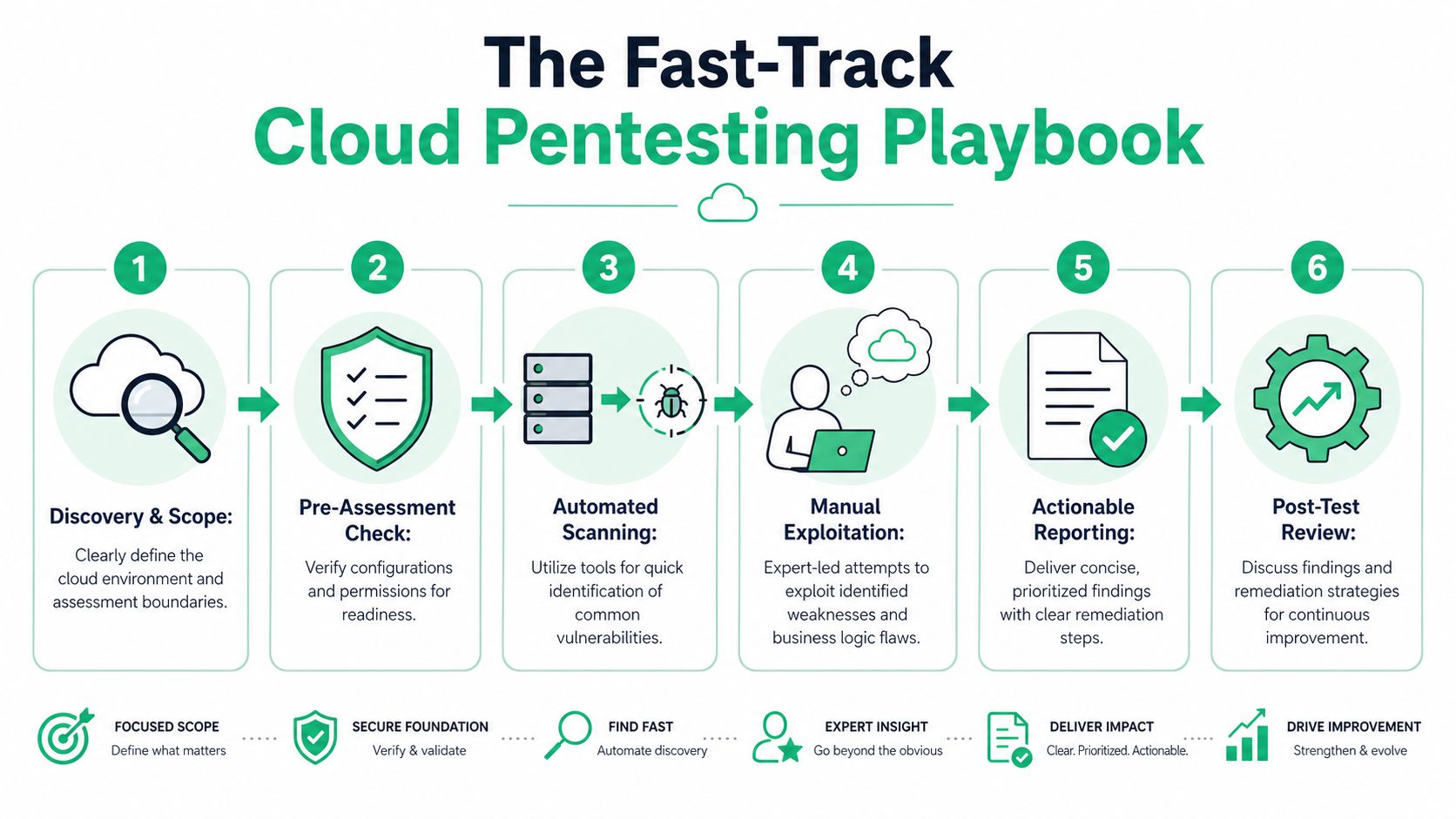
A simple six-part testing flow
Most fast, useful cloud penetration testing engagements follow a pattern. Not because the work is generic, but because disciplined testing works.
Discovery
The tester confirms accounts, apps, storage, identities, and exposed services that are in scope.Readiness check
Before deeper testing starts, they verify access, logging expectations, contacts, and any production safety rules.Automated scanning
This catches low-hanging fruit quickly. It speeds up the project, but it is not the project.Manual exploitation
This is the part that matters most. The tester validates whether findings are exploitable and what an attacker could do next.Risk validation
Findings get ranked by business impact, not by raw technical noise.Review and handoff
The client gets the result in plain English, with proof and fix guidance.
What good testers actually look for
They don't just hunt CVEs. They look for weak decisions in how the environment is built and operated.
Here are common targets in a fast cloud security assessment:
| Area | What the tester looks for |
|---|---|
| IAM | Over-privileged roles, weak MFA coverage, stale accounts, bad trust policies |
| Storage | Public access, weak bucket policies, exposed backups, sensitive files |
| Compute | Vulnerable hosts, weak hardening, bad secret handling, risky metadata access |
| Applications | Auth flaws, privilege bypass, insecure APIs, broken session controls |
| Infrastructure as code | Misconfigurations repeated across environments, unsafe defaults |
| Logging and monitoring | Gaps that let attacks happen without detection |
Keep the process fast without making it shallow
Speed doesn't come from skipping steps. It comes from removing waste.
You don't need endless kickoff calls, giant questionnaires, or a consulting deck with fifty pages of filler. You need a clean target list, rapid access setup, and a tester who knows where to look first.
That is exactly why SMBs should prefer focused manual penetration testing over oversized engagements. A short, disciplined test often tells you far more than a long engagement padded with automation and commentary.
Ask these questions before hiring anyone
Not all pen testing firms run a useful cloud security assessment. Some mostly resell scanners and call it consulting.
Ask direct questions:
- Who is doing the testing? Ask whether certified pentesters with OSCP, CEH, or CREST credentials are performing the work.
- How much is manual? If they can't explain the manual part clearly, that's a warning sign.
- Will they validate exploitation? You want proof of risk, not just screenshots of settings.
- How fast is reporting? If reporting drags, the test loses value.
- Will the report help with compliance? The answer should be yes, and they should be able to explain how.
From Raw Findings to an Actionable Report
A penetration test report should help two groups at once. Engineers need to know what to fix. Auditors need to see evidence that you tested real controls.
If the report fails either group, it fails the job.

Bad reports waste everyone's time
You've probably seen the bad version. It shows a long list of issues with vague titles, generic remediation text, and no context about what matters now.
That kind of report creates three problems. Developers can't tell where to start. Leadership can't judge business risk. Auditors see a stack of findings but not a credible remediation plan.
A useful cloud security assessment report is shorter, sharper, and better organized.
What should be in the report
At minimum, a good report includes proof, priority, and plain language. If one of those is missing, the document becomes shelfware.
Look for these elements:
- Executive summary with the big risks explained in business terms
- Technical findings with affected asset, impact, evidence, and reproduction notes
- Severity ranking based on realistic attacker outcomes
- Remediation guidance that a developer or cloud engineer can act on
- Retest path so your team can verify closure later
The report should separate signal from noise. A publicly exposed storage path tied to sensitive data belongs near the top. Minor issues with low impact should not bury the actual risks.
Structure matters more than page count
Nobody wins when a report is long just to look impressive. The best penetration testing reports are concise and specific.
A penetration testing report example can help you evaluate whether a report is actionable or just padded. You want clear findings, proof-of-concept evidence, and remediation steps that map to the actual environment tested.
What auditors want: evidence that you tested meaningful systems, identified risk, and tracked remediation in a defensible way.
Turn findings into a fix order
Raw findings are just raw material. They become useful when the tester turns them into a clear remediation sequence.
A successful cloud security assessment process includes mapping vulnerabilities to CVE identifiers for patch prioritization and using a risk matrix to score threats, according to this cloud assessment reporting guide. That structure turns technical output into a remediation plan your team can use immediately.
That matters because not every issue should be fixed in the order it appears. Some low-effort fixes close major attack paths. Some high-severity issues require more planning. A good report makes those trade-offs obvious.
Make the report useful for both engineers and leadership
The easiest way to fail a report is to write it for only one audience.
Your engineers need enough detail to reproduce the issue and fix it correctly. Your leadership team needs to understand why the issue matters without reading ten pages of technical notes. A strong report handles both by separating executive summary from technical detail.
Here's a simple way to judge report quality:
| Report element | Why it matters |
|---|---|
| Executive summary | Helps leaders understand exposure quickly |
| Proof of concept | Shows the issue is real, not theoretical |
| Asset identification | Tells the team exactly what is affected |
| Risk ranking | Helps teams fix the most dangerous items first |
| Remediation steps | Turns the report into a work plan |
| Retest notes | Supports closure and audit evidence |
Speed matters here too
A report that arrives weeks later loses value. By then, the team has moved on, the sprint changed, and the compliance deadline got closer.
Fast delivery is not a luxury. It's part of the service. If you need findings to drive fixes and satisfy an audit, a useful report should land while the test is still fresh and while the people involved still remember the environment.
That speed is one reason manual pen testing can work well for SMBs when it's tightly scoped. Fewer distractions. Fewer vanity findings. Faster handoff.
Map Your Report to Compliance Demands
Most SMBs don't buy a cloud security assessment for fun. They buy it because a customer asked for proof, an auditor asked for evidence, or a framework requires testing.
That's fine. Compliance is a valid reason to run a penetration test. The mistake is treating the report like a box-checking artifact instead of a piece of audit evidence.
Auditors want proof, not promises
Your policy can say data is protected. Your architecture diagram can say access is controlled. Your team can say encryption is enabled.
Auditors still want proof.
The pressure is growing because 54% of cloud-stored data is now classified as sensitive, up from 47% the previous year, according to the Thales 2025 Cloud Security Study. In that environment, frameworks like PCI DSS and HIPAA don't reward vague claims. A penetration test gives concrete evidence that controls around encryption, access, and exposure were tested.
Use the report as evidence
A solid penetration testing report helps show that you didn't just deploy controls. You validated them.
That means the report should clearly show:
- What was tested such as production apps, cloud storage, IAM paths, or public endpoints
- How it was tested through manual pen test work, supported by targeted scanning where useful
- What failed or held up under testing
- What was fixed or scheduled for remediation
This is what makes the document useful during audit review. It shows effort, scope, findings, and a response plan.
Your auditor doesn't need a novel. They need a clear trail from tested control to identified risk to remediation action.
Mapping pentest findings to compliance requirements
Below is a simple way to connect technical findings to common compliance expectations.
| Common Finding Category | Example Vulnerability | Relevant Compliance Control (SOC 2, PCI, HIPAA) |
|---|---|---|
| Identity and access | Admin role has excessive permissions and weak MFA coverage | SOC 2 logical access controls, PCI DSS access restriction requirements, HIPAA access control safeguards |
| Data exposure | Public storage bucket contains sensitive files | SOC 2 confidentiality controls, PCI DSS protection of stored account data, HIPAA protection of electronic protected health information |
| Encryption weakness | Sensitive database backup is accessible without proper encryption controls | SOC 2 data protection controls, PCI DSS encryption requirements, HIPAA transmission and storage safeguards |
| Network exposure | Public-facing management interface is reachable from the internet | SOC 2 system security controls, PCI DSS firewall and secure configuration requirements, HIPAA technical safeguards |
| Logging gap | Critical admin actions are not adequately logged or reviewed | SOC 2 monitoring controls, PCI DSS logging and monitoring requirements, HIPAA audit controls |
| Application security | Broken authorization lets one user access another tenant's data | SOC 2 security and confidentiality controls, PCI DSS secure systems requirements, HIPAA access and integrity safeguards |
Use findings to support remediation narratives
Audits aren't just about whether issues exist. They're about whether you handle them responsibly.
If your penetration test found a risky IAM role, your remediation narrative should show who fixed it, when they fixed it, and how the fix was verified. If the test found exposed storage, the narrative should show whether public access was removed, whether encryption was confirmed, and whether access logging was improved.
That turns a report into evidence of control maturity. Not perfection. Maturity.
Keep your evidence package simple
Don't overcomplicate your audit package. For most SMBs, a practical set of documents works better than a giant folder no one can readily use.
Include:
- The final penetration test report
- A remediation tracker with owners and status
- Screenshots or ticket references for major fixes
- A retest summary if critical issues were verified after remediation
That package tells a clean story. You assessed risk, prioritized it, fixed what mattered, and kept records.
Next Steps After Your Cloud Assessment
The report is not the finish line. It's the handoff.
A cloud security assessment has real value only if your team uses it to improve the environment and stop repeat mistakes. Otherwise, you paid for a snapshot and learned nothing durable.
Fix by owner and deadline
Don't send the report into a shared inbox and hope for the best. Assign every finding to an actual owner.
Cloud engineers should own cloud configuration fixes. Developers should own app flaws. Security or GRC should track status, deadlines, and evidence. Keep one person responsible for driving the full remediation list to completion.
A simple remediation tracker usually beats a fancy dashboard because people use it.
Retest the important issues
Critical and high-risk findings should be retested after the fixes go in. That confirms the issue is closed and gives you better evidence for customers, auditors, and internal reviews.
Teams often fix the symptom instead of the root cause. A retest catches that. It also helps prevent the awkward situation where a known issue shows up again in the next penetration test.
Use the assessment as your baseline
This is the part many companies skip. They treat the pen test as a one-time event instead of a baseline for ongoing monitoring.
That's a mistake. In 2023, 80% of companies experienced a serious cloud security issue, according to Exabeam's cloud security statistics roundup. Many breaches stemmed from poor visibility in hybrid setups, which is exactly why your assessment should become the reference point for continuous checks, not just a PDF sitting in a folder.
A good penetration test shows where you were weak on test day. A smart team uses that result to watch for the same failure pattern every day after.
Keep the in-between process lean
You don't need an enterprise security program to stay on top of things between penetration tests. You need basic discipline.
Use a short operating rhythm:
- Review identity changes when admins, vendors, or service accounts change
- Watch storage exposure after deployments, migrations, and backup changes
- Check public attack surface when new apps, APIs, or dashboards go live
- Track remediation drift so fixed issues don't return
If you can afford more, add posture tooling and better alerting. If you can't, keep the manual review process lean and consistent.
Run the next assessment before you need it
The worst time to schedule a pen test is when the auditor is already waiting or the customer questionnaire is already late. Book before the pressure hits.
That gives your team time to fix what matters, retest major issues, and present a cleaner security story. It also keeps the cloud security assessment in its proper role. A working control, not a panic purchase.
If you need a fast, affordable, audit-ready penetration test, Affordable Pentesting is built for exactly that. Their certified pentesters help startups and SMBs get real findings, clear reports, and practical remediation guidance without the bloated timelines and pricing that make traditional firms painful to work with.