.svg)

A laptop goes missing a few weeks before your audit. Someone left it in a rideshare, a coffee shop, or an airport bin. If that laptop stores customer data, employee records, contracts, screenshots, cached credentials, or source code, you don't have a lost device problem. You have a breach problem.
Full disk encryption is the control that turns that story into a manageable incident instead of a compliance nightmare. If the drive is encrypted and the device is powered off, the thief gets hardware, not your data. That's why founders, IT managers, and compliance leads keep seeing FDE show up in audit conversations.
This also matters outside the audit room. Security controls only count if your team can deploy them, manage them, and prove they're on. Startups don't need enterprise theater. They need a setup that works on real laptops, survives staff turnover, and doesn't fall apart when someone forgets a password.
Why Full Disk Encryption Is Non-Negotiable
A stolen unencrypted laptop can trigger legal review, customer notices, and ugly audit questions fast. Auditors know this, which is why full disk encryption sits near the bottom of the security pyramid. It's basic, and that's exactly why it matters.
Major frameworks treat it that way. SOC 2, HIPAA, PCI DSS, and ISO 27001 all expect you to protect data at rest. If your team stores regulated or sensitive data on laptops, FDE is the practical control that closes the obvious gap.
The broader market tells the same story. The global disk encryption market was valued at USD 14.89 billion in 2024 and is projected to reach USD 34.21 billion by 2032, according to Data Bridge Market Research on the global disk encryption market. That growth reflects a simple reality. FDE is no longer a nice extra. It's baseline protection.
What auditors actually care about
Auditors usually aren't impressed because you bought a shiny security tool. They want to know whether laptops and workstations that hold sensitive data are protected if they're lost or stolen.
They also care whether your policy matches your practice:
- Device coverage matters: If some company laptops are encrypted and others aren't, your control is weak.
- Evidence matters: You need screenshots, MDM reports, or system records that show FDE is enabled.
- Scope matters: Portable devices are especially important because they leave the office.
Practical rule: If a device can hold sensitive data and leave your building, assume it needs full disk encryption.
FDE should also sit next to other real controls, including access management and ethical insider risk management. Encryption helps if a laptop disappears. It doesn't solve every problem created by the person who already has access.
If you're handling regulated health data, this becomes even more urgent. Teams preparing for HIPAA reviews often pair endpoint hardening with Affordable Pentesting HIPAA solutions so they can verify that encryption, access controls, and actual attack paths line up with what their policy claims.
How Full Disk Encryption Actually Works
The concept is often overcomplicated. Here's the simple version.
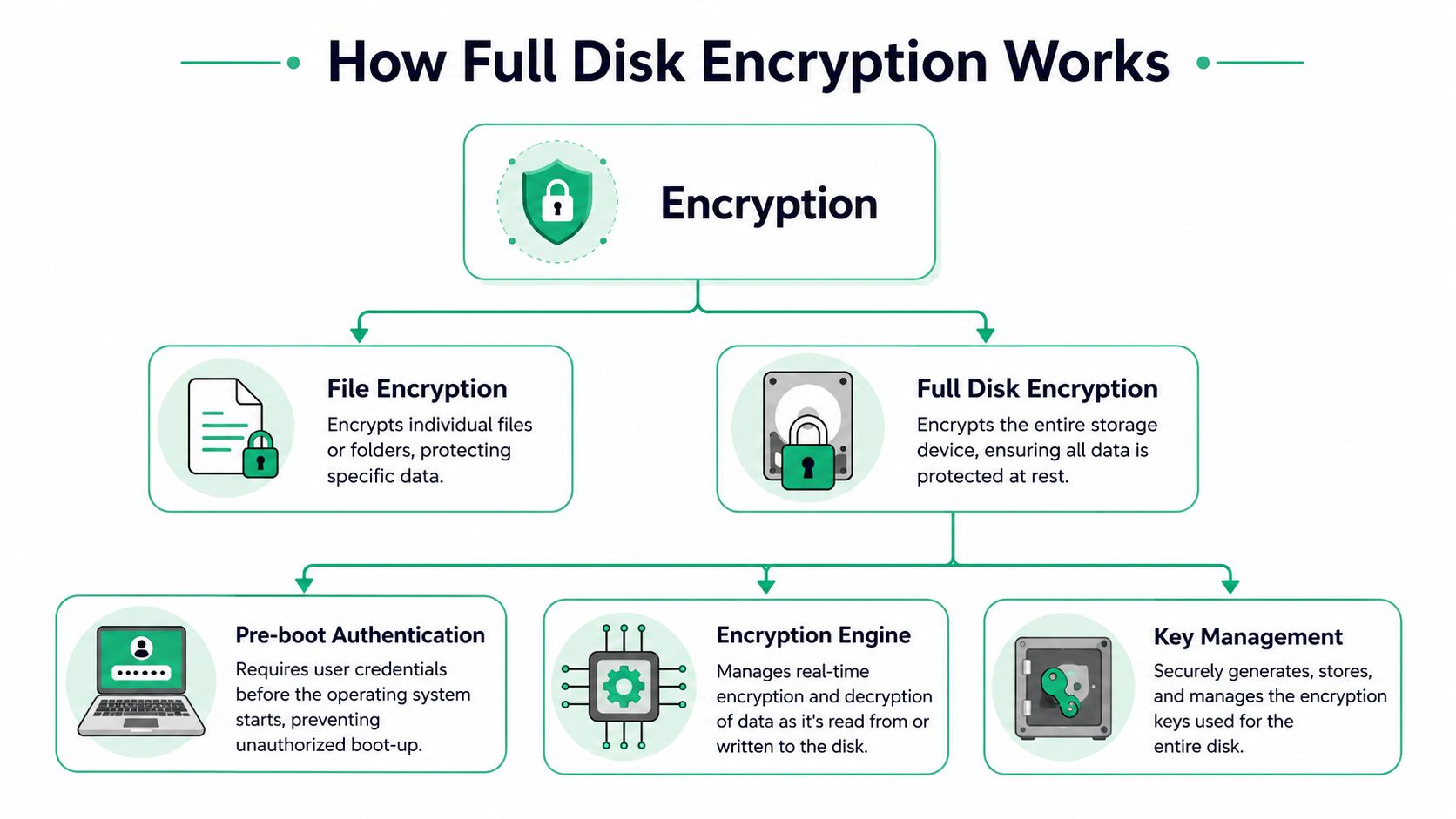
File encryption is like locking a few folders in a filing cabinet. Full disk encryption is like locking the entire room, the filing cabinet, the trash can, and the copier before anyone can even walk in. That difference is why auditors prefer it.
FDE works under the operating system, at the drive level. FDE operates at the block level using symmetric algorithms like AES-256, encrypting every sector of a drive. This process is standardized by NIST under FIPS 197 and is transparent to the user after authentication, providing a level of protection that file-level encryption cannot match, as described by Encryption Authority's explanation of full disk encryption.
The three parts that matter
You only need to understand three pieces.
Encryption engine. This is the part that scrambles the data on the drive and unscrambles it after successful login. With FDE, this encompasses the operating system, temp files, swap space, hibernation files, deleted data remnants, and the stuff users forget exists.
Pre-boot authentication. This is the password, PIN, or other check that happens before the operating system starts. That's important because if the operating system loads before trust is established, an attacker gets more chances to mess with the device.
Key storage. The encryption key can't just float around carelessly. Good deployments use hardware protection such as a TPM or Secure Enclave so the key isn't trivially exposed.
Why file encryption isn't enough
A lot of teams think encrypting a few folders solves the problem. It doesn't.
File-level encryption misses the messy parts of real systems:
- System files and logs: Sensitive data can land outside user folders.
- Temporary copies: Apps often create hidden working files.
- Swap and hibernation data: Memory contents can get written to disk.
- Metadata: File names, timestamps, and structure can still reveal too much.
That's why auditors push for the whole disk. Selective encryption looks neat in a slide deck. It breaks down on actual laptops used by actual employees.
If your policy says sensitive data must be encrypted at rest, but your browser cache, print spooler, and temp storage aren't covered, your control isn't complete.
What this looks like for a user
On a properly configured device, the user powers on the laptop, authenticates, and then works normally. After that login step, encryption fades into the background. That's good. Security controls users hate tend to get bypassed.
For startups, the right goal is boring reliability. Turn it on. Make it automatic. Store recovery material safely. Verify it stays enabled after updates and hardware changes.
Choosing Your FDE Deployment Option
You probably already own the tool you need. Windows gives you BitLocker. macOS gives you FileVault. Linux usually relies on LUKS. For most SMBs, the smartest choice is the native option built into the operating system you're already managing.
The actual difference isn't marketing. It's operational friction. You need something your team can deploy fast, recover safely, and prove to an auditor without turning each laptop into a one-off project.
What SMBs should compare
Look at these criteria first:
- Setup simplicity: Can a small IT team enable it consistently?
- Recovery workflow: Can you recover a device without improvising?
- Management overhead: Can you track status across the fleet?
- Audit evidence: Can you show reports or device status easily?
FDE Tools Comparison for SMBs
| Feature | BitLocker (Windows) | FileVault (macOS) | LUKS (Linux) |
|---|---|---|---|
| Built into OS | Yes, on supported Windows editions | Yes | Commonly available on Linux distributions |
| Best fit | Windows-heavy teams | Apple-first teams | Linux workstations and developer systems |
| Ease of rollout | Usually easiest with Microsoft-centric management | Straightforward in Apple environments | Strong but more hands-on |
| Recovery handling | Works best when recovery keys are centrally stored | Works best when recovery is centrally managed | Requires careful admin planning |
| Audit friendliness | Strong when tied to device management and reporting | Good when managed through Apple fleet tools | Depends heavily on documentation and consistency |
| Common SMB issue | Recovery keys scattered across inboxes and chats | Personal Apple habits leaking into business workflows | Admin knowledge trapped with one engineer |
My blunt recommendation
If your team runs mostly Windows laptops, use BitLocker. If your team runs Macs, use FileVault. If you run Linux endpoints, use LUKS, but only if someone on staff can support it without guessing.
That may sound obvious, but many startups waste time hunting for a universal third-party answer when the built-in control is already the right one. Native tools usually integrate better with login, hardware security features, and device management.
The gotchas that hurt during audits
The audit problem usually isn't "we chose the wrong encryption product." It's "we can't prove it was enabled everywhere," or "nobody knows where the recovery keys are."
Watch for these problems early:
- Bring your own device confusion: Personal devices blur ownership and recovery responsibilities.
- No central record: Teams assume encryption is on, but nobody checks.
- One admin knows everything: That admin leaves, and the process leaves with them.
- Exceptions pile up: A few developer laptops stay out of scope until the auditor asks for the asset list.
A simple rule works well. Standardize by operating system, then manage by policy. Don't let every department invent its own encryption process.
The Live System Gap FDE Does Not Fix
Here's the mistake that gets companies burned. They enable full disk encryption and start acting like the endpoint is now safe from everything. It isn't.
A common but critical misconception is that FDE protects against active threats like ransomware. In reality, FDE offers no protection for data in use on a powered-on system, creating a 'live system' security gap that must be addressed with other controls to achieve true compliance, as discussed in this Security Stack Exchange explanation of the live system gap.

What happens after login
Once the user authenticates and the system boots, the operating system can read the disk. So can any malware running with the user's access. That's the whole issue.
If an employee clicks a phishing link, launches malware, or installs a bad browser extension, FDE doesn't stop the resulting damage on that live machine. Ransomware can still encrypt working files. Info-stealers can still scrape sessions, credentials, and tokens.
The control you actually have
FDE protects data at rest. That's valuable. If a device is off and stolen, the attacker has a much harder time reading the drive.
But FDE does not replace:
- Endpoint detection and response
- Patch management
- Phishing-resistant access controls
- Backups and recovery planning
- Pentest, pen test, penetration test, and penetration testing work
FDE is a lock on a parked car. It doesn't stop a thief you've already let into the driver's seat.
A good pentest earns its keep. A fast, affordable manual penetration test shows you what an attacker can still do after a user logs in, clicks the wrong thing, or exposes an internal service. That's the gap many firms ignore while they sell compliance comfort.
What founders should ask instead
Stop asking, "Are our laptops encrypted?" Ask the harder question. "If one employee account gets compromised on a normal workday, what can the attacker do next?"
That question points you toward the controls that matter on live systems. It also keeps your audit prep honest. Auditors like encryption, but they don't want magical thinking.
Key Management A Critical SMB Responsibility
The hardest part of full disk encryption isn't turning it on. It's keeping control of the keys without creating a business continuity disaster.
For SMBs, the risk profile is brutal. For SMBs, the biggest risk of FDE is not a hacker breaking the encryption, but permanent data loss due to a lost password or recovery key. FDE systems are designed with no backdoors, making key custody a single point of failure for business continuity if not managed properly, according to Seagate's full disk encryption FAQ.
The mistake small teams keep making
A founder enables encryption, copies the recovery key into a notes app, sends it in chat, or leaves it in a ticket. That feels convenient until the laptop is locked, the employee leaves, and nobody knows which key belongs to which device.
At that point, the encryption is doing its job perfectly. Your data is sealed off from everyone, including you.
Reality check: A lost recovery key can hurt your company faster than a stolen laptop.
What good key custody looks like
You do not need a giant enterprise key management project. You do need discipline.
Use a process like this:
- Store recovery material centrally in a business-controlled system, not a personal vault or random chat thread.
- Limit access so only authorized admins can retrieve recovery keys.
- Map keys to assets so every laptop has a clear owner and record.
- Document handoffs for onboarding, offboarding, and device replacement.
- Test recovery before an emergency forces you to improvise.
The policy matters as much as the tool. If your written process is weak, your real process will be chaos.
Keep policy tied to operations
This is one place where written controls really matter. Your key handling process should live inside broader data governance, not in somebody's head. If you need to tighten that foundation, start with mastering effective data policies so encryption, retention, access, and recovery all support each other.
A practical SMB rule is simple. Two trusted admins should be able to locate and recover a device key without involving the original user. If only one person knows how recovery works, you don't have a process. You have a future outage.
Integrating FDE Into Daily Operations
Turning on encryption once is easy. Keeping it reliable across hires, replacements, repairs, and updates is where teams get sloppy.
The cleanest approach is to bake FDE into your normal device lifecycle. New laptop comes in, gets enrolled, encryption is verified, recovery is escrowed, and only then does it go to the employee. If that sequence isn't standard, you'll end up chasing exceptions forever.
Where teams get tripped up
Imaging and provisioning change first. You can't treat encryption like an optional post-install step that someone remembers later. It should be part of your baseline build for Windows, macOS, and Linux devices.
Patching also needs a bit more discipline. Major system changes, firmware updates, and hardware repairs can affect boot behavior, recovery prompts, or device trust, so your team should verify encryption status after those events instead of assuming nothing changed.
MDM makes this manageable
For most startups and SMBs, mobile device management is the simplest way to make FDE stick. An MDM can enforce encryption, report status, escrow recovery keys, and flag devices that drift out of compliance.
That solves several audit headaches at once:
- Consistency: Devices follow the same policy.
- Visibility: IT can see what is and isn't encrypted.
- Evidence: Reports are easier to hand to auditors.
- Recovery: Keys don't depend on one employee's memory.
BYOD needs hard boundaries
Bring your own device programs create the most confusion. If an employee uses a personal laptop for work, you need clear rules on whether full disk encryption is mandatory, how compliance is verified, and who controls recovery access.
If you can't enforce those rules cleanly, don't pretend you have a secure BYOD program. Limit access through managed apps or company-owned devices instead. Loose BYOD policies create audit pain because responsibility gets fuzzy fast.
A control you can't enforce on employee devices is not a dependable control.
Your Audit-Ready FDE Implementation Checklist
Audit readiness comes down to proof. You need to show that encryption is enabled, managed, documented, and tied to the systems in scope.
For payment data, the requirement is direct. PCI DSS v4.0 Requirement 3.5.2 explicitly mandates full disk encryption for protecting cardholder data on portable devices. Encrypting only certain files is not enough; the entire disk must be encrypted to pass an audit, as noted in this summary of PCI DSS full disk encryption requirements.
The checklist that actually matters
Use this as your working list before the auditor shows up.
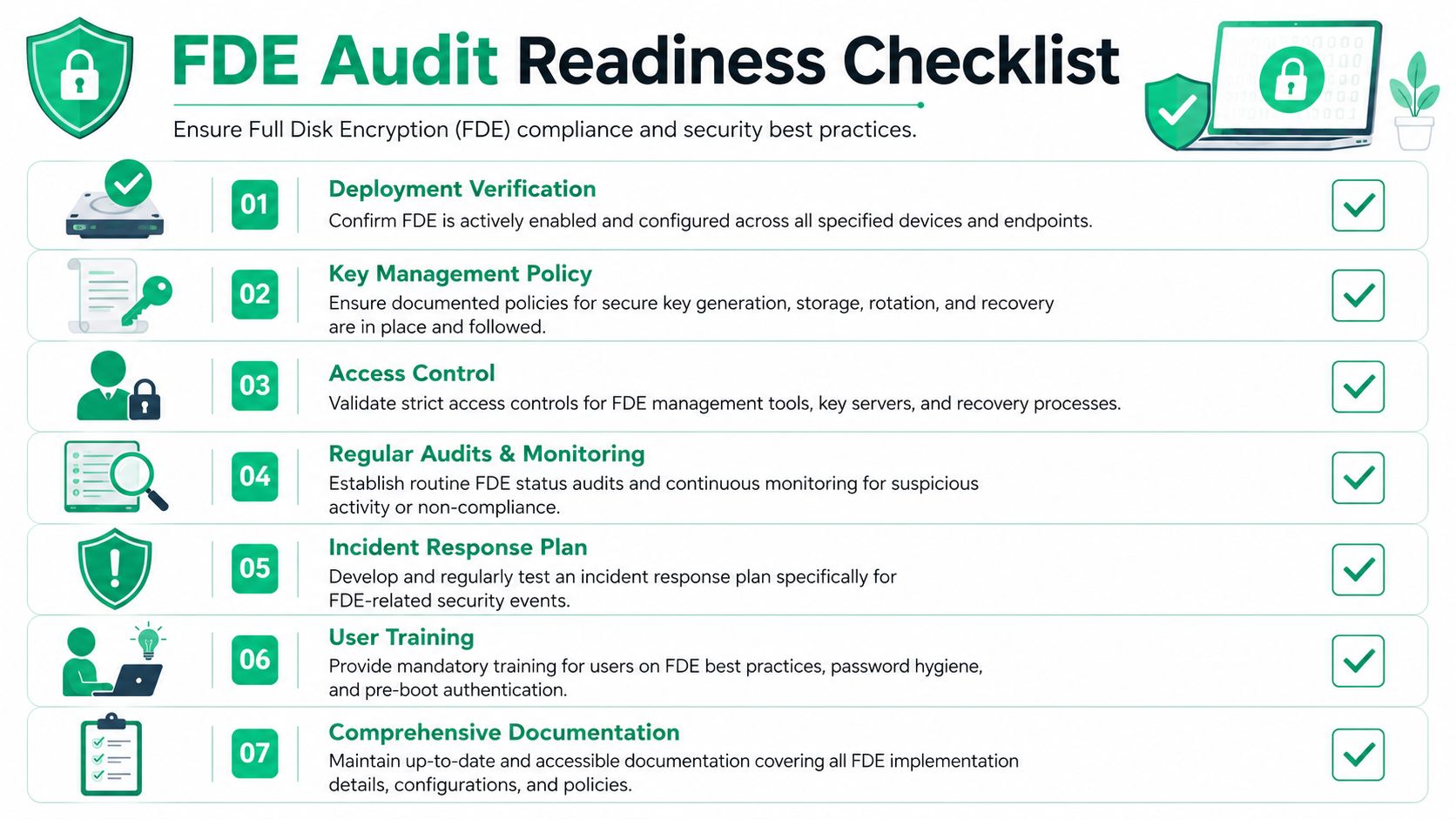
- Confirm deployment: Verify that all in-scope laptops and portable endpoints have full disk encryption enabled.
- Standardize by platform: Use BitLocker for Windows, FileVault for macOS, and LUKS for Linux where appropriate.
- Verify hardware-backed protection: Make sure your deployment uses supported hardware security features where available.
- Document recovery handling: Write down who can access keys, where they're stored, and how recovery works.
- Collect evidence: Export device reports, screenshots, or MDM status records for audit support.
- Train staff: Users need basic instructions on boot prompts, password hygiene, and what to do if a device requests recovery.
- Review exceptions: Any device outside policy should be fixed, removed from scope, or explicitly documented.
What an auditor will ask for
Expect practical questions, not philosophy.
They'll usually want to see:
| Evidence area | What you should have ready |
|---|---|
| Device coverage | Asset inventory matched to encryption status |
| Policy | Written endpoint encryption and recovery policy |
| Key handling | Documented escrow and recovery process |
| Technical proof | Screenshots, management console views, or system records |
| Exception management | A list of devices not covered and why |
Where penetration testing fits
FDE helps you satisfy data-at-rest requirements. It does not prove that the rest of your environment is secure. That's why teams preparing for audits often pair endpoint controls with pentesting for SOC 2 compliance to validate what happens on live systems, web apps, cloud services, and internal attack paths.
If you want the short version, here it is. Encrypt every in-scope portable device. Control and test your recovery process. Keep evidence ready. Don't pretend FDE solves malware, phishing, or ransomware on an active machine.
If you need a fast, affordable pen test, penetration test, or penetration testing partner that finds issues and gets your report back within a week, talk to Affordable Pentesting. Their certified pentesters, including OSCP, CEH, and CREST professionals, help startups and SMBs prepare for SOC 2, HIPAA, PCI DSS, and ISO 27001 without the bloated timelines and pricing traditional firms push. Use the contact form and get a scope that fits your budget and your audit deadline.