.svg)

Your mobile app is live. Users are signing up. Then a customer, auditor, or security questionnaire lands in your inbox and asks for a penetration test report.
That's when most founders hit the same wall. Traditional firms quote a huge project, drag the scope into endless meetings, and hand back a report weeks or months later. If you're trying to close a deal, satisfy SOC 2, or show due diligence before a release, that timeline is useless.
Mobile application security testing doesn't need to be slow, bloated, or confusing. You need a process that finds real issues, explains them clearly, and gives your team something an auditor will accept. If you're also tightening your broader security posture, it helps to secure your digital fortress across the rest of your environment, not just the app itself.
A mobile app also rarely stands alone. The API, admin panel, and supporting SaaS environment matter just as much, which is why teams often pair mobile reviews with Affordable Pentesting for cloud applications.
Your Fast Guide to Mobile App Pentesting
The old pentesting model is built for giant companies with giant budgets. Startups and SMBs usually need something simpler. They need a pen test that targets the actual attack surface, moves quickly, and produces a report that helps with compliance instead of creating more work.
What founders usually get wrong
A lot of teams wait until the audit is already in motion. By then, every delay hurts. Legal is waiting, sales is waiting, and engineering is trying to guess what the tester will ask for.
The fix is straightforward:
- Scope the actual app. Include the mobile client, the backend API it talks to, authentication flows, and any sensitive storage on the device.
- Ask about manual testing. If the firm mostly runs scanners, you're paying for noise.
- Demand a usable report. Auditors want evidence. Developers want reproduction steps. Leadership wants business impact in plain English.
A cheap scan that misses the real flaw is more expensive than a focused penetration test that finds it early.
What a practical engagement looks like
A solid mobile penetration testing engagement should feel boring in the best way. You share the app build, test accounts, API details, and scope. The testers review the binary, inspect traffic, probe authorization, and check whether sensitive data leaks onto the device or backend.
Then you get a report your team can act on. Not a giant PDF stuffed with generic scanner output. A real report with findings, severity, proof, and fixes.
That's the standard you should hold vendors to. If they can't explain their process clearly, they probably can't explain your security to an auditor either.
Why Mobile Security Testing Matters More Than Ever
Mobile apps are no longer side projects. For many companies, the app is the product, the customer portal, the payment layer, or the front door into internal systems. If that front door is weak, the rest of your stack is exposed too.
The money flowing into this space tells you the same story. The global mobile application security testing market was valued at USD 806.7 million in 2022 and is projected to reach USD 5.3 billion by 2030, according to KBV Research on the mobile application security testing market. That projection exists because businesses now treat mobile security as a requirement tied to risk, compliance, and customer trust.
Mobile risk is business risk
A vulnerable mobile app isn't just a technical problem. It can expose customer data, leak credentials, and create compliance trouble fast. That matters even more when your app handles payments, health data, internal workflows, or anything tied to regulated information.
Large enterprises are spending heavily here, but startups shouldn't read that as "wait until we're bigger." They should read it as "the people buying from us now expect proof."
If you're trying to navigate app security regulations, the practical takeaway is simple. Security testing is part of how you prove you take data protection seriously.
Why compliance teams keep asking for proof
Frameworks like SOC 2, PCI DSS, HIPAA, and ISO 27001 don't reward vague promises. They reward evidence. A mobile app that processes sensitive data or connects to important systems needs documented testing, documented remediation, and a report that shows someone competent looked.
That pressure is one reason the market keeps growing. Another is threat complexity. Modern apps aren't just a mobile screen anymore. They're a mesh of APIs, third-party SDKs, cloud services, and device-level storage. Every one of those pieces can fail in a different way.
Security testing is no longer a “nice to have” before launch. It's part of staying sellable.
Meeting Security Standards Auditors Actually Accept
Auditors don't just want a report with a logo on it. They want to see that your penetration test followed a recognized method and covered the places where mobile apps usually break.
What auditors are really checking
Most of the time, they're looking for three things:
- A credible scope that includes the mobile app and the systems it touches
- A real testing method based on accepted security standards
- Evidence of remediation for serious findings
For mobile applications, OWASP's mobile standards are the practical baseline. Think of MASVS as the checklist of controls your app should meet. Think of the Mobile Application Security Testing Guide as the playbook a tester uses to verify those controls.
That matters because "we ran a scan" usually won't satisfy anyone serious. Auditors want to know how authentication was checked, whether local data storage was reviewed, whether traffic was inspected, and whether access controls were tested with actual exploitation attempts.
What your report should map to
If you're preparing for SOC 2 or supporting a customer security review, ask your provider whether the report clearly ties findings to recognized testing criteria. That makes life easier for your GRC team and cuts down back-and-forth with auditors.
A useful deliverable should include:
| What auditors need | What your report should show |
|---|---|
| Testing scope | Platforms tested, app version, APIs, auth flows, environments |
| Methodology | OWASP-aligned mobile testing and manual validation |
| Findings | Clear severity, impact, proof, and remediation |
| Retest evidence | Confirmation that fixes were verified when needed |
For compliance-heavy teams, SOC 2 pentesting services from Affordable Pentesting are one example of a service category built around those expectations.
Audit reality: If the report doesn't clearly show what was tested, how it was tested, and what was fixed, expect follow-up questions.
What usually gets rejected
Auditors and customer security teams tend to push back on reports that are too thin, too generic, or obviously automated. If every finding looks copied from a scanner template, confidence drops fast.
A proper mobile application security testing report should read like a human investigated your app. Because that's what exactly happened.
Common Mobile App Vulnerabilities We Find Daily
Your team ships the app, a prospect asks for a pentest report, and everyone assumes the risky part is some exotic exploit. It usually is not. The problems that block audits and expose customer data are the same ones we see every week in startup mobile apps built under deadline pressure.
App store review does not test security. It checks store policy and basic functionality. If you want a fast, affordable mobile pentest that satisfies auditors, start with the flaws that show up in real engagements.
Insecure data storage is still everywhere
Sensitive data often ends up on the device with weak protection or no protection at all. We regularly find auth tokens in shared preferences, customer data in local databases, cached API responses left readable, and secrets hardcoded into the app package.
That matters because a lost phone, malware infection, rooted device, or backup extraction can turn local storage into an easy source of account access and data theft. Iterasec highlights this pattern in its mobile application penetration testing guide.
A good tester does not stop at identifying stored data. They verify whether it can be extracted, reused, or chained into account takeover.
Broken authorization in APIs causes bigger failures than UI bugs
Founders often focus on what users can tap on screen. Attackers focus on what the backend will accept.
The common failures are predictable:
- Broken authorization that lets one user pull another user's records
- Weak session handling where old tokens remain valid longer than they should
- Client-side trust where the server accepts prices, roles, account IDs, or flags the app should never control
- Weak transport validation where TLS handling or certificate validation can be bypassed
These bugs are cheap to miss and expensive to explain after an incident. They also tend to be the findings that make customer security reviewers question everything else in your stack.
Third-party SDKs widen the attack surface fast
Mobile teams use SDKs to ship faster. That tradeoff is fine until an ad SDK, analytics package, or helper library introduces insecure storage, risky permissions, weak crypto, or known vulnerable components.
The hard part is not spotting that a dependency exists. The hard part is deciding what needs an upgrade, what needs isolation, and what should be removed before an auditor or enterprise buyer asks hard questions. That is one reason mature teams pair pentesting with broader security exercises, including strengthening governance through resilience drills.
If your app handles sensitive data, test local storage, authentication flows, API authorization, and third-party components by hand. A scanner alone will miss the business impact.
How We Conduct a Mobile Penetration Test
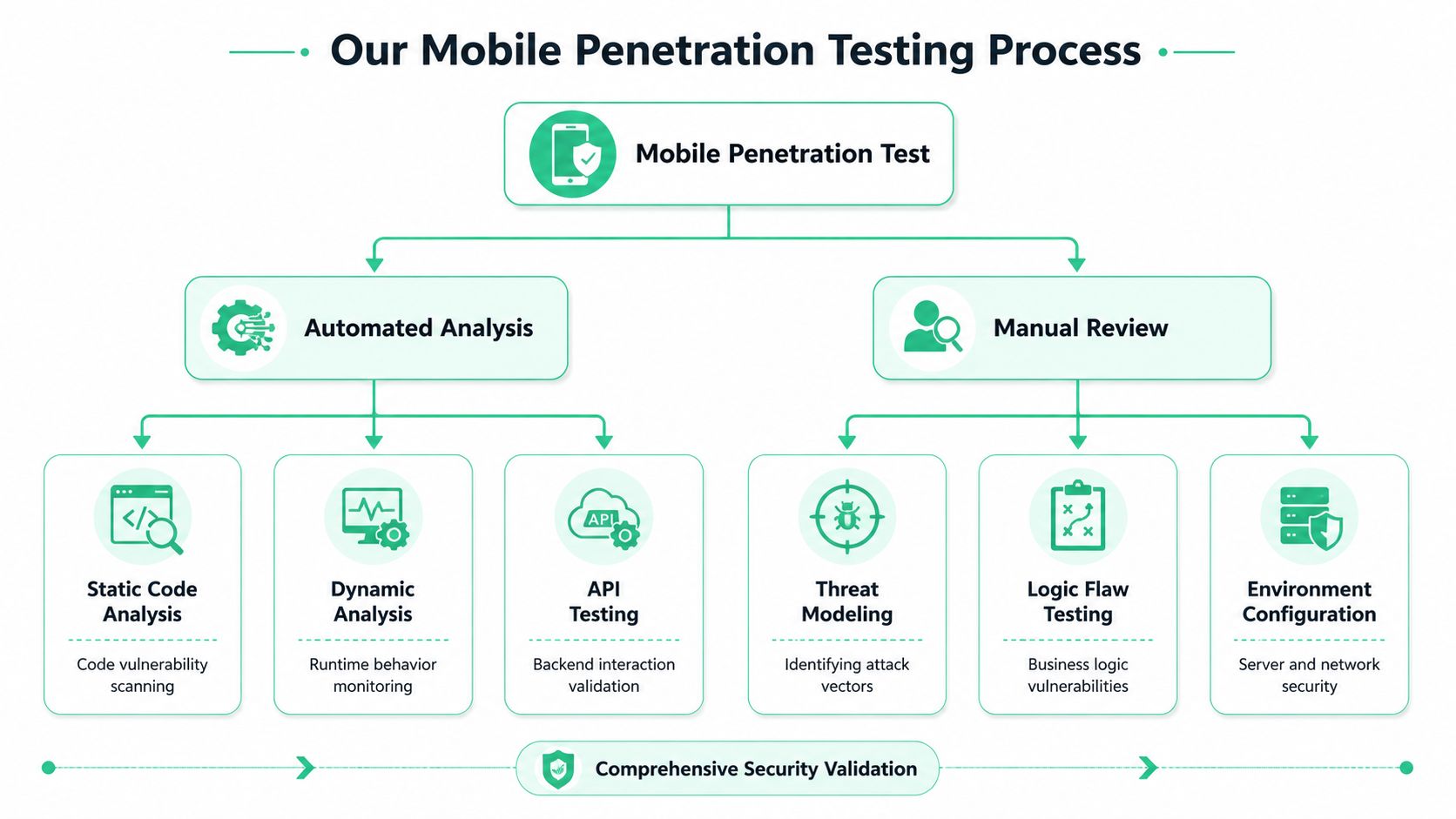
Your team is about to send a security packet to an enterprise buyer or auditor, and they ask one simple question. How was the mobile app tested?
A real mobile penetration testing engagement needs speed, evidence, and enough depth to catch the flaws that matter. For startups and SMBs, that means using automation to clear routine work fast, then spending human time on the attack paths that can block a deal, fail an audit, or expose customer data.
Automated analysis clears the obvious issues first
Start with automation. It is the fastest way to surface hardcoded secrets, weak configurations, outdated libraries, and code patterns that deserve manual review.
The three methods that matter are:
- SAST checks source code or compiled code without running the app
- DAST tests the app while it is running and talking to the backend
- IAST combines runtime testing with code-level visibility during execution
Interactive Application Security Testing, or IAST, is useful because it sees code behavior and runtime behavior together. CircleCI's guide to mobile app security testing notes that this approach can automate much of the routine checking, which frees skilled testers to spend their time on real abuse cases instead of repetitive triage. If you want a plain-English example of where automation fits, review Affordable Pentesting automated tools.
Manual review is where the real pentest happens
Scanners are good at pattern matching. They are bad at judgment.
A tester needs to determine whether a low-privilege user can reach an admin function, whether an onboarding flow can be abused for account takeover, or whether the app trusts device-side decisions that belong on the server. Those findings are the ones auditors care about because they tie technical flaws to business risk.
A competent tester will usually work through five areas:
- Decompile and inspect the app to map trust boundaries, sensitive functions, and embedded secrets.
- Intercept and modify traffic with tools like Burp Suite or OWASP ZAP to test how the app and API handle tampering.
- Validate auth flows and access control across users, roles, and edge cases.
- Review local storage and device behavior to see what data lands on the phone and whether it is exposed.
- Check environment weaknesses such as bad certificate validation, debug settings, insecure logs, and weak build protections.
That mix gives you something useful, not just a pile of scanner output.
Some teams go one step further and connect pentest findings to broader operating readiness. If you are building a fuller security program, strengthening governance through resilience drills is worth reading.
What speed looks like
Fast mobile testing comes from tight scope, prepared access, and testers who know where to look first.
That means having a test build ready, clear account roles, API documentation if available, and a target list that matches your real audit or customer requirements. A capable team with certifications such as OSCP, CEH, and CREST should be able to test without turning a straightforward mobile review into a long consulting project.
If you are buying this service, ask blunt questions. How many days of testing are included? Will the report map findings to recognized standards? How quickly do you get retest validation after fixes? That is how you get a mobile pentest that is affordable, fast enough for a startup timeline, and still credible when an auditor asks for proof.
Automated Scanners vs Manual Penetration Testing
Your developer runs a mobile scanner, gets a clean-looking report, and assumes the app is ready for audit. Two weeks later, a tester changes one API call, jumps from a basic account into another user's data, and your “passed security review” story falls apart.
That happens because scanners check patterns. Mobile attacks happen in flows, permissions, session handling, and backend assumptions.
Why scanners miss what matters
Automated tools are good at repeatable checks. They spot known issues fast, help catch regressions, and fit nicely into development pipelines. Keep them.
What they do not do well is think like an attacker with intent.
A scanner might flag a suspicious parameter. A human tester asks a better question. Can that parameter be changed to skip payment, pull another customer's records, approve an action out of order, or hit an admin function from a low-privilege account? That is the difference between tool output and a pentest an auditor will respect.
Here's the practical comparison:
| Capability | Automated Scanning | Manual Penetration Testing |
|---|---|---|
| Known vulnerability checks | Strong | Strong |
| Business logic abuse | Weak | Strong |
| Authorization testing | Limited | Strong |
| False positive handling | Often noisy | Human validation |
| Auditor confidence | Low on its own | Much stronger |
| Remediation guidance | Generic | Specific and contextual |
What to use and when
Use scanners early and often. Run them during development. Run them before releases. Use them to catch the obvious stuff cheaply.
Then pay for manual testing before an audit, a major launch, or a customer security review. That is the step that finds whether your app can be abused in ways a script will never understand.
If you want a clearer view of where automation fits, Affordable Pentesting automated tools give a useful reference point. Just do not buy the fantasy that automation alone equals a mobile penetration test.
A scanner finds patterns. A tester proves risk.
Practical buying advice
If a vendor is selling “fully automated penetration testing” for a mobile app, ask bluntly: who is testing role bypass, workflow tampering, token misuse, and API abuse by hand?
If the answer is vague, walk away.
Startups and SMBs do not need a bloated engagement with weeks of meetings and a six-figure price tag. They need a focused manual test, backed by automation, with a report that maps findings to accepted standards and gives developers clear fixes. That is how you keep costs under control, move fast, and still hand auditors something credible.
Turning Your Pentest Report Into Action
A penetration test only pays off if your team can use the results fast. That's where a lot of firms fail. They deliver a dense report full of jargon, bury the serious issues, and leave developers guessing what to fix first.
A useful report does the opposite. It starts with a short executive summary in plain English. Then it breaks findings into severity, business impact, evidence, and concrete remediation steps.
What a good report includes
Your mobile application security testing report should make three audiences happy at once:
- Leadership needs a clear statement of risk and what blocks compliance
- Developers need reproduction steps and fix guidance they can act on
- Auditors need proof that real testing happened and that remediation is being tracked
The best reports also show priority. Not every finding deserves the same response. A clear report separates dangerous issues from cleanup work so your team doesn't waste time polishing low-risk items while a real authorization flaw stays open.
How to use the report well
Once the report lands, move quickly:
- Fix the highest-risk items first. Access control, auth, and sensitive data exposure usually belong at the top.
- Schedule a retest for the issues that matter to compliance or customer commitments.
- Save the evidence. Auditors and enterprise buyers often want the original report plus proof that key findings were resolved.
That's why speed matters on the vendor side too. If you get your final report within a week of testing, your developers can start remediation while the release, audit, or sales cycle is still moving.
Don't judge a pentest by how many pages are in the PDF. Judge it by how quickly your team can turn findings into fixes and proof.
If you need a fast, affordable mobile app pentest that focuses on real findings, clear reporting, and compliance-ready documentation, talk to Affordable Pentesting through the contact form.