.svg)
Threat modeling is a structured way to find the security weaknesses in a system before an attacker does, by asking what you're building, what can go wrong, and what you're going to do about it. Done early, it catches design flaws while they're still cheap to fix, on a whiteboard instead of in a breach report. It's one of the highest-leverage security habits a small team can build, and it costs you nothing but focused thinking. At Affordable Pentesting, we treat threat modeling as the map and a penetration test as the ground truth that proves which risks are real.
Most SMBs skip it. Not because it's hard, but because it sounds like something only a bank with a security department does.
That's backwards.
The smaller your team, the more a design flaw hurts, because you don't have layers of controls to catch it later. A thirty-minute threat modeling session can save you a five-figure incident. Let's make it concrete.
In this guide:
- What threat modeling is
- Why it matters for small teams
- The threat modeling process
- STRIDE, explained
- A quick threat modeling example
- Threat modeling methods compared
- Threat modeling vs penetration testing
- FAQ
What threat modeling is
Threat modeling is the practice of looking at a system, mapping how it could be attacked, and deciding what to do about each risk. Think of it as walking through your house as a burglar would. Which window is unlatched? Which door is hidden from the street? Where's the spare key?
You're not waiting to get robbed to find out. You're reasoning about it in advance.
In software, that means looking at your application, its data, and the trust boundaries between its parts, then asking where an attacker could get in and what they'd reach. The output is a prioritized list of threats and the fixes or mitigations for each one.
The key word is structured. Anyone can worry about security in a vague way. Threat modeling turns that worry into a repeatable process with a checklist, so you catch the threats you'd otherwise forget.
Why threat modeling matters for small teams
The economics are simple. A flaw caught at design time costs a fraction of the same flaw caught in production, and a tiny fraction of one caught after a breach.
Here's what threat modeling buys you.
- Cheaper fixes. Changing an architecture decision in a design doc is easy. Changing it after launch means a migration, downtime, and risk.
- Better scoping for testing. A threat model tells your pentester where the real risk lives, so the engagement targets what matters instead of guessing.
- A shared security brain. The session gets your engineers thinking like attackers. That mindset outlasts any single fix.
- Compliance evidence. Frameworks like SOC 2 and ISO 27001 like to see that you consider security in your development process. A documented threat model is proof.
- Fewer surprises later. Threats you model and fix during design don't come back as expensive criticals in a pentest or, worse, an incident. You pay once, early, instead of many times, late.
And it scales down. You don't need a formal program to start. You need a whiteboard, the people who understand the system, and an hour.
The threat modeling process
The cleanest framing comes from four questions. Adam Shostack, who wrote the book on this, boils the whole practice down to them.
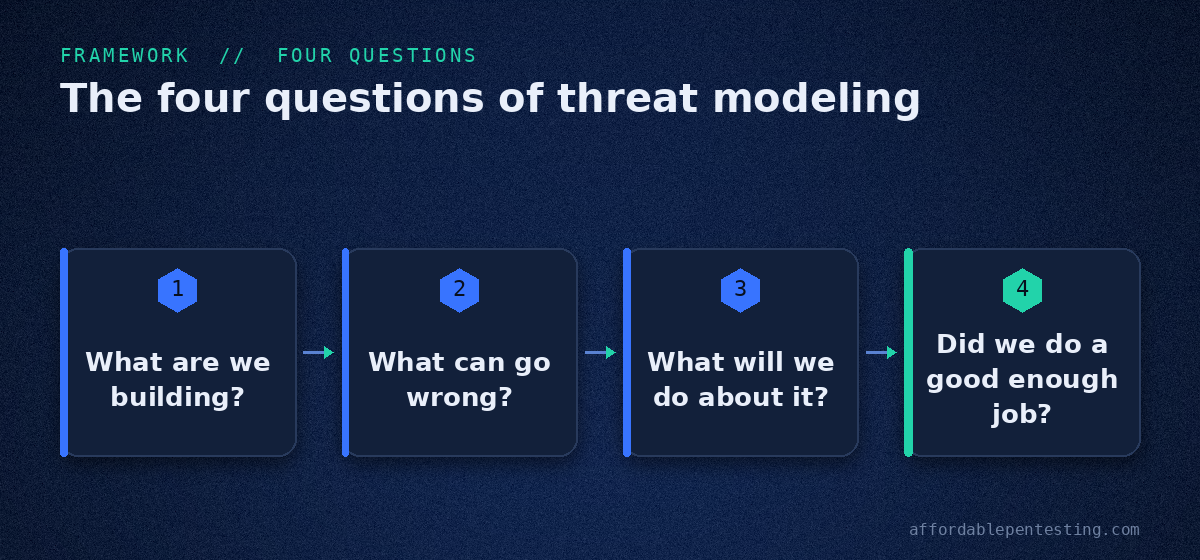
- What are we building? Diagram the system. Draw the components, the data stores, the flows between them, and the trust boundaries where data crosses from less-trusted to more-trusted. You can't defend what you can't see.
- What can go wrong? Walk each component and data flow and brainstorm threats. This is where a framework like STRIDE keeps you honest, so you don't just list the attacks you already fear.
- What are we going to do about it? For each threat, pick a response: mitigate it, eliminate the feature, transfer the risk, or knowingly accept it. Not every threat needs a fix, but every threat needs a decision.
- Did we do a good enough job? Review the model. Did you cover the whole system? Are the mitigations real? Update it as the system changes, because a threat model from two years ago describes an app that no longer exists.
That's the loop. Draw it, break it, fix it, check it. Everything else is detail.
STRIDE, explained
The hardest question is number two, "what can go wrong," because a blank page invites blank stares. STRIDE fixes that. It's a checklist of six threat categories from Microsoft, and each one maps to a security property you're trying to protect.
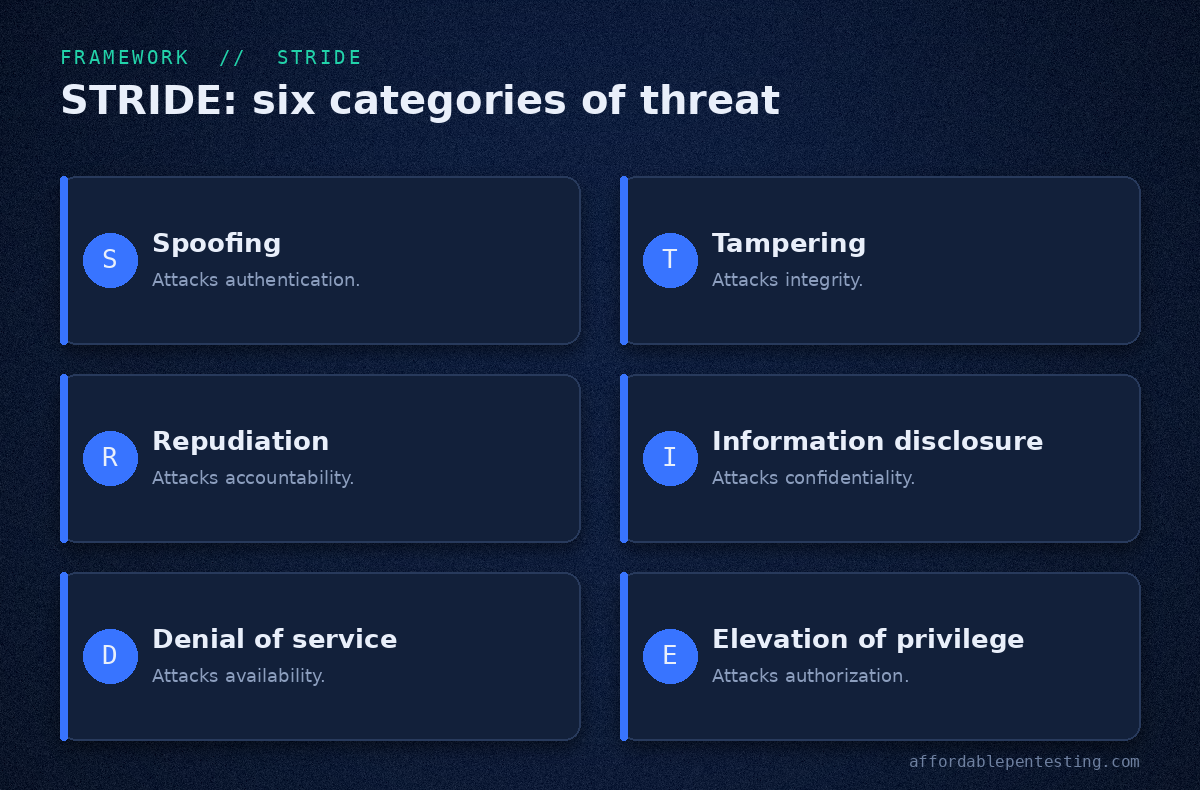
- Spoofing. Pretending to be someone or something you're not. It attacks authentication. Example: stealing a session token to log in as another user.
- Tampering. Modifying data or code without authorization. It attacks integrity. Example: changing a price in a request before it reaches the server.
- Repudiation. Denying you did something, with no way to prove otherwise. It attacks accountability. Example: a user disputes a transaction and your logs can't settle it.
- Information disclosure. Exposing data to people who shouldn't see it. It attacks confidentiality. Example: an API that returns more fields than the UI shows.
- Denial of service. Making a system unavailable. It attacks availability. Example: a single expensive query an attacker can trigger over and over.
- Elevation of privilege. Gaining rights you shouldn't have. It attacks authorization. Example: a normal user reaching an admin function by editing a URL.
Run each component of your system through those six, and you'll surface threats you would never have brainstormed cold. That's the whole point of a framework: it makes your thinking exhaustive instead of anxious.
A quick threat modeling example
Theory is easy to nod along to and hard to use. So here's STRIDE applied to something every app has: a login form.
Picture a simple web app. Users log in with an email and password, the server checks them, and hands back a session token. Run that one flow through the six categories and watch the threats fall out.
- Spoofing. Can someone guess or reuse a token to log in as another user? Mitigate with strong, random tokens and short session lifetimes.
- Tampering. Can a user alter the token to change who the server thinks they are? Sign it and validate it server-side on every request.
- Repudiation. If an account is abused, can you prove who did what? Log authentication events with enough detail to reconstruct them later.
- Information disclosure. Does a failed login quietly reveal whether that email has an account? Return the same generic error either way.
- Denial of service. Can an attacker hammer the login to lock out real users or exhaust the server? Rate-limit attempts and back off on repeated failures.
- Elevation of privilege. Once logged in, can a normal user reach an admin route by editing a URL? Check authorization on every request, not just at the front door.
One form. Six real threats, each with a concrete fix. That took a few minutes of structured thinking, and it kept a whole class of bugs out of the app before anyone wrote a line of defensive code. Scale that habit across every feature and you can see why it pays.
When should you threat model?
The best time is early, when you're designing a new feature and changes are still just words in a doc. The second-best time is now. Any system you already run can be modeled, and it's worth doing whenever you add a major feature, change how data flows, bring in a new third-party integration, or prepare for a compliance audit. Then revisit it on a cadence, because your system keeps changing and the threats against it change right along with it.
Threat modeling methods compared
STRIDE is the most common starting point, but it isn't the only method. A few others are worth knowing, depending on what you care about most.
| Method | Focus | Best for |
|---|---|---|
| STRIDE | Six categories of technical threats | Most teams starting out; app and system design |
| PASTA | Risk and business impact, seven stages | Tying technical risk to business priorities |
| DREAD | Scoring and ranking a known threat | Prioritizing which threats to fix first |
| Attack trees | Mapping paths to a specific goal | Reasoning through how one critical asset could fall |
Don't overthink the choice. STRIDE for finding threats, DREAD or a simple risk score for ranking them, and you've got 90% of the value. The OWASP threat modeling community keeps good references if you want to go deeper. When you're ready to act on the ranking, our guide to vulnerability prioritization picks up where the model leaves off.
Threat modeling vs penetration testing
People sometimes ask which one they need. That's like asking whether you need the blueprint or the building inspector. You want both, and they happen at different times.
Threat modeling is a design-time exercise. It's you, reasoning about what could go wrong, before or during development. It's cheap, it's proactive, and it's based on how you think the system works.
A penetration test is runtime proof. It's a human attacking the system as it actually is, finding out which of your worried-about threats are real and which brand-new ones you never modeled. It's based on how the system actually behaves, which is never quite how you drew it.
The two feed each other. Your threat model tells the pentester where to dig, so the penetration test spends its hours on your real risks. The pentest, in turn, shows you where your model was wrong so you can sharpen it. If you've mapped your attack paths, pair this with our work on attack path analysis and attack surface management to close the loop.
Model to find the risks. Test to prove them. Fix what's real.
Frequently asked questions
What is threat modeling?
Threat modeling is a structured process for identifying security threats to a system, evaluating them, and deciding how to address each one. It's usually done during design so that flaws are caught and fixed before they reach production.
What is a threat model?
A threat model is the output of that process: a diagram of the system plus a prioritized list of the threats it faces and the planned response to each. It's a living document that you update as the system changes.
What is threat modeling in cybersecurity?
In cybersecurity, threat modeling means analyzing an application or network to map how an attacker could compromise it. Teams often use a framework like STRIDE to make sure they consider every category of threat, not just the obvious ones.
What is the STRIDE threat model?
STRIDE is a framework of six threat categories: Spoofing, Tampering, Repudiation, Information disclosure, Denial of service, and Elevation of privilege. Each maps to a security property, which makes it a reliable checklist for finding what can go wrong.
How do you do threat modeling?
Answer four questions: what are you building, what can go wrong, what will you do about it, and did you do a good enough job. Diagram the system, apply a framework like STRIDE to find threats, decide on a response for each, and review the model as the system evolves.
Is threat modeling the same as a penetration test?
No. Threat modeling is a proactive design-time analysis of what could go wrong. A penetration test is a hands-on attack against the live system to prove what actually is wrong. They complement each other, and strong security programs use both.
The bottom line
Threat modeling is the cheapest security work you'll ever do and among the most valuable. An hour with a whiteboard, the right people, and a framework like STRIDE will surface risks you'd otherwise ship straight into production.
But a model is a theory. At some point you need to know which threats are real.
That's the part we handle. Once you've mapped your risks, get a quote for a manual pentest that proves them out, or book a call to talk through your scope. Reports in about five business days, from $2,000.