.svg)

Your compliance deadline is close. Your scanner dumped a giant report in your lap. Half the findings look harmless, the other half look vague, and none of it answers the only question that matters.
How does an attacker get to your critical data?
That's where most firms waste your time. They sell a slow penetration test, a slow pen test, or a slow penetration testing engagement, then hand over pages of noise. You pay a premium to learn what a scanner already told you.
Attack path analysis fixes that. It shows the route, not just the potholes.
Stop Chasing Alerts and Start Finding Paths
An IT manager at a startup gets a scanner report full of medium findings. A compliance auditor is asking for evidence. The founder wants to know what must be fixed now. Nobody cares about page 143 of a PDF if it doesn't lead to customer data, admin control, or payment systems.
That's the problem. Security teams keep getting lists. Attackers use chains.

Why the usual report fails
A basic scan tells you what exists. It doesn't tell you what connects.
You might have a web app issue, an over-permissioned user account, and a bad cloud rule. Looked at one by one, each finding may seem annoying but not urgent. Chained together, they can become the shortest route to your production database.
That's why a decent security program has to move beyond isolated findings. If you're already working through external exposure, this practical guide to ASM helps frame the front door problem. Attack path analysis handles what happens after that door opens.
Most teams aren't short on findings. They're short on context.
What attackers actually do
Attackers don't sort findings by CVSS score and work top to bottom. They look for the easiest sequence that gets them somewhere valuable.
That sequence usually crosses systems. A forgotten admin panel leads to a credential. The credential leads to a cloud role. The cloud role leads to a bucket, server, or identity provider. Your scanner may list all those pieces. It usually won't tell you they form one workable path.
This is why startups get ripped off by slow firms. They pay for a penetration test and receive broad coverage without practical ranking. Then they still have to guess what to fix first.
What a useful report should tell you
A useful pen testing report should answer four things fast:
- Entry point Someone gets in through a real weakness, not a theoretical one.
- Movement path The report shows how that access expands across systems.
- Target asset It names what the attacker can reach.
- Fix priority It tells you which single change breaks the chain.
If your current vendor can't do that clearly, you're not buying clarity. You're buying paperwork.
What Is Attack Path Analysis Really
Attack path analysis came out of early attack graph research. A key 2002 paper showed how graphs could model an attacker's reach through a network, which became the basis for how defenders find and prioritize chained exploits today, as summarized in this review of attack path analysis history.
Here's the simple version. A burglar doesn't care about every weak spot in the neighborhood. They care about the route from outside the house to the item they want.
Think like a burglar
If the target is a diamond in a locked upstairs room, an open side gate matters only if it helps the burglar reach the stairs, bypass the dog, and get to the room. Cyber attacks work the same way.
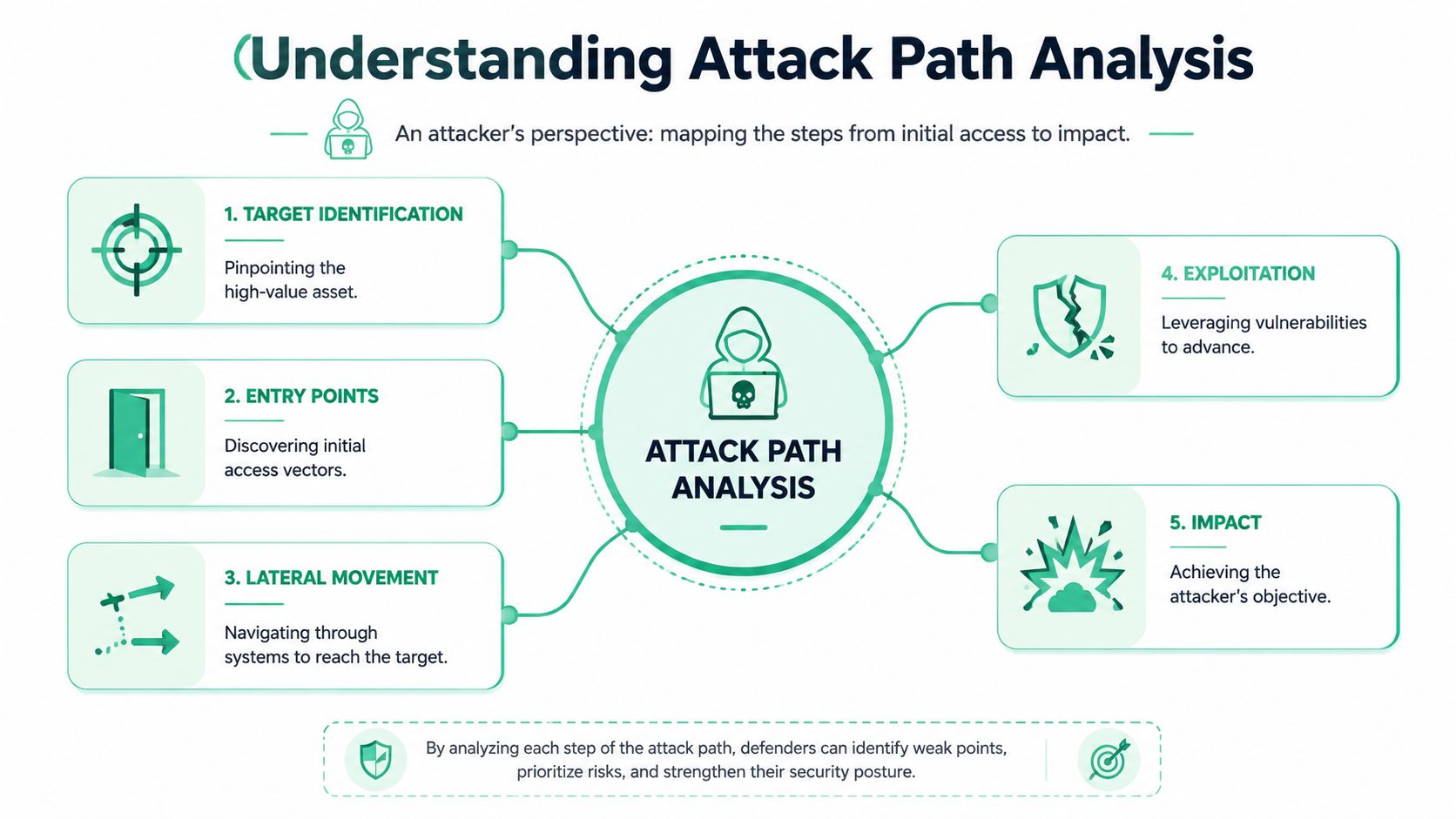
An attacker wants your admin console, customer records, cloud control plane, payment system, or domain-level access. Attack path analysis maps the steps that connect where they start to where they want to end.
What the graph actually shows
An attack graph is just a map of relationships. It links users, systems, permissions, services, and weaknesses so you can see how one compromise can lead to another.
A simple path might look like this:
- Initial access A public login, exposed app, or weak integration gets touched first.
- Privilege growth The attacker finds a permission they shouldn't have.
- Lateral movement They hop to another system that trusts the first one.
- Objective reached They land on a critical asset.
If lateral movement is still fuzzy for your team, CloudCops' guide on lateral movement is worth reading because it explains the middle of the attack, which is where most companies lose the plot.
Attack path analysis is attacker math. It asks what can be chained, not just what exists.
Why this matters in plain English
A scanner might tell you a cloud role is too broad. Another tool might tell you a VM is old. A directory review might show a user has too much trust. Attack path analysis connects those dots.
That's what makes it practical for smaller companies. You don't need a giant security team to benefit from it. You need a clear map of the few things that put your important systems at risk.
Why This Beats Traditional Vulnerability Scans
Traditional scanning has value. It finds stuff fast. But if you rely on it alone, you're paying to collect hay while the needle stays in the stack.
Microsoft's exposure management guidance makes the core point clearly. Modern environments create more possible attack routes than humans can review manually, and path-based prioritization matters because breaches are expensive and slow to contain. IBM's 2008 global study found the average breach lifecycle was 287 days, and later IBM reporting found the global average breach cost reached $4.88 million in 2024, as cited in Microsoft's attack path documentation.
Scanner output versus real attacker logic
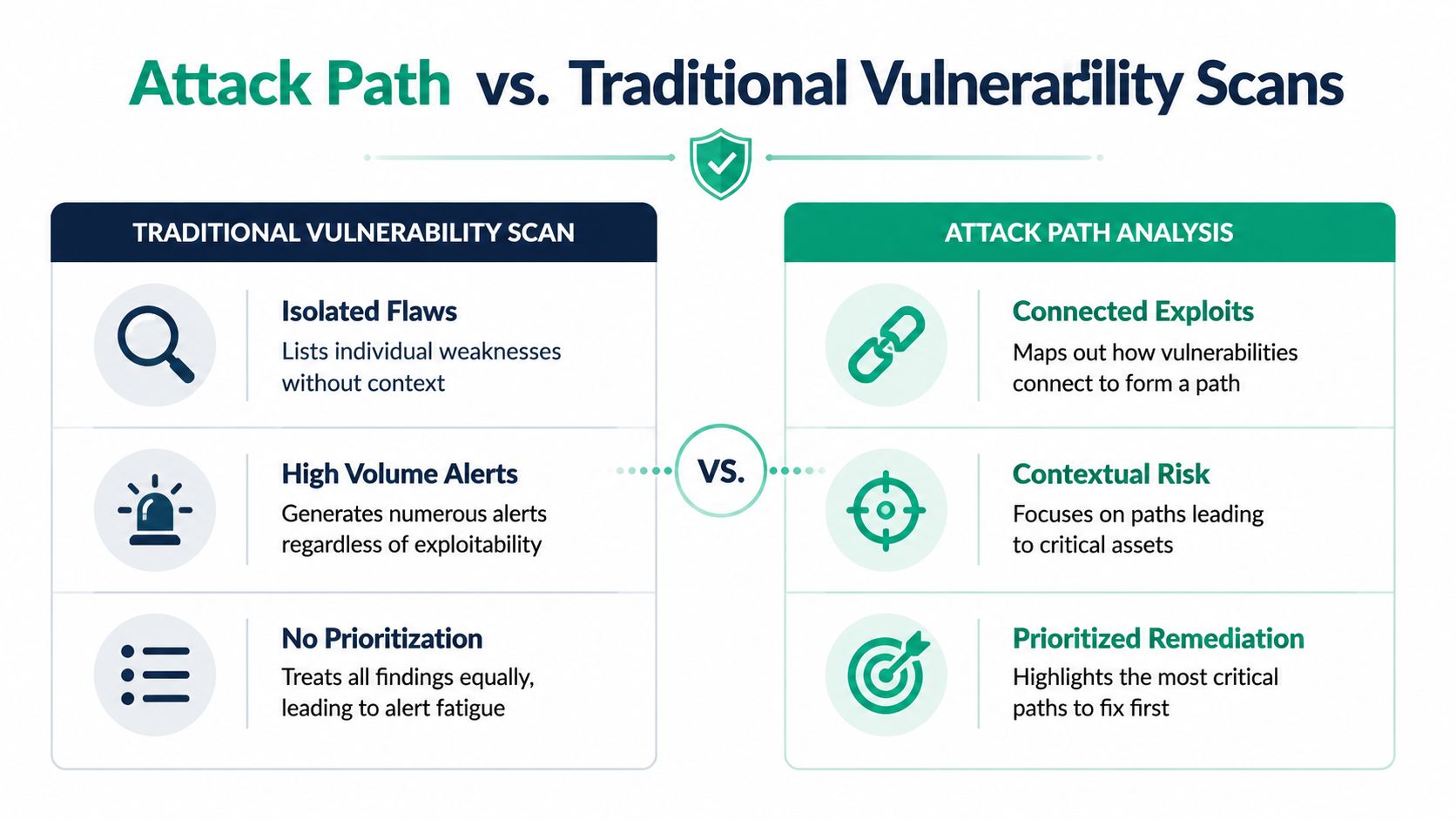
A scanner reports isolated flaws. Attack path analysis ranks reachable outcomes.
That difference matters because not every weakness leads anywhere useful. Some findings are dead ends. Some are ugly but contained. Some are boring on their own and dangerous only when combined with identity abuse, trust relationships, or network access.
Here's the blunt comparison:
| Approach | What you get | What you still have to figure out |
|---|---|---|
| Vulnerability scan | Large list of issues | Which ones actually lead to critical assets |
| Attack path analysis | Chained risk to specific targets | Which choke point breaks the path fastest |
Why smaller teams should care
SMBs and startups don't have time to patch everything first and think later. They need a sequence.
A good penetration testing process uses scan data as raw material, not the final answer. The useful output is a short list of actions that cut off realistic attacker routes. That saves engineering time, cuts remediation drama, and gives leadership a better answer than "we're working through the backlog."
- Less waste Teams stop burning cycles on disconnected findings.
- Better audit story You can show why a fix mattered, not just that a ticket closed.
- Clearer ownership Identity, cloud, and app teams can see where their controls intersect.
If your vendor still treats every finding like equal risk, they're not helping. They're outsourcing prioritization back to you.
How We Perform a Fast Penetration Test
The right way to do this is simple. Use automation to collect the obvious. Use humans to prove what can be chained.
That's why a fast pentest, pen test, or penetration test shouldn't end with a tool export. Good testers use the output as a starting point, then manually validate the path. That's where the true value lives.
Automation finds pieces
Automation is great at breadth. It can surface internet-facing assets, known software issues, identity sprawl, exposed cloud storage, and weak service configurations.
But tools don't think like an operator during a live compromise. They usually won't test whether one low-privilege foothold can be turned into meaningful access across apps, cloud roles, and internal trust.
Humans confirm the route
Certified testers play a crucial role. An OSCP, CEH, or CREST professional can look at separate findings and ask the question that scanners miss. "Can I use this to move?"
That matters even more in environments like Microsoft 365, identity-heavy SaaS stacks, and cloud migrations. If you're reviewing M365 risk during platform changes, Ollo's M365 migration security is a useful example of why security has to follow the business process, not just the server list.
Practical rule: If a firm can't explain the attack chain in plain English, they probably didn't validate it.
What fast should look like
A solid process for fast pentesting for compliance should move quickly without becoming lazy. That means scoping the environment, checking likely entry points, validating privilege paths, and writing a report people can act on. If you're comparing options, this page on fast pentesting for compliance shows what a leaner model looks like.
A useful manual penetration testing workflow usually includes:
- Surface mapping Web apps, cloud assets, exposed services, and identity touchpoints get mapped first.
- Path validation Testers verify whether separate issues can be combined into a working route.
- Evidence capture Screenshots, reproduction steps, and business impact get documented for engineers and auditors.
- Fix guidance The report points to the smallest effective change that breaks the chain.
You don't need a giant consulting team camped in meetings for weeks. You need qualified people who can test efficiently, write clearly, and get out of the way.
Real Attack Path Examples for SMBs
Theory sounds nice until you see how ordinary the starting point usually is. Most SMB attack paths don't begin with some movie-style zero-day. They begin with normal mess.
Research highlighted by Microsoft says 85% of exploitable routes to critical assets involve indirect access chains, and attack paths that combine an identity misconfiguration with a software vulnerability are 3x more likely to result in a successful breach, according to Microsoft's overview of attack path analysis.
SaaS startup example
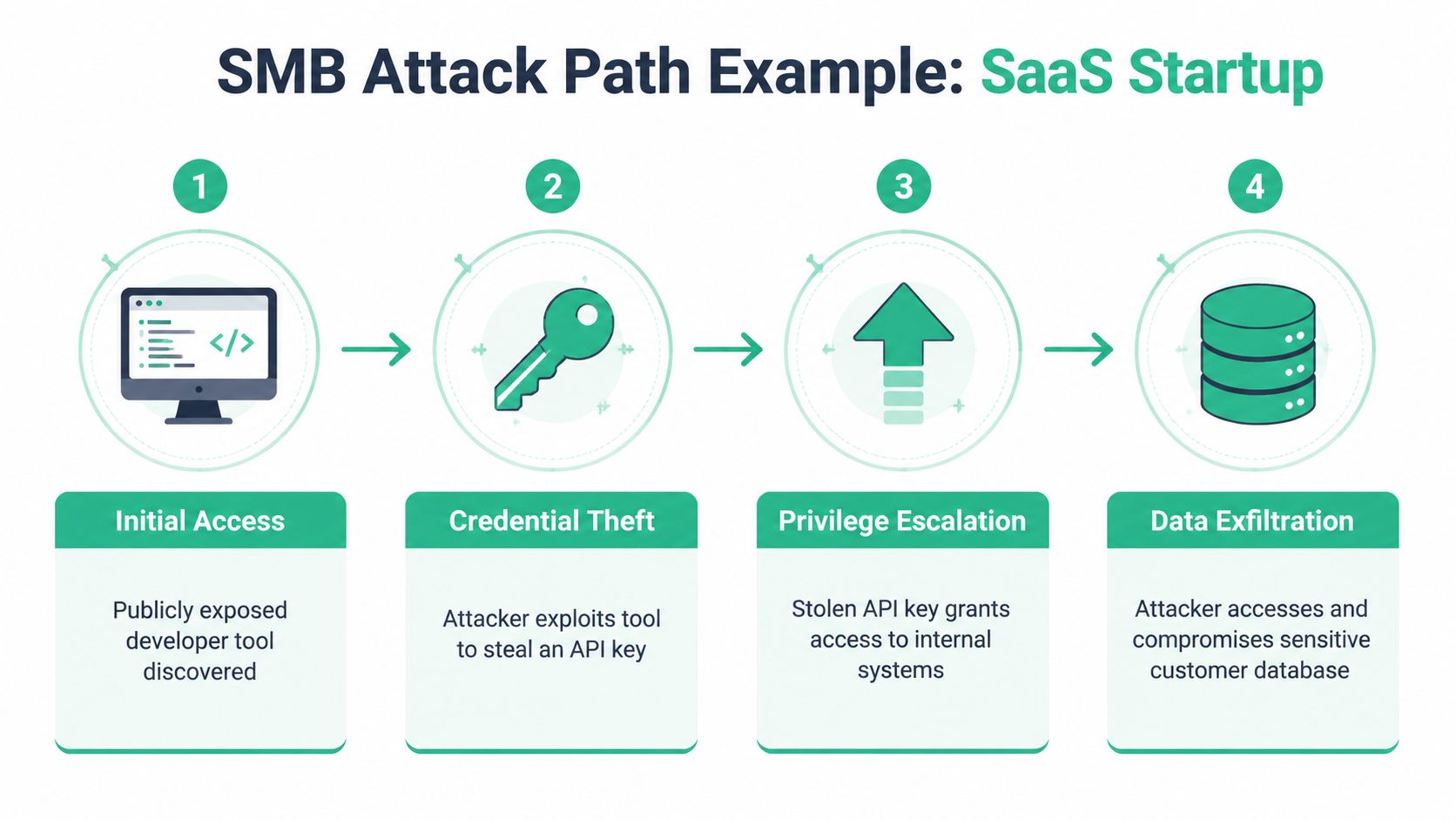
A startup leaves a developer tool exposed to the internet. The tool itself may not look catastrophic. But it gives an attacker a way to steal an API key.
That key opens access to a development environment. In that environment, the attacker finds old credentials or broad permissions that were never cleaned up. From there, they pivot into production data.
None of those steps may look dramatic in isolation. Together, they form one clean path to customer information.
E-commerce example
An online store runs a third-party marketing plugin with a known weakness. The attacker uses it to gain low-level access on the website.
That low-level access shouldn't be enough to matter. But the attacker finds a weak internal password or a reused admin secret. That lets them move to a system connected to payment processing or customer records.
This is why indirect access matters more than teams expect. The first issue is often minor. The chain is the problem.
The dangerous finding isn't always the loudest one. It's the one that connects.
What these examples teach
Two patterns show up again and again:
- Identity is often the bridge Bad permissions, stale accounts, or trust relationships turn small problems into big ones.
- Exposure compounds A plugin flaw, leaked key, or weak internal access can become a route to regulated data.
That's exactly why a real pen test shouldn't stop at "vulnerability found." It has to answer whether the issue participates in a path to something that would hurt your business.
Meet Compliance Demands for SOC 2 and PCI
A lot of compliance pain comes from bad evidence, not bad intent. Teams have scans, tickets, and screenshots, but none of it clearly shows they understand real-world risk.
That's where attack path analysis becomes more than a security exercise. It gives GRC teams something they can practically use.
What auditors want to see
Most auditors don't need a dramatic red team story. They need proof that you can identify important risk, assess impact, prioritize remediation, and show follow-through.
Public guidance on attack path analysis rarely explains this operational side well. That gap matters because SMBs need a repeatable way to map path findings to controls for SOC 2, PCI DSS, and ISO 27001, as noted in Cycognito's discussion of attack path analysis for audit evidence.
A useful compliance packet should include:
- A defined critical asset list What counts as crown jewels in your environment.
- Mapped attack paths Which routes could reach those assets.
- Remediation records What was fixed, by whom, and when.
- Residual risk notes What remains open and why.
How this helps with common frameworks
For SOC 2, path analysis supports the story that you assess access risk in a structured way. For PCI DSS, it helps show that systems affecting cardholder data are protected from realistic compromise paths. If your team needs extra context on PCI obligations, Blowfish Technology's PCI guide is a practical primer.
For companies preparing evidence around trust services criteria, Affordable Pentesting's SOC 2 offerings show the kind of focused testing many smaller teams are looking for.
What to hand your auditor
Don't dump raw scan exports on an auditor and hope they connect the dots. Give them artifacts with narrative.
A better package looks like this:
| Audit artifact | Why it matters |
|---|---|
| Attack path diagram or narrative | Shows how risk reaches protected assets |
| Validation notes from a penetration test | Proves the path was tested, not guessed |
| Remediation evidence | Shows you acted on prioritized risk |
| Retest results | Confirms the path was broken |
That makes your audit easier because the evidence tracks to actual business risk, not just a pile of technical debris.
Fix What Matters and Get Back to Work
Once you have the path, the remediation plan usually gets simpler. You don't need to boil the ocean. You need to break the route.
Tenable says that prioritizing patches on assets that break the top 10 shortest attack paths can reduce overall risk exposure by 60% within 30 days, according to Tenable's guide to attack path analysis. That's the right mindset. Interrupt the path first, then clean up the rest.
Start with choke points
A choke point is the link that holds several bad outcomes together. It might be one privileged account, one overly broad trust policy, one exposed admin service, or one weak segmentation rule.
Fixing that single point can shut down multiple routes at once.
Use this order:
- Find the shared connector Look for the account, permission, host, or rule that appears across multiple paths.
- Choose the smallest effective fix Remove excess access, tighten a network rule, patch the key system, or rotate the exposed secret.
- Retest the path Don't assume the route is dead. Verify it.
- Record the evidence Save the before and after for engineering leadership and auditors.
Show progress without drowning people
Executives don't need every exploit detail. Engineers do. Your report should serve both.
A clean way to present progress is:
- To leadership Name the affected business asset, the path risk, and the fix status.
- To engineers Provide exact steps to reproduce, validate, and retest.
- To compliance teams Keep the evidence trail tied to control objectives and closure dates.
Good remediation isn't "patch more." It's "break the route that matters most."
Stop paying for noise
If your vendor gives you a giant list and no path, they left the hard part to you. That's not expert penetration testing. That's expensive sorting.
You want a pentest, pen test, or penetration testing engagement that finds the route, proves the risk, and gives you fixes your team can ship.
If you're done paying too much for slow reports and weak findings, talk to Affordable Pentesting. Their OSCP, CEH, and CREST-certified pentesters focus on fast, affordable penetration testing for startups and SMBs, with audit-ready reporting delivered within a week. Use the contact form and get a quote without wasting another month on security theater.