.svg)
Authorization Testing for Fast Compliance Audits
Your audit deadline is close. Your team is already buried. Then the penetration testing quotes show up, and they're not small. On average, pen testing costs fall between $5,000 and $30,000, but prices can rise to $60,000 or more depending on scope, methodology, and compliance needs such as SOC2 or PCI DSS, according to Blaze Information Security's penetration testing cost breakdown.
That's the part most founders, IT managers, and compliance leads hate. You don't need a six-week consulting circus. You need a solid pentest, real findings if they exist, and a report your auditor will accept without drama.
One of the fastest ways to tell whether a web app is secure is authorization testing, which involves a tester checking whether logged-in users can access data or actions they should never touch. If your app gets this wrong, you can pass login checks and still leak customer records, admin functions, or medical data.
If you're dealing with SOC 2, HIPAA, PCI DSS, or a customer security review, this isn't a side issue. It's a core part of a real penetration test. Legal teams also often want a broader review process around third-party risk, which is where a structured vendor security assessment can help alongside your pen test.
Practical rule: If your app has more than one user role, you need authorization testing in your pen testing scope.
A focused manual pen test gives you the fastest path forward. It checks the access controls that matter, cuts out scanner noise, and gets you an audit-ready report quickly. That's what busy teams need.
Your Fast Track to Passing Security Audits
Traditional penetration testing firms often sell process instead of results. They stretch scoping, add meetings, and hand over a bloated report long after your audit window starts closing. For a startup or lean security team, that's useless.
What matters is simple. Can an attacker log in as a normal user and reach data, pages, APIs, or functions meant for someone else? If yes, you have a real problem. If no, you need proof in writing.
Why speed matters for compliance
Auditors usually don't care how elegant your security story sounds. They want evidence that someone tested the system and verified access controls. A delayed penetration test report can slow procurement, renewals, and compliance signoff.
A fast pen test helps in three ways:
- It keeps your audit moving: You get documentation while remediation is still realistic.
- It gives developers clear targets: They can fix actual flaws instead of arguing over scanner output.
- It avoids waste: You pay for expert review, not unnecessary layers of account management.
What a founder should prioritize
If you're choosing between a cheap automated scan and a focused manual penetration test, pick the one that answers the question your auditor and customers care about. Can unauthorized users get access they shouldn't have?
That's where authorization testing earns its keep. It's one of the clearest indicators that a pen test was done by someone who understands how applications break in real life.
What Is Authorization Testing Really
Think of your app like a private club. Authentication is the bouncer checking your ID at the door. It answers one question: are you really who you say you are?
Authorization is what happens after you get inside. It decides whether you can enter the VIP room, open the cash office, or view someone else's locker.

Formally, authorization testing is defined as the systematic process of evaluating whether an application properly enforces access controls by verifying that users can only perform actions and access resources explicitly permitted by their assigned roles or privileges, as described by AppSec Labs on authorization testing.
That sounds technical, but the idea is basic. A normal user should only see and do normal-user things. An admin should have more access, but only what the role needs. A billing user shouldn't suddenly be able to export HR files.
The two failures that matter most
When authorization breaks, it usually breaks in one of two ways.
- Horizontal privilege escalation: One user accesses another user's stuff. Think customer A viewing customer B's invoice, order history, or support ticket.
- Vertical privilege escalation: A lower-level user gets higher-level power. Think staff account to admin account.
Both are bad. Horizontal issues expose private data. Vertical issues can hand over full control of the app.
A login page can be perfect while the app behind it is wide open.
Why teams confuse this with login security
A lot of teams say, "We have SSO, so we're fine." No, you're not. Strong login security doesn't prove the app checks permissions correctly after the user signs in.
That's why manual testers spend time mapping roles, actions, and data flows instead of only looking for obvious flaws. If you want a deeper look at role design and access control checks, this guide on how to test identity and access management is a useful next step.
The short version is this. Authentication gets a user in. Authorization decides what that user can touch. Good penetration testing checks both, but authorization testing is where many serious findings live.
Common Authorization Flaws We Find Daily
Most authorization bugs aren't exotic. They're simple mistakes that slip through development because nobody tested the app from the wrong user's perspective.
That's why these flaws show up so often in a penetration test. A developer builds a feature that works for the right user, then nobody verifies what happens when the wrong user sends the same request.

IDOR is the classic example
The most common one is IDOR, short for insecure direct object reference. The idea is simple. A user loads a record with an ID in the request, changes that ID, and suddenly sees someone else's data.
A basic example looks like this:
- Normal flow:
/orders/123 - Attacker test:
/orders/124
If the app returns another user's order, the access check failed. That's not a minor bug. It's direct data exposure.
Hidden buttons don't protect anything
Another common issue is broken function-level authorization. The app hides admin buttons from regular users, so the team assumes the action is protected.
But hiding a button in the interface means nothing if the backend still accepts the request.
For example, a regular user may never see "Delete User" in the dashboard. Then a tester captures a request, changes the target endpoint, and submits it directly. If the server processes it, the app is trusting the front end instead of enforcing access on the server.
Field note: If an action is dangerous, the server has to verify permission every single time. Not once. Not only in the UI. Every request.
Privilege escalation gets ugly fast
Privilege escalation happens when a low-privilege account gains extra rights. Sometimes it's obvious, like changing a role value in a request. Sometimes it's buried in workflow logic, like being able to approve your own request when the app was supposed to require manager review.
These bugs matter because they change impact fast. One weak access check can turn a normal account into an internal attacker with broad visibility or control.
Here's what these flaws usually lead to:
- Data exposure: Customer records, invoices, support threads, and internal files leak.
- Unauthorized actions: Users create, delete, approve, or modify things they shouldn't.
- Compliance trouble: Auditors and customers see access control weaknesses as a major red flag.
Automated tools can help spot patterns, but they often miss these issues because they don't understand who should be allowed to do what. A certified human tester can.
How Our Pentesters Find Authorization Bugs
Your auditor asks for proof that access controls were tested. You do not need a giant slide deck or a week of theory. You need a pentest that shows who can do what, where the checks fail, and how to fix them before the audit window closes.
That starts with a simple question. Which users should be blocked from which actions?
We map the permission model first
A good tester does not poke at random endpoints and hope for a finding. We build a working map of roles, sensitive actions, and protected data first. That includes admin functions, approval flows, file access, billing actions, record ownership, and API operations.
Then we turn that map into abuse cases the client and auditor can both understand:
- A standard user cannot read another customer's record
- A support account cannot change roles or billing settings
- A read-only account cannot create, edit, approve, or delete data
This keeps the test focused. It also keeps the final report clear, which matters if you need to hand it to an auditor fast.
We tamper with real requests, not screenshots
Our testers log in with low-privilege accounts, intercept their own traffic, change the request, and send it again. We test the API and the server-side checks directly, because that is where authorization succeeds or fails.
Common changes include:
| Test action | What the tester changes | Secure result |
|---|---|---|
| View another account | Replace an object ID | Server denies access |
| Use an admin feature | Call the endpoint directly | Server returns forbidden |
| Change protected data | Add a hidden or unauthorized parameter | Server rejects or ignores it |
For web and API testing, teams commonly use Burp Suite Professional and OWASP ZAP to intercept traffic, replay requests, and probe for broken access checks, as outlined in AppSec Labs' authorization testing overview.
We verify what the server actually did
The response code matters, but it is not enough. A tester checks whether the server blocked the action, leaked data in the body, updated a record anyway, or exposed a function through a secondary endpoint.
A clean authorization finding usually looks like this:
- Request: standard user calls an admin-only API route
- Expected: access denied
- Vulnerable result: data is returned or the action completes
That is the kind of issue an auditor understands immediately. It ties the technical flaw to a real business risk and gives your team a fix target instead of vague security language.
We test the places scanners miss
The strongest findings usually sit in workflow logic. Can a manager approve their own request? Can one tenant export another tenant's reports? Can a user with partial access chain two harmless actions into one unauthorized result?
Scanners rarely answer those questions well because they do not understand your permission model. Human testers do. If your product exposes a lot of backend functionality, purpose-built API pentesting environments make this work faster and cleaner.
We also look at how you prevent regressions
Authorization bugs keep coming back when teams only test them once before an audit. The better approach is to test policy logic in development and CI, especially for APIs and role-based changes. Permit.io explains this well in its SDLC guidance for authorization testing.
That gives you two wins. You catch obvious breakage before release, and your pentest can spend time finding the business-logic failures that matter for compliance.
Automated Scanners vs Manual Penetration Testing
You buy a scanner on Monday, run it on Tuesday, and get a clean-looking dashboard by Wednesday. Your auditor still asks for a penetration test, and for good reason. A scanner can help your team catch routine problems fast. It cannot tell you whether your access rules break under real abuse.
That gap matters most in authorization testing because the bug is often in the decision, not the endpoint.
What scanners do well
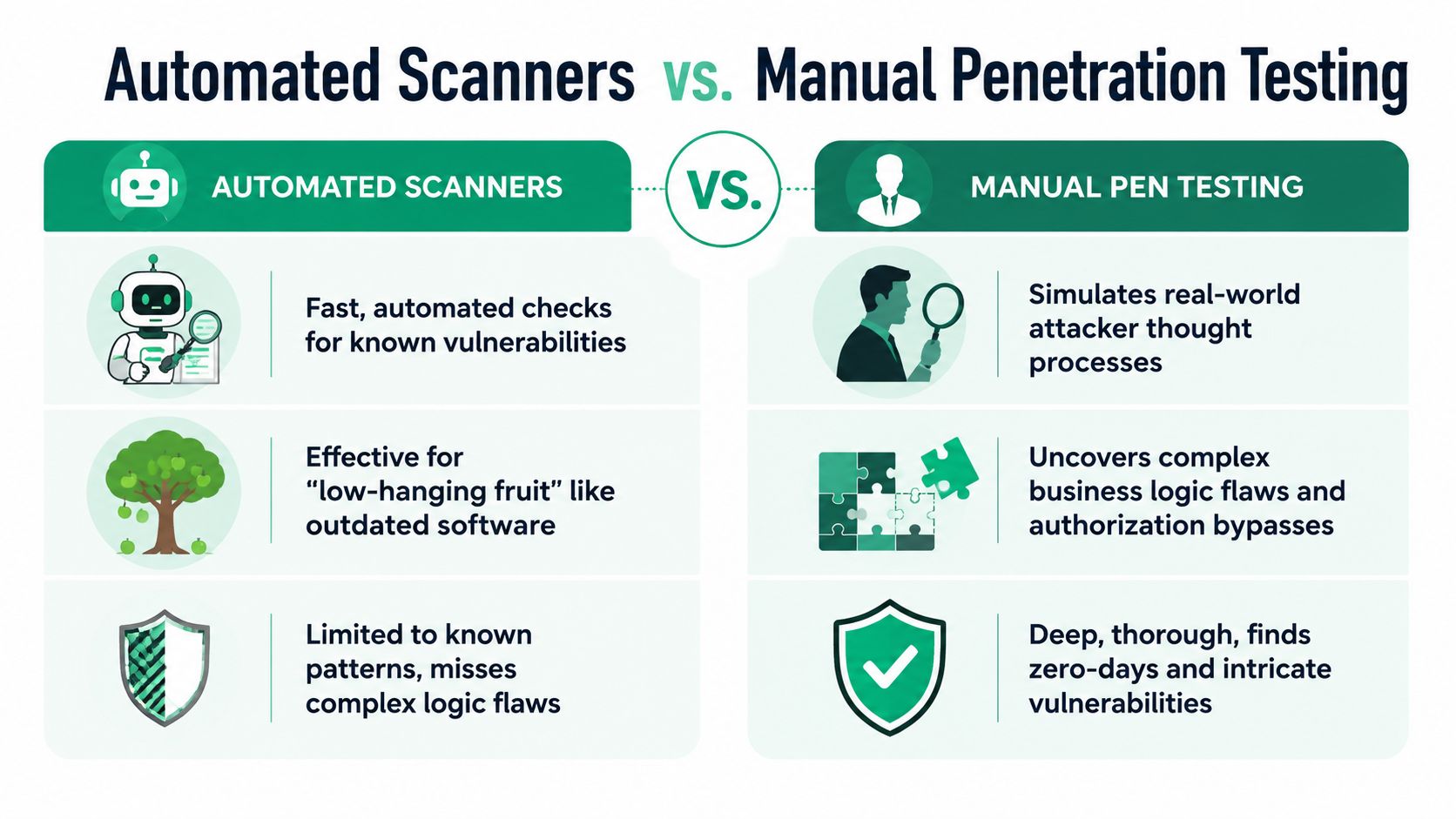
Use scanners for repeatable checks. They are good at spotting common weaknesses, flagging standard misconfigurations, and giving engineers quick feedback during builds and releases.
They also help teams keep basic coverage in place:
- Known weakness checks: Outdated components and standard misconfigurations
- Consistency: The same checks run every build or release
- Early developer feedback: Simple mistakes get caught before production
That makes automation useful for speed and cost control. If you need a fast compliance pentest, keep the scanner running in the background so the human tester can spend time on the access-control failures that software misses.
Where scanners fall short
Scanners do not understand your permission model. They do not know whether a sales rep should see only assigned accounts, whether one clinic must stay isolated from another, or whether an employee can approve their own reimbursement.
Serious findings often hide in business logic that scanners cannot understand.
A scanner can hit /users/124 and check the response. A pentester asks a harder question. Should this user see that record at all, and can they reach it through a second role, a shared workflow, or a sequence of harmless-looking actions?
That is the difference between an alert list and a finding that matters to an auditor.
Manual penetration testing takes more effort and produces better authorization findings.
What auditors need
For compliance, a human-led pentest carries more weight because the report shows judgment, validation, and business context. It proves someone tested access rules on purpose instead of exporting automated alerts and calling it done.
If your goal is a fast, affordable pentest report for SOC 2, PCI, or HIPAA, use scanners as support tools. Do not use them as a substitute for manual testing. Automation helps you move faster. Manual testing finds the authorization bugs that can delay your audit.
Turning Pentest Findings Into Actionable Reports
A penetration test report should help two groups immediately. Developers need to know what broke and how to fix it. Auditors need evidence that the testing was real and the findings were handled seriously.
Most traditional firms fail on both. They deliver too late, write too much, and bury the useful parts under pages of filler.
What a good report actually includes
A useful pentest report is concise and specific. It should show the vulnerable function, explain the business impact in normal language, include proof, and tell the team how to remediate the issue.
The strongest reports usually include:
- Clear finding titles: No vague labels that force developers to guess
- Evidence: Screenshots, request snippets, or response details that prove the issue
- Remediation guidance: Direct steps the engineering team can act on
- Risk prioritization: So the client knows what to fix first
Fast reports beat perfect-looking reports
For compliance work, waiting weeks for a polished PDF is a bad trade. The report needs to land while the team still has time to fix what matters and submit evidence.
A focused manual pen test can produce a clean, audit-ready report within about a week from kickoff. That's fast enough to support tight audit timelines and still useful enough for real remediation.
Bottom line: A pen test isn't finished when testing ends. It's finished when the client has a report they can use.
That's the standard to judge any penetration testing provider by.
Authorization Testing for SOC 2 PCI and HIPAA
If you're chasing compliance, authorization testing is not optional. Access control is one of the first things auditors, assessors, customers, and security reviewers care about because weak permissions lead directly to exposed data.
This is even more important for apps and APIs. 63% of organizations experienced an API security incident in the past year, yet only 27% have mature testing for cloud and API endpoints, which shows a major gap in authorization verification for modern systems, according to DeepStrike's 2025 penetration testing statistics summary.
Where it fits in real frameworks
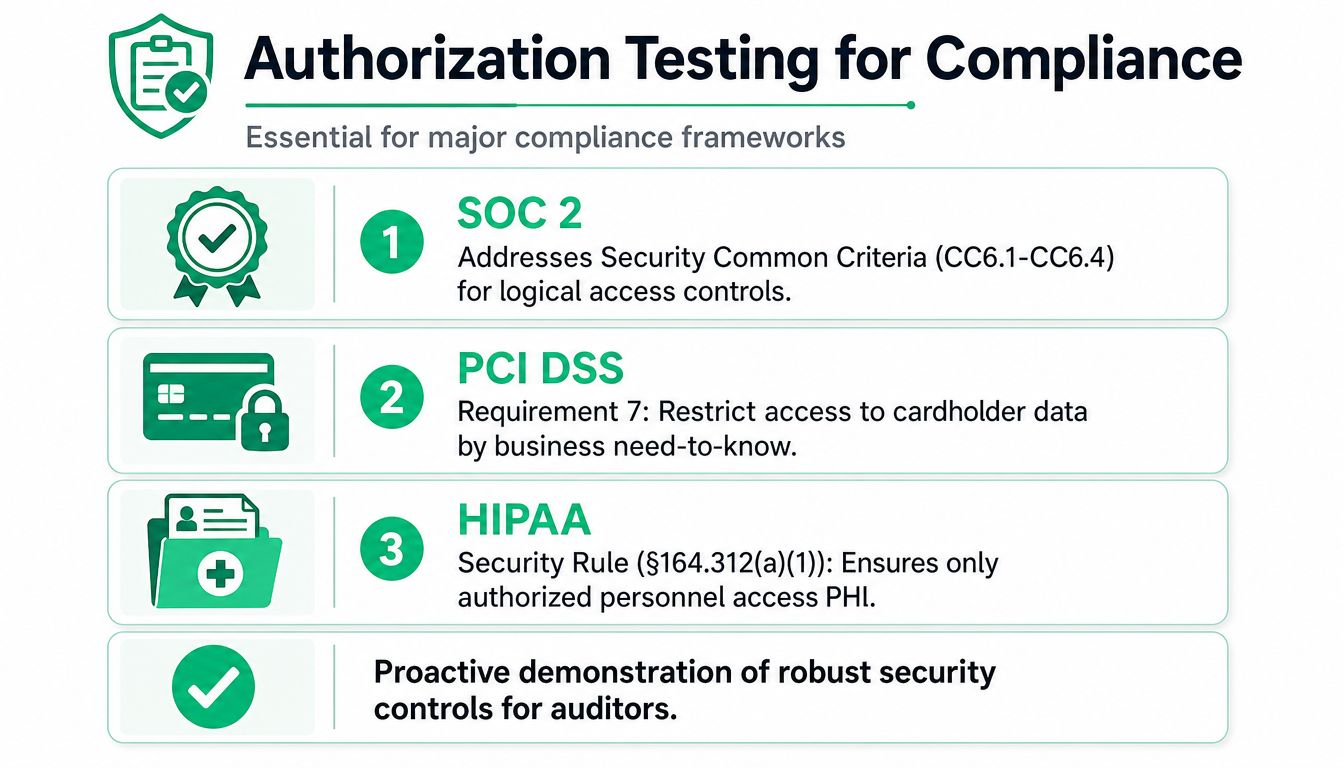
You don't need to memorize control numbers to understand the point. These frameworks all require controlled access to sensitive systems and data, and a real penetration test helps prove those controls work.
| Framework | Why authorization testing matters |
|---|---|
| SOC 2 | Verifies that logical access controls prevent unauthorized access |
| PCI DSS | Supports access restrictions around cardholder data and sensitive functions |
| HIPAA | Helps validate technical access controls around electronic protected health information |
| ISO 27001 | Demonstrates that access restrictions and secure system behavior are actually enforced |
What auditors want to see
They want evidence that your controls aren't just written in a policy doc. They want proof that a user with the wrong privileges cannot access restricted data or actions.
That means your pentest should cover things like:
- Role separation: Users can't act outside their assigned privilege level
- Object access checks: One customer can't pull another customer's data
- API enforcement: Backend endpoints don't trust the front end to make authorization decisions
If you're preparing for SOC 2 specifically, teams usually need reporting that's fast, clean, and easy to hand over. That's why practical guidance around easy SOC 2 pentest reports matters so much during audit season.
A rushed scanner output won't satisfy a serious reviewer. A targeted penetration test that verifies authorization controls will.
If you need a fast, affordable pen test for SOC 2, PCI DSS, HIPAA, or ISO 27001, Affordable Pentesting is built for that exact job. You get certified pentesters with OSCP, CEH, and CREST backgrounds, a manual penetration test focused on real findings, and an audit-ready report within seven business days of kickoff. Skip the bloated quotes and slow timelines. Use the contact form and get a scope that fits your app, your budget, and your deadline.