.svg)

Your audit is getting close. Your login flow feels “good enough.” Your dev team says they added MFA, the scanner came back mostly clean, and nobody wants to spend enterprise money fixing auth.
That's exactly how startups and SMBs get burned.
Broken authentication is just a bad lock on your front door. If attackers can log in as your users, steal a live session, or abuse your password reset flow, they don't need a fancy exploit. They walk in through the part of your app that's supposed to decide who belongs there.
Your Biggest Security Risk Is an Open Door
If you're staring down SOC 2, PCI DSS, HIPAA, or ISO 27001, this is one of the fastest ways to fail both security and common sense. A lot of teams obsess over edge-case bugs and miss the login box, session handling, and account recovery flow. That's backwards.
According to Verizon DBIR data summarized here, compromised credentials were the initial access vector in 22% of incidents, and breaches involving them cost an average of $4.81 million. That's not a niche issue. It's a board-level risk sitting inside basic identity checks.
A lot of founders also underestimate how fast broken auth turns into a business problem. You're not just dealing with a security defect. You're dealing with audit findings, customer trust, legal exposure, and a very bad explanation to investors.
If you want a simple primer on the broader risk side, TekRecruiter on cybersecurity challenges is worth reading. Then bring the focus back to your actual exposure surface, especially internet-facing systems, where Affordable Pentesting solutions can help frame what an attacker sees first.
Practical rule: If an attacker can fake identity, the rest of your controls don't matter much.
The mistake I see most often is assuming authentication is “handled” because there's a login page and an MFA checkbox somewhere. That's not enough. If session tokens don't die when they should, if password reset can be abused, or if rate limits are weak, your app may still be wide open.
What Broken Authentication Really Means
A password is only one piece of the system. Authentication is the whole setup that decides whether someone is really the user they claim to be. That includes login, MFA, sessions, password reset, logout, lockout rules, and token handling.
If any one of those parts is weak, your app can trust the wrong person.
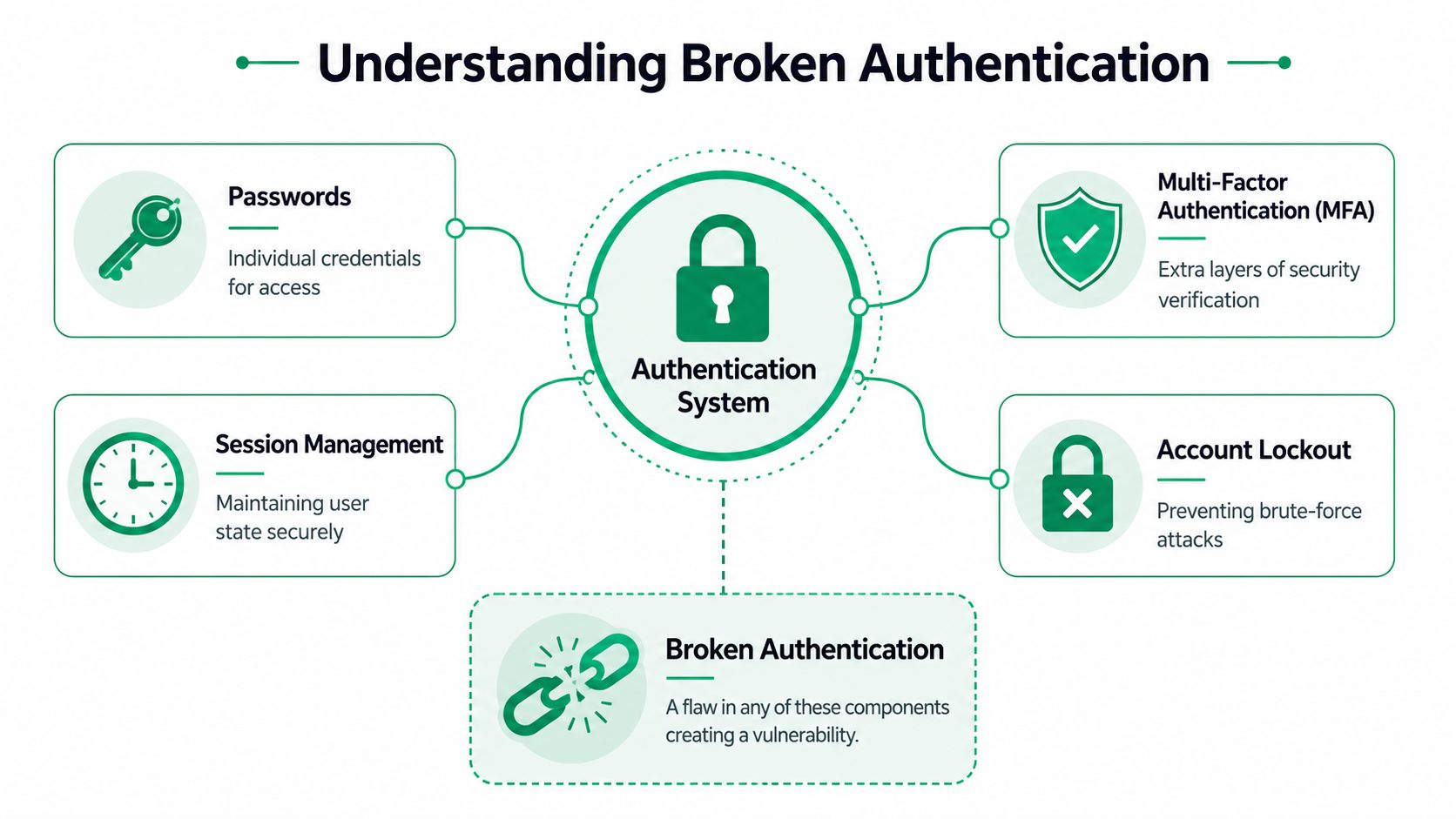
It's bigger than passwords
A lot of teams hear “broken authentication” and think “users picked bad passwords.” That's only part of it. The bigger issue is whether your system handles identity safely after login and during recovery.
Common examples include:
- Weak session handling: A user logs out, but the session still works.
- Bad token practices: A token lives too long or can be guessed, reused, or exposed.
- Poor reset logic: An attacker abuses “forgot password” to take over the account.
- No login throttling: Bots can hammer the login form until something works.
According to this summary of OWASP risk ranking, broken authentication is the #2 vulnerability in the OWASP Top 10, directly enabling attackers to steal session tokens, bypass password checks, and impersonate legitimate users without exploiting complex code flaws.
That last part matters. Attackers often don't need deep technical magic. They need one sloppy auth workflow.
What this looks like in plain English
Think of your app like an office building.
| Part of the building | What it means in your app |
|---|---|
| Front door key | Password |
| Security guard | MFA or additional checks |
| Visitor badge | Session token or cookie |
| Badge expiration | Session timeout |
| Lost badge desk | Password reset flow |
If your visitor badge never expires, anyone who finds it can roam around. If the lost badge desk hands out replacements too easily, the whole building has a problem. That's broken authentication.
Broken auth isn't one bug. It's a chain of small trust failures.
That's why founders get surprised by it. The login page can look polished and still be fragile underneath.
Common Attack Vectors and Exploit Scenarios
Attackers don't care whether your stack is trendy. They care whether your auth flow is soft. Here's how they usually probe it.

Credential stuffing
A user reused the same password on another service that got breached. An attacker buys or finds that username and password pair, then runs it against your login page with a bot.
If your app doesn't slow down repeated attempts or challenge suspicious logins, the attacker gets in without guessing anything. For a useful plain-English breakdown of how these automated attacks work, Refact's bot attack insights are a solid companion read.
Session hijacking
A legitimate user signs in. Your app issues a session cookie that acts like a temporary badge.
If that cookie is exposed, reused too long, or not invalidated on logout, an attacker can use the cookie and skip the password entirely. The app thinks it's still the actual user.
Brute-force login abuse
Some systems still let attackers try password after password with barely any friction. Maybe there's no rate limit. Maybe lockout rules are weak. Maybe the login API responds differently when a username is valid, which helps attackers refine the list.
That turns your login into a guessing game attackers can automate.
Password reset takeover
“Forgot password” is one of the easiest places to mess up.
I've seen apps reveal whether an account exists, issue reset links that last too long, or fail to kill old sessions after a reset. That means the attacker doesn't even need the original password. They just need your recovery process to be lazy.
Session fixation and stale access
Sometimes the app fails to issue a fresh session after login, or it lets a session stay active far too long. That creates a path where the attacker can lock onto a known session value or keep using old access long after the user thought they were safe.
If your app trusts old identity state, attackers will too.
These aren't rare, exotic scenarios. They're the kind of flaws that show up in startups shipping fast, especially when one engineer owns auth part-time and everyone assumes the framework took care of the hard parts.
Why Automated Scanners Miss These Flaws
Scanners are useful. They catch obvious mistakes fast. They do not think.
That's the problem with broken authentication. Most auth failures don't show up as one loud red flag. They show up as a chain. A weak timeout here. A missing rate limit there. A reset flow that keeps old sessions alive. Individually, each flaw may look small. Together, they become full account takeover.
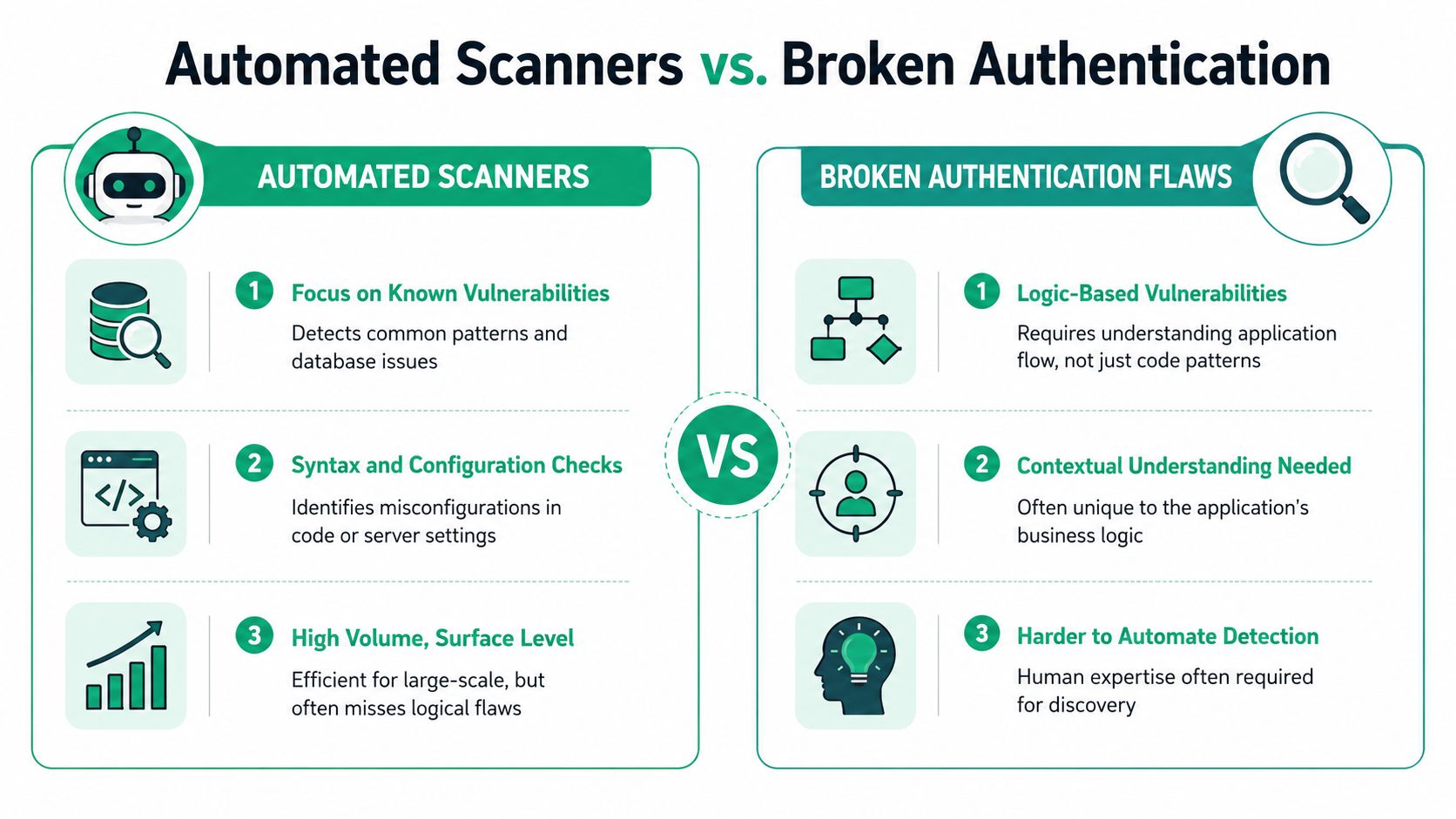
Tools check patterns
Automated tools are good at known signatures. They can spot missing headers, exposed software versions, simple configuration issues, and some common auth missteps.
What they usually can't do well is follow your app's logic like an attacker would. They don't notice that a low-privilege user can start a password reset, hold onto an old session, then switch into another account because logout behavior is sloppy.
Humans test the story
A real pentester asks ugly questions:
- What happens after logout
- Does the reset flow kill every active session
- Can a user move from one role to another without re-auth
- Does MFA apply everywhere or only on the happy path
- Can bots hammer login endpoints through the API even if the web form looks protected
According to this explanation of manual testing value, manual pentests uncover broken authentication issues that automated tools miss because attackers often chain small flaws like weak session timeouts, missing rate limits, and poor password reset logic into full account takeover.
The false comfort problem
A clean scan often gives leadership the wrong message. The team sees “no critical findings” and assumes auth is solid. Then a human tester logs in as one user, manipulates the flow slightly, and ends up inside an admin path.
That's why scanner-only security is cheap in the wrong way. You save money upfront and pay for it later in findings, audit pushback, or breach response.
Reality check: A scanner reports what it sees. A pentester checks what an attacker can do.
If your compliance plan relies on automated output alone, you're betting the business on shallow coverage.
Finding Flaws With a Manual Pen Test
A proper manual pen test looks at how your app behaves, not just how it's configured. That matters because broken authentication usually lives inside behavior. The tester has to act like a user, then act like a cheat.
The first thing a good pentester does is map the authentication surface. Not just the login form. Every path tied to identity. Signup, login, MFA prompts, password reset, account recovery, API tokens, role switching, remember-me features, session cookies, and logout behavior all go on the table.
What a tester actually does
A manual penetration test for auth usually includes things like:
- Trying to bypass login logic: Testing alternate endpoints, hidden flows, and edge cases that skip normal checks
- Abusing session state: Reusing cookies after logout, changing devices, or holding stale sessions open
- Probing role boundaries: Seeing whether one user can access another user's data or jump privileges
- Breaking recovery flows: Testing whether password reset can be replayed, guessed, or used without killing old access
This isn't glamorous work. It's disciplined, methodical checking. That's why it finds real flaws.
Why certifications matter
A lot of founders get sold cheap scans dressed up as security reviews. Auditors usually see right through that.
According to this guide on accepted tester qualifications, certified ethical hackers holding OSCP, CEH, or CREST credentials are required by frameworks like SOC 2 and PCI DSS to validate that authentication mechanisms withstand real-world attacks, since auditors reject reports from uncertified testers or purely automated scans.
That means the person doing the work matters almost as much as the work itself.
| Testing option | What you usually get |
|---|---|
| Automated scanner only | Fast output, weak context, limited auth coverage |
| Uncertified freelancer | Mixed quality, possible audit friction |
| Certified manual tester | Real attack logic, stronger findings, better audit acceptance |
If your team needs something audit-ready, review what a real web app assessment should include. Affordable Pentesting's security audit is a useful benchmark for what to expect from a proper manual engagement.
Speed matters too
Old-school firms love long timelines, giant PDFs, and vague severity ratings. Startups don't need that. You need clear findings, proof, remediation steps, and a report you can hand to engineering and compliance without translation.
For startups and seed-stage companies, this pricing breakdown notes that a focused web application pentest targeting authentication flows starts at $4,000–$8,000, covering one web app, one user role, and key API endpoints, with reports delivered in 5–7 days.
That's the sweet spot for SMBs. Fast enough for deadlines. Deep enough to matter. Cheap enough to justify before an audit turns ugly.
How To Fix Broken Authentication Securely
You do not need a giant security program to make auth a lot safer. You need discipline in a few places that matter.
Start with the basics that block the most common account takeover paths. Then tighten session handling. Then clean up the ugly edge cases your dev team keeps pushing to “later.”
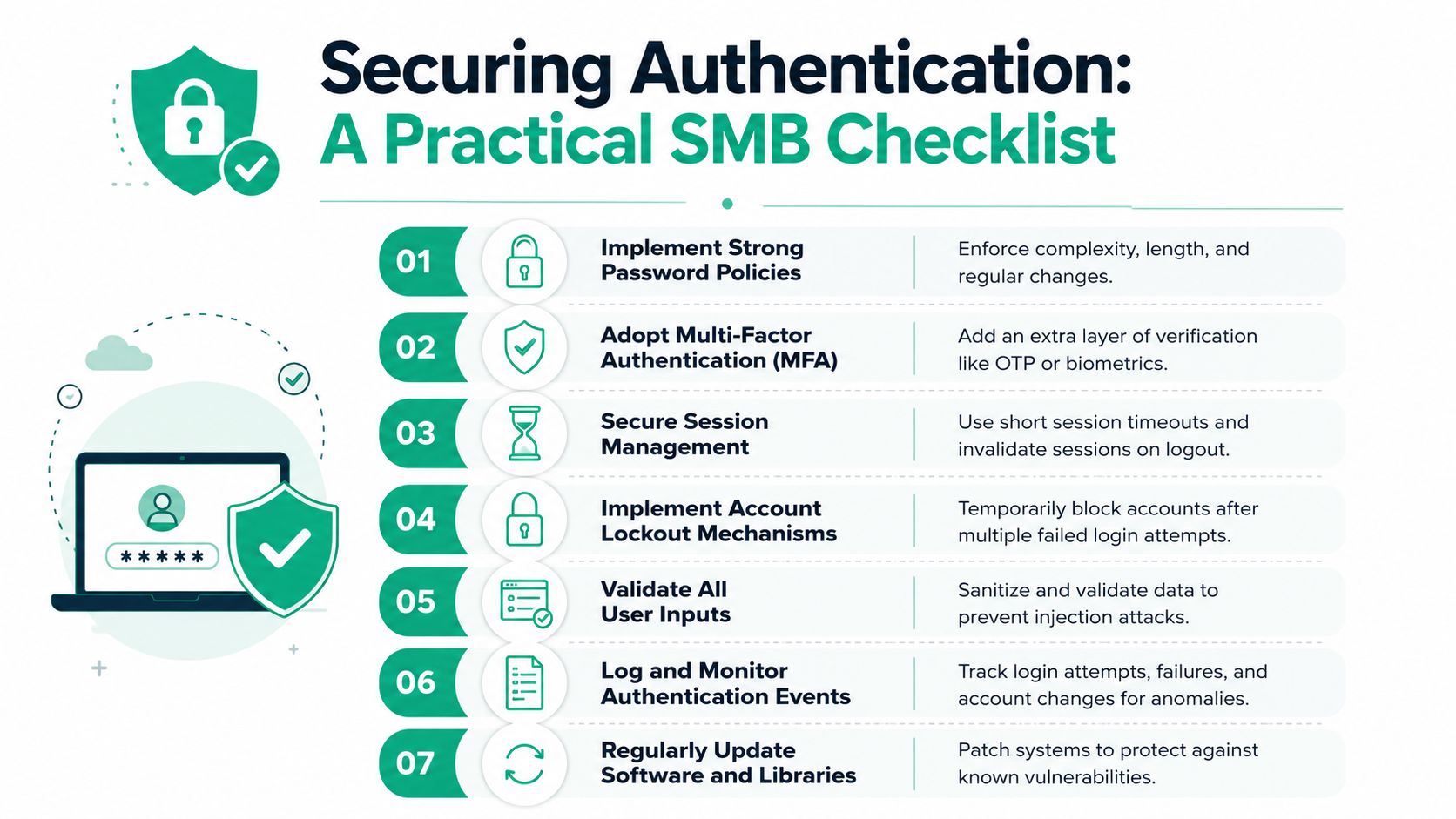
Fix the session layer first
The session is where many teams fail. They authenticate correctly once, then trust too much for too long.
According to OWASP-focused guidance summarized here, fixes must include using server-side session managers to generate high-entropy random IDs, storing them securely, and invalidating them immediately upon logout, with idle timeouts of 15–30 minutes and absolute timeouts of 8–12 hours.
That means:
- Kill sessions on logout: Not just in the browser. On the server.
- Expire idle sessions: Don't let abandoned accounts stay live all day.
- Set a hard maximum session life: Even active sessions should eventually require re-authentication.
Use a practical checklist
Here's the short version your team can act on now:
Turn on MFA where it counts most
Start with admin accounts, finance users, support staff, and any customer portal holding sensitive data.Add rate limiting to login and reset flows
If bots can try repeatedly without friction, you're inviting abuse.Tighten password reset
Make reset links short-lived, single-use, and tied to session invalidation.Stop exposing auth state carelessly
Don't leak whether an account exists through error messages or recovery responses.Review session storage and rotation
Keep tokens secure, rotate where appropriate, and don't leave old access hanging around.
Don't overcomplicate the fix
A lot of SMBs get bad advice here. They're told to buy a whole identity platform, hire specialists, and rebuild auth from scratch. Sometimes that's justified. Usually it isn't.
Organizations can often get real improvement by cleaning up login throttling, session invalidation, MFA enforcement, and reset logic. If you also need a broader look at access mistakes that expose data after login, this guide on how to secure client sites from data leaks is worth your time.
You should also look beyond the login page itself. Identity risk includes permissions, role changes, and token handling across the app. That's where comprehensive IAM testing becomes useful.
Good auth security is boring on purpose. Users log in, tokens expire, stale access dies, and weird flows don't work.
That's what you want. Predictable and hard to abuse.
Your Action Plan For SMBs And Startups
If you're a startup or small team, you probably don't have dedicated security staff watching authentication every day. That's normal. It's also why auth problems linger until an audit or customer questionnaire forces the issue.
According to OWASP API Security guidance, pragmatic solutions are needed because many SMBs lack dedicated security staff to enforce complex policies, leaving a gap that can be filled with affordable pentesting aligned with SOC 2 and PCI DSS requirements.
Here's the move:
- Fix the obvious gaps now: MFA coverage, rate limits, session invalidation, and password reset logic
- Book a manual pen test: Not just a scanner run. You need someone to test the auth flows like an attacker would
- Use the report to close the loop: Hand findings to engineering, then give the final report to compliance and customers
That's the practical path. Not six months of procurement. Not a bloated enterprise statement of work. Not a scan with zero useful findings.
You need a penetration test or pen testing engagement that is affordable, manual, and fast enough to help before your deadline hits. If a firm can't explain how they test broken authentication in plain English, can't show certified pentesters, or can't return a useful report within a week for a focused scope, keep looking.
If you need a fast, audit-friendly way to test broken authentication without paying big-firm prices, Affordable Pentesting is a practical place to start. Their team focuses on startups and SMBs, uses certified testers, and delivers reports you can hand to engineering and compliance without the usual delay. Use their contact form to get a same-day quote.