.svg)
You need a cloud penetration test because the audit clock is ticking, your stack keeps changing, and the firms you called want too much money and too much time. That frustration is valid. A lot of traditional pentesting shops still run like it's ten years ago.
They drag out scoping, hand you a giant questionnaire, disappear for weeks, and come back with a report full of low-value noise. Meanwhile, your AWS, Azure, or GCP environment is still exposed, your compliance deadline is getting closer, and your team is stuck waiting.
Your Cloud Pentest Should Not Be Slow or Costly
If you're trying to get ready for SOC 2, HIPAA, PCI DSS, or ISO 27001, you don't need theater. You need a real pen test that finds actual risk, produces an auditor-friendly report, and doesn't wreck your budget.
Cloud risk isn't something you can push to next quarter. 82% of data breaches in 2023 involved data stored in the cloud, according to AppSecure's cloud security statistics. That's the practical reason a cloud pentest matters. The business reason is just as blunt. The broader penetration testing market is projected to reach $3.9 billion by 2029 in the same source, but plenty of SMBs still get priced out.
What CTOs usually run into
Most buyers hit the same wall:
- Slow sales cycles: You ask for a quote and get a workshop.
- Bloated scope: They try to sell a giant engagement when you need a focused cloud penetration test.
- Weak findings: You pay a lot and get obvious scanner output.
- Late reporting: The report lands after your audit prep window is already blown.
That model doesn't fit startups, lean SaaS teams, or SMBs with real deadlines.
Practical rule: If a vendor can't explain the scope, timeline, and deliverable in plain English, don't trust them with your cloud.
A cloud pentest for an SMB should be simple. Define the accounts, apps, APIs, and cloud assets that matter. Test them manually. Show exploit paths clearly. Give the team fixes they can use right away.
If you're comparing options, start with a realistic view of low cost penetration testing. Cheap and useless is a waste. Expensive and slow is also a waste. What you want is focused, manual penetration testing that maps to compliance needs and moves fast enough to help.
What a sensible model looks like
A modern pen testing service should do four things well:
- Scope fast
- Test manually
- Report clearly
- Finish quickly
No mystery. No padded timeline. No enterprise-level process built for a company ten times your size.
Understanding Cloud Penetration Testing Basics
A traditional penetration test is like checking the doors and windows on a building that stays in one place. Cloud penetration testing is different. It's like checking a building where rooms appear and disappear, keys get handed out automatically, and new hallways connect to other buildings without anyone noticing.
That difference matters because cloud environments aren't just servers on the internet. They're made of identities, permissions, storage settings, APIs, serverless functions, automation, and third-party connections. A lot of the risk lives in configuration mistakes, not just missing patches.

Why cloud pentesting became necessary
Cloud penetration testing became critical after 2015 as enterprise cloud migration accelerated, and the Cloud Security Alliance has tracked cloud threats since 2010. The 2024 CSA threat reporting highlighted persistent problems like misconfigurations, which are involved in 23% of all cloud security incidents, as noted by Omdia's market analysis.
That lines up with what testers see every week. The biggest issues usually aren't movie-style hacks. They're bad IAM settings, exposed storage, broken access control, risky APIs, and cloud resources nobody meant to leave open.
What makes cloud different from old-school pen tests
Here's the plain-English version.
| Area | Traditional pentest | Cloud pentest |
|---|---|---|
| Main target | Servers and network exposure | Permissions, configs, APIs, storage, identities |
| Environment | Mostly static | Constantly changing |
| Big risk | Open services and old software | Misconfigurations and access mistakes |
| Attack path | Break in from outside | Abuse trust, roles, keys, and service connections |
In cloud environments, the question isn't only "Can an attacker get in?" It's also "What can they do once they get a token, role, or misplaced permission?"
Cloud security failures are often boring at the start and catastrophic at the end.
A public bucket seems small. An overpowered role seems convenient. A forgotten API key in code seems harmless. Then an attacker chains them together.
What a cloud penetration test actually checks
A proper cloud pen test usually looks at things like:
- IAM and role design: Who can access what, and who can do too much
- Storage exposure: Buckets, blobs, snapshots, and backups
- API security: Whether endpoints leak data or allow bad access
- Serverless and app logic: Functions, triggers, and trust relationships
- Cross-account trust: Whether one weak area opens a path into another
If your team wants a simpler overview of how a faster model works, this guide to fast pentesting for cloud security is useful.
A cloud penetration test isn't just a cloud version of the same old checklist. It's a different job. If your vendor treats it like a normal network test with a new label, they're missing the point.
Cloud Pentest Rules for AWS Azure and GCP
You can't just point tools at a cloud account and start attacking everything. AWS, Azure, and GCP all have rules because you're testing inside shared infrastructure. You're allowed to test your own environment, but you're still operating on someone else's platform.
Many internal teams understandably feel nervous. They are right to be. A sloppy penetration testing engagement can create support tickets, policy issues, and unnecessary risk if nobody defines the boundaries first.
The rule that matters most
Test your assets, not the provider's underlying platform.
That means your applications, your storage, your roles, your APIs, your compute instances, and your cloud configurations are in scope if authorized. The provider's core infrastructure is not. Denial of service activity is also the kind of thing you avoid unless the provider policy explicitly allows a narrow version of it, which usually isn't what compliance buyers need anyway.
AWS testing expectations
AWS generally allows customers to test approved parts of their own environment under its penetration testing policy. In practice, that means teams commonly test items like customer-owned compute, applications, APIs, and configuration layers while staying away from anything that would impact AWS infrastructure or other tenants.
For a sane AWS cloud pentest, the workflow usually looks like this:
- Define the AWS accounts and services in scope
- Confirm whether any planned activity needs policy review
- Avoid disruptive techniques
- Log all testing windows and contacts
- Coordinate with stakeholders before exploitation
The point isn't bureaucracy. The point is keeping your engagement controlled and defensible.
Azure testing expectations
Azure also permits authorized testing of customer-owned resources within Microsoft's rules of engagement. The practical issue with Azure isn't usually permission to test. It's complexity. Azure tenants often have messy role assignments, app registrations, legacy subscriptions, and identity sprawl.
For Azure, teams should be clear on:
- Which subscriptions are in scope
- Which user roles or service principals are provided
- Which applications tie back to Entra ID
- Which resources could trigger operational alarms
That prep saves time. It also prevents the classic problem where a pentester is asked to assess "Azure" when what the client really means is two subscriptions, one app gateway, one storage layer, and a handful of privileged roles.
If your scope says "test our cloud," your scope is bad.
GCP testing expectations
GCP is usually straightforward for authorized testing of your own projects as long as you stay inside acceptable use boundaries. The challenge in GCP is often visibility. Projects multiply fast, service accounts get reused, and inherited permissions can create ugly access paths that nobody intended.
Before a GCP penetration test starts, make sure you know:
| Question | Why it matters |
|---|---|
| Which projects are included | GCP environments often spread assets across many projects |
| Which service accounts exist | These accounts can become the shortest path to privilege abuse |
| Which APIs are exposed | Many cloud attacks start through API misuse |
| Who approves the test | Clear authorization protects everyone |
What clients should expect from the tester
A competent cloud pentesting team doesn't make you guess. They should help pin down scope, identify sensitive services, and handle the admin side cleanly. They should also explain what they won't do.
Good rules of engagement usually cover:
- Authorized targets
- Testing windows
- Allowed techniques
- Emergency contacts
- Data handling
- Reporting format
This isn't red tape. It's basic professionalism. Cloud providers expect it, compliance teams need it, and your ops staff will thank you for it.
The simple takeaway
AWS, Azure, and GCP all let you test your own stuff within defined boundaries. The hard part isn't whether cloud penetration testing is allowed. The hard part is doing it cleanly, with proper authorization, and with a scope that matches your real risk.
That's exactly why experienced testers matter. They know how to test hard without testing stupid.
Our Step-By-Step Cloud Pentesting Process
You hire a pentest firm. Two weeks disappear into kickoff calls, scoping gets bloated, the testers dump scanner output into a PDF, and your compliance deadline is still staring you in the face. That process is broken.
A cloud pentest should move fast, stay focused, and give your team something useful within days, not after a long consulting exercise.
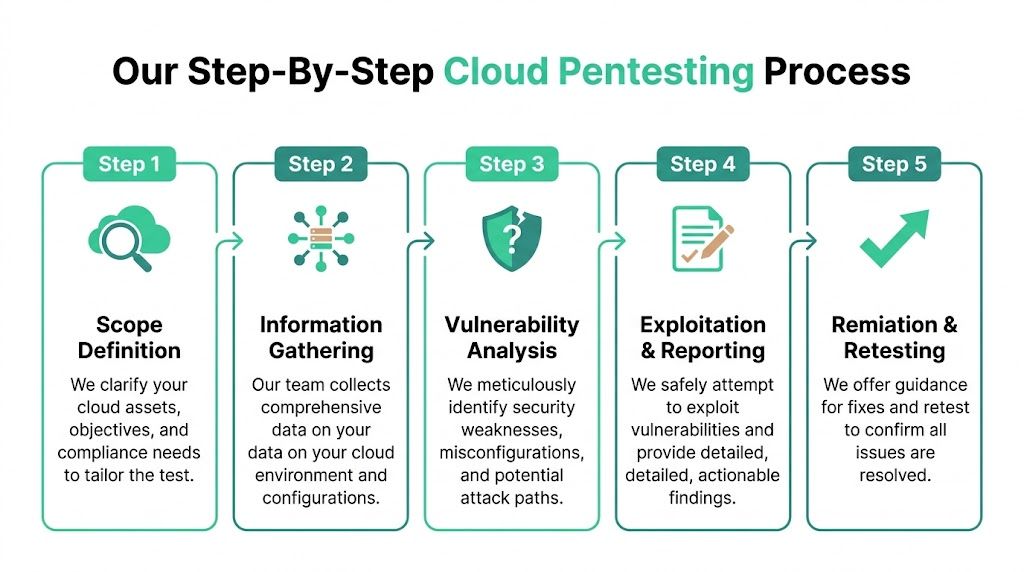
Step one is scope
Start with the assets that can hurt you or fail an audit. That usually includes cloud accounts, production apps, internet-facing APIs, storage, IAM roles, serverless functions, and any systems tied to compliance.
Bad scoping wastes money. Enterprise firms often drag SMBs into oversized engagements because that is how they bill. A good cloud pentest cuts straight to the attack paths that matter.
The scope should answer a few direct questions:
- Which cloud platforms are included
- Which applications and APIs are in scope
- Which environments can be tested
- Which compliance requirement drives the engagement
- Which systems are excluded
Step two is authorization
Get approvals locked down before testing starts. Written authorization, rules of engagement, emergency contacts, and provider-specific boundaries should be settled early so your security team is not chasing signatures mid-engagement.
This step also prevents internal confusion. Your ops lead knows what is happening. Your compliance contact knows what evidence is coming. Your pentesters know where they can push hard without creating noise you did not approve.
Step three is manual testing
Value shows up here.
Automated scans have a place, but they do not tell you how an attacker moves from a weak IAM permission to exposed secrets, from a misconfigured function to lateral access, or from a tenant-isolation bug to real data exposure. Manual testing does.
A good tester follows chains, not just findings. They check privilege paths, exposed metadata, token handling, storage access, CI/CD secrets, API abuse, and role assumption paths across services. If your team builds detection workflows in-house, the logic behind a Python Intrusion Detection System can complement that work, but it does not replace an adversarial pentest.
Field note: The gap between a scan and a real pentest is human judgment.
Certifications also matter here. OSCP, CEH, and CREST are not a substitute for skill, but they are a useful filter. You want testers who can verify exploit paths, explain impact, and avoid wasting your team's time with noisy false positives.
Step four is reporting
The report has to work for engineers, leadership, and auditors at the same time. If it only lists findings without proof, your engineers cannot fix with confidence. If it is too technical, leadership and compliance teams cannot use it.
A report worth paying for includes:
- Clear scope and test dates
- Executive summary in plain English
- Technical findings with evidence
- Prioritized remediation steps
- Retest notes if fixes are validated
Speed matters here too. If a firm needs weeks to deliver a cloud pentest report, they are slowing down your remediation cycle and your audit prep for no good reason.
Step five is remediation support
A lot of vendors disappear after sending the PDF. That is not helpful.
You need a team that will walk through the findings, tell you what to fix first, answer engineering questions, and confirm whether your remediation closed the issue. For SMBs, this matters even more because lean teams do not have time to interpret vague security advice.
| Process step | What you get |
|---|---|
| Scoping | A focused target list tied to business risk and compliance needs |
| Authorization | Clear approval and testing boundaries |
| Manual testing | Real attack-path validation by human testers |
| Reporting | Evidence-based findings your engineers and auditors can use |
| Remediation support | Help prioritizing fixes and confirming closure |
The right process is simple. Tight scope, fast execution, clear reporting, and practical follow-up. That is how SMBs get compliance-ready cloud pentesting without paying enterprise consulting prices.
Common Cloud Flaws and Real Attack Examples
Cloud penetration testing gets valuable when the findings feel real. Not abstract. Not theoretical. Real enough that your CTO, auditor, and engineering lead all understand the problem without a translator.
The most common cloud flaws usually aren't exotic. They're permissions mistakes, exposed assets, weak access controls, and small coding shortcuts that turn into major exposure.

Over-permissive IAM roles
This is the classic cloud mistake. A user, app, or service gets more access than it needs because it was easier during setup and nobody tightened it later.
That's not a small issue. IAM misconfigurations are responsible for 80% of cloud breaches, and attackers can escalate privileges successfully in 65% of multi-cloud setups because controls are inconsistent, according to GuidePoint Security's cloud penetration testing overview.
Here's how it usually plays out. A tester gets access to a low-level application role. That role can read one bucket. Inside the bucket is a config file with credentials or tokens. Those credentials allow access to another service. That service can assume a stronger role. A small foothold turns into broad control.
The attacker doesn't need admin on day one. They just need one badly scoped permission and patience.
Business impact is obvious. Sensitive data exposure, environment takeover, and failed compliance reviews.
Public storage exposure
Think of a public bucket like a filing cabinet left on the sidewalk with no lock. It might contain logs, backups, customer documents, screenshots, exports, or internal app data. Teams often create these buckets for convenience, testing, or sharing. Then they forget them.
A manual penetration test catches the context around the exposure. Is the bucket public, or just predictable? Does directory listing reveal names? Do files contain keys, internal URLs, or user data? Can the exposed files be used to move deeper into the environment?
Cloud pentesting surpasses checkbox auditing. The core issue isn't merely "public storage exists"; it's what an attacker can do next.
Exposed API keys and secrets
This one is painful because it's so preventable. Developers move fast, someone hardcodes a secret, and it ends up in source control, a build artifact, a mobile app, a function variable, or a public repo.
That's basically taping your office key to the front door.
Once a tester finds a live API key, they check what it grants. Maybe it's harmless. Maybe it provides access to data, billing, messaging, storage, or admin functions. The difference matters, and only a real pen test tells you where that path leads.
If your team is building extra monitoring around this area, a practical companion read is this Python Intrusion Detection System guide, which helps explain how detection logic can support response after bad access starts.
Serverless function abuse
Serverless code feels small, so teams often underestimate it. That's a mistake. A function can still hold secrets, trigger workflows, access storage, or call privileged services.
A tester might find a function that trusts user input too much. Or one that leaks stack traces and environment details. Or one that can be triggered in ways the developer didn't expect. If that function runs with broad permissions, the attacker now has a launch point.
Common serverless attack chains look like this:
- Weak trigger validation: The function accepts input it shouldn't
- Excessive role permissions: The function can access far more than needed
- Sensitive environment data: Tokens or keys are exposed in runtime settings
- Privilege pivot: The attacker uses the function to reach storage, queues, or internal services
Broken access control in cloud apps
This often shows up in SaaS products hosted in the cloud. One user can access another user's record by changing an identifier, or one tenant can query data meant for another tenant because the API trusts the request too much.
This isn't always a cloud platform problem. It's often an application logic problem living in a cloud environment. But the outcome is still severe because the cloud makes the app reachable, scalable, and connected to valuable data stores.
| Flaw | Simple version | Likely impact |
|---|---|---|
| IAM misconfig | Giving out master keys | Privilege escalation |
| Public storage | Unlocked filing cabinet | Data exposure |
| Exposed secrets | Key taped to the door | Unauthorized service access |
| Serverless abuse | Trusted helper doing the wrong job | Lateral movement |
| Broken access control | Users seeing each other's records | Tenant data leakage |
These are exactly the issues cheap scanner-only work tends to miss or under-explain. A good cloud penetration test doesn't just find the crack. It shows how someone gets through it.
How to Prepare for a Cloud Pen Test
Preparation doesn't need to be complicated. It just needs to be organized. When clients come prepared, the engagement starts faster, runs cleaner, and produces a better report.
If you want a general pre-engagement reference, this Cloud Service Security Checklist is a useful sanity check before testing starts.
Get the scope straight
Decide what needs testing. That might be one AWS account, a production Azure app, a GCP project, a customer-facing API, or a mix of those.
Write down:
- Which cloud assets are in scope
- Which environments are included
- Which compliance goal matters
- Which systems are off-limits
If you hand a tester a vague sentence, you'll get a vague result back.
Gather access and contacts
Most cloud penetration testing engagements move faster when the client has read-only visibility ready where appropriate, plus a clear point of contact on the engineering or security side.
Have these ready before kickoff:
- A primary technical contact
- An approver for scope and testing windows
- Relevant cloud account or tenant details
- Any required test credentials
- Escalation contacts if something unexpected happens
Good prep saves more time than any kickoff meeting ever will.
Collect the useful documents
Nobody needs a giant binder. But a few basic artifacts help a lot.
| Item | Why it helps |
|---|---|
| Architecture diagram | Shows trust relationships and likely attack paths |
| Asset list | Keeps the test focused |
| Known constraints | Prevents accidental disruption |
| Compliance requirements | Aligns report language to the audit need |
If you need a more detailed walkthrough, this guide on how to prepare for a penetration test covers the basics in plain English.
Tell the truth about your environment
Don't hide the messy parts. Old accounts, abandoned resources, rushed integrations, temporary permissions, and half-migrated apps are exactly where good findings come from.
A pen test is not a performance review for your team. It's a fast way to find the stuff attackers would find anyway.
Get Fast Affordable Cloud Pentests for Compliance
A lot of companies don't need a giant consulting project. They need a cloud penetration test that helps them pass an audit, fix real issues, and move on with business. That's especially true for startups and SMBs.
The market gap is obvious. 65% of organizations faced cloud incidents last year, while 70% of SMBs cite cost as a major barrier to getting a penetration test, according to DeepStrike's overview of cloud pentesting tools and market gaps. That's exactly why so many smaller teams stay stuck between bad options. Too expensive, too slow, or too shallow.

What compliance buyers should demand
If you're buying cloud pentesting for SOC 2, HIPAA, PCI DSS, or ISO 27001, stop rewarding bloated process.
Demand these basics:
- Manual testing: Not just a scan with a nicer logo
- Certified testers: OSCP, CEH, and CREST matter as credibility signals
- Fast delivery: If the report takes forever, it doesn't help the audit
- Actionable findings: Engineers need fixes, not theater
- Clear scope: The report should match the systems your auditor cares about
A proper penetration test should help three groups at once. Security gets real risk visibility. Engineering gets practical remediation. Compliance gets clean documentation.
Why the old model fails SMBs
Traditional firms often build around large enterprise sales cycles. That's fine for massive companies with long procurement windows and dedicated security teams. It's bad for startups, lean SaaS providers, healthcare groups, fintech teams, and other SMBs that need to move.
Those teams usually want something simpler:
- A straightforward quote
- A short lead time
- Testing focused on cloud assets and APIs
- An auditor-ready report within a week
- A chance to ask follow-up questions after delivery
That's a reasonable ask. It shouldn't be rare.
The direct recommendation
If you're running cloud workloads and have a compliance deadline, stop overcomplicating this. Get a focused pen test from certified testers who know AWS, Azure, GCP, APIs, IAM, and cloud app logic. Make sure they can explain findings in plain English and get the report back fast.
Cloud penetration testing isn't optional once customer data, regulated data, or production applications are in play. The only real question is whether you want to deal with the problem now, on your terms, or later, on an attacker's terms.
If you need a fast, affordable, compliance-ready cloud pen test, contact Affordable Pentesting through the form on the site. You'll get a straightforward path to manual penetration testing, clear reporting, and a timeline that fits real audit pressure.