.svg)
Your app is down. Customers are emailing. Slack is full of guesswork. One person thinks AWS is the issue, another thinks it's a bad deploy, and nobody knows who's allowed to post the status update.
That's what a bad continuity setup looks like.
A real continuity plan example isn't a giant binder nobody opens. It's a short, usable playbook that tells your team what matters most, who makes the call, how fast systems need to come back, and what to do when a cloud app, vendor, or ransomware event knocks you sideways. If you run a SaaS product or web app, you need that playbook before the outage, not during it.
Why Your Business Needs a Real Continuity Plan
Most founders wait too long. They assume backups exist, the cloud provider will sort it out, or the team can improvise. That works right up until it doesn't.
The ugly truth is that plenty of companies still have gaps. About 61% of businesses globally report having a business continuity plan, but in the United States, just under 20% say their plan is incomplete and 14% say they have no plan at all, according to business continuity planning statistics compiled by Invenio IT. That means a lot of teams are still one outage away from chaos.
What actually goes wrong
When there's no real plan, teams usually fail in boring ways first.
- Nobody owns the decision: Engineering waits on leadership, leadership waits on IT, and hours disappear.
- Customer messaging stalls: Support can't say anything because legal, sales, and ops never agreed on a process.
- Recovery priorities are backwards: Teams restore a nice-to-have internal tool before the production database or login flow.
- Vendor dependencies get missed: Your app may be “up,” but your identity provider, payment processor, or ticketing tool is still broken.
A continuity plan should remove debate during an incident. If people are arguing about ownership, the plan is already failing.
Auditors do not want theater
Auditors don't care that you have a polished PDF with a logo on the cover. They want evidence that you've identified critical operations, assigned responsibility, and tested the plan in a way that matches how your company runs.
That matters for insurance too. If you're reviewing financial exposure alongside operational recovery, a practical overview of business interruption insurance for NJ companies can help you think through what a disruption costs when systems or facilities go offline.
Prevention matters as much as recovery. A continuity plan helps you survive an incident, but reducing breach risk up front still matters. That's why many teams pair continuity work with pentesting for data breach avoidance, especially when web applications and cloud workloads drive most of the business.
The plan should be small and brutal
Keep it lean. If your continuity plan example can't be used by a tired engineer and a stressed operations lead at 2 a.m., it's too complicated.
The right document does four things well:
| What the plan must answer | Why it matters |
|---|---|
| What must come back first | So the team restores business-critical services in the right order |
| How long downtime is acceptable | So recovery decisions have a hard target |
| Who can declare and lead the response | So people stop waiting for permission |
| How employees, customers, and vendors get updates | So communication doesn't become its own incident |
Building the Core of Your Continuity Plan
Most continuity plans fail because they start with a template instead of a decision. Start with business impact, then build everything else around it.
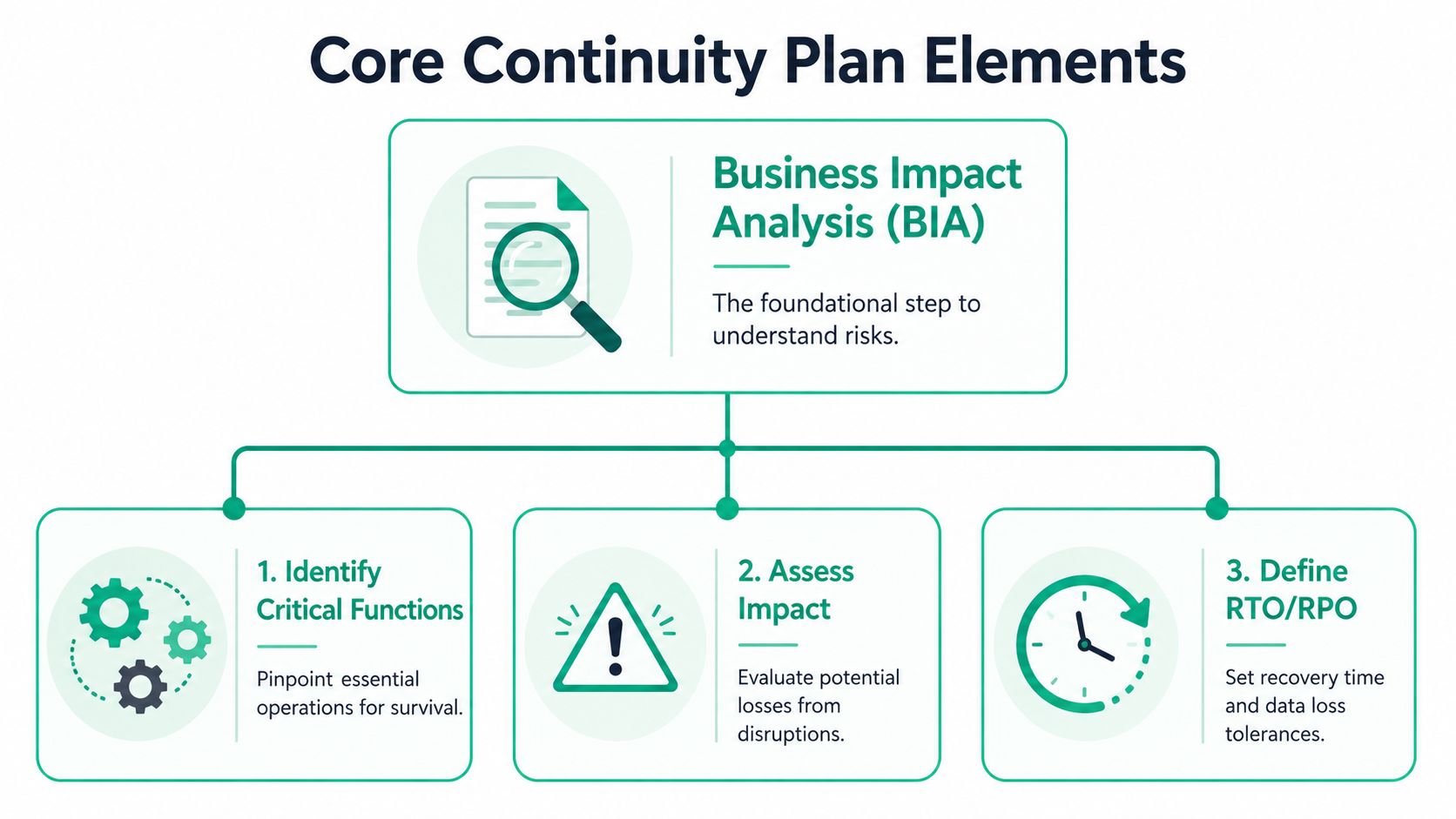
The backbone is a Business Impact Analysis, usually shortened to BIA. That's just a structured way to answer a simple question. If this process or system breaks, how bad is it, and how fast do we need it back?
Start with the BIA
Don't overcomplicate it. List your business functions and systems, then rank them by operational pain.
For a SaaS company, that usually means things like:
- Production application: If customers can't use the app, revenue and trust take the hit fast.
- Authentication: If users can't log in, the rest of the stack doesn't matter.
- Database and backups: If data is missing or corrupted, recovery gets ugly.
- Support workflow: If support can't see tickets or communicate status, customer frustration spikes.
- Billing and payment processing: If this breaks, finance and customer operations both feel it.
Define RTO and RPO clearly
A sound continuity plan defines an RTO, which is the maximum tolerable downtime, and an RPO, which is the acceptable data loss. Guidance from Arcserve's continuity planning steps also recommends using a BIA to prioritize systems and following the 3-2-1-1 backup rule, meaning three copies of data, on two media types, with one offsite and one immutable.
Put plainly:
- RTO asks: How long can this be down before the business really hurts?
- RPO asks: How much data can we afford to lose and still recover sanely?
Practical rule: If you guessed your RTO and RPO without talking to the people who own revenue, support, product, and compliance, you don't have targets. You have wishful thinking.
Assign owners, not departments
“IT handles it” is not a plan. You need names.
A useful continuity plan example assigns at least these roles:
| Role | What they own during disruption |
|---|---|
| Incident leader | Declares the event, sets priority, approves major actions |
| Technical lead | Coordinates engineering recovery tasks and status |
| Communications lead | Sends internal and external updates |
| Vendor coordinator | Contacts cloud, SaaS, and other third parties |
| Compliance or legal contact | Reviews notification and reporting obligations |
Build your communications path
Outages get worse when your main tools are unavailable. If Slack, email, or your identity provider is down, your team still needs a fallback.
Use a simple communication structure:
- Primary channel: Your normal internal comms tool.
- Backup channel: A second platform that doesn't rely on the same provider.
- Customer status path: Status page, support notice, or approved email update.
- Executive escalation path: A direct way to reach decision-makers fast.
Backup strategy should match reality
Don't just say “we back up data.” Document where backups live, who can restore them, and whether the backup design protects you from ransomware and provider failure.
A lot of startup plans break here. They assume snapshots alone are enough. They often aren't. Your continuity plan should state the actual restore process and the person accountable for proving it works.
Your Editable Business Continuity Plan Example
Most continuity templates are too generic to help a SaaS team under pressure. They list sections like “communications” and “recovery” but skip the details that matter, especially vendor dependencies and decision rights. As noted by Invenio IT's real-life continuity examples, many continuity plan examples fail to show how to set concrete recovery targets or handle cloud-dependent workflows, even though those details matter for SOC 2 and HIPAA resilience evidence.
Copy this continuity plan example into your doc system and edit it. Keep it short. If a section can't be acted on quickly, rewrite it.
Business Continuity Plan for [Company Name]
Use real names, real tools, and real systems. Delete anything your team won't actually use.
1. Purpose and Scope
This plan supports continued operation and recovery of critical business functions during a disruptive event affecting people, technology, vendors, facilities, or communications.
Covered areas include production systems, customer support, internal operations, and key third-party services.
This tells auditors what the plan applies to and keeps the document from turning into a vague “everything” plan.
2. Plan Owner and Approval
Executive sponsor: [Name, title]
Plan owner: [Name, title]
Last approved date: [Date]
Next review date: [Date]
Auditors want ownership. If nobody owns the plan, nobody updates it.
3. Activation Criteria
Activate this plan when one or more of the following occurs:
- Customer-facing production outage
- Major cloud or SaaS vendor outage affecting core operations
- Ransomware or destructive malware event
- Loss of access to critical data or systems
- Office, network, or workforce disruption that prevents normal operations
This prevents endless debate about whether the event is “serious enough.”
4. Incident Leadership and Decision Rights
Incident leader: [Name]
Backup incident leader: [Name]
Technical recovery lead: [Name]
Communications lead: [Name]
Compliance or legal lead: [Name]
Vendor management lead: [Name]
Approval required for customer notice: [Name or role]
Approval required for failover or major service shutdown: [Name or role]
Decision rights matter more than pretty formatting.
Use a simple critical systems table
This is the part often skipped or made too fuzzy.
5. Critical Functions and Recovery Targets
| Business Function | Supporting System or Vendor | Owner | RTO | RPO | Manual Workaround | Dependency Notes |
|---|---|---|---|---|---|---|
| Customer login | [Identity provider] | [Name] | [Time] | [Time] | [Yes/No] | [SSO, MFA, admin access] |
| Core application | [Cloud platform or hosting] | [Name] | [Time] | [Time] | [Yes/No] | [Load balancer, app nodes, secrets] |
| Primary database | [Database platform] | [Name] | [Time] | [Time] | [Yes/No] | [Replication, backup location] |
| Billing | [Payment vendor] | [Name] | [Time] | [Time] | [Yes/No] | [Subscription sync, invoice flow] |
| Customer support | [Help desk platform] | [Name] | [Time] | [Time] | [Yes/No] | [Email routing, access controls] |
If the owner field is blank, fix that before anything else.
Document dependencies honestly
Most startup outages aren't isolated. One provider goes down and five workflows stop.
6. Dependency Map
Critical vendors and services:
- Cloud hosting provider
- Identity provider
- Source code repository
- CI or deployment pipeline
- DNS provider
- Payment processor
- Email delivery platform
- Help desk or ticketing platform
For each dependency, document:
- What breaks if it fails
- Who owns the relationship
- Whether a fallback exists
- How the team verifies service restoration
This is where cloud-native companies either get serious or get surprised.
7. Backup and Data Recovery
Backup systems covered: [List systems]
Backup locations: [List locations]
Immutable backup method: [Describe briefly]
Restore owner: [Name]
Restore verification process: [Describe]
Last restore test date: [Date]
Backups only count if someone can restore them under pressure.
8. Communications Checklist
Internal notification channel: [Primary method]
Backup team notification channel: [Secondary method]
Customer status page owner: [Name]
Customer support lead: [Name]
Vendor escalation contacts stored in: [Location]During an incident, communications lead must:
- Confirm audience list
- Use approved message templates
- Log outgoing updates
- Record time of each stakeholder notification
This creates evidence and avoids mixed messages.
Include scenario runbooks
Generic plans say “respond to incident.” That's useless. Add short runbooks for the events you're most likely to face.
9. Scenario Runbook for Major Cloud Outage
Trigger: Core hosting provider outage or regional service failure
Immediate actions:
- Confirm provider status and affected services
- Freeze non-essential changes
- Determine customer impact
- Activate customer communications
- Evaluate failover or degraded-service options
- Record timeline and decisions
This keeps the first thirty minutes from turning into guesswork.
10. Scenario Runbook for Ransomware Event
Trigger: Confirmed encryption, extortion note, or destructive malware behavior
Immediate actions:
- Isolate affected systems
- Preserve logs and evidence
- Disable compromised accounts if needed
- Validate backup integrity before restore
- Notify leadership and compliance contacts
- Begin recovery based on system priority list
This creates a bridge between incident response and business continuity.
11. Manual Operations Fallbacks
If core systems are unavailable, use the following temporary workarounds:
- Support requests routed to [alternate inbox or process]
- Customer notices posted via [status path]
- Revenue-impacting requests escalated to [team or role]
- Critical approvals handled through [offline method]
Auditors like seeing that the business can still function in a degraded state.
12. Test and Maintenance Log
Last tabletop exercise: [Date]
Last operational recovery test: [Date]
Findings from last test: [Summary]
Corrective actions: [List]
Next scheduled review: [Date]
This section often matters as much as the plan itself because it proves the plan is alive.
Keep the final document easy to update. A shared doc plus a controlled contact sheet is usually better than a fancy system nobody maintains.
Testing Your Plan Before Disaster Strikes
A continuity plan that hasn't been tested is paperwork. That's it.
Good teams don't test to prove they're smart. They test to catch the dumb gaps before a real outage exposes them. Guidance from Preparis on identifying continuity gaps through testing says plans should be tested at least annually, or twice a year for organizations with high turnover, because stale contact data and untested recovery assumptions are common failure points.
Run a tabletop, not a fire drill circus
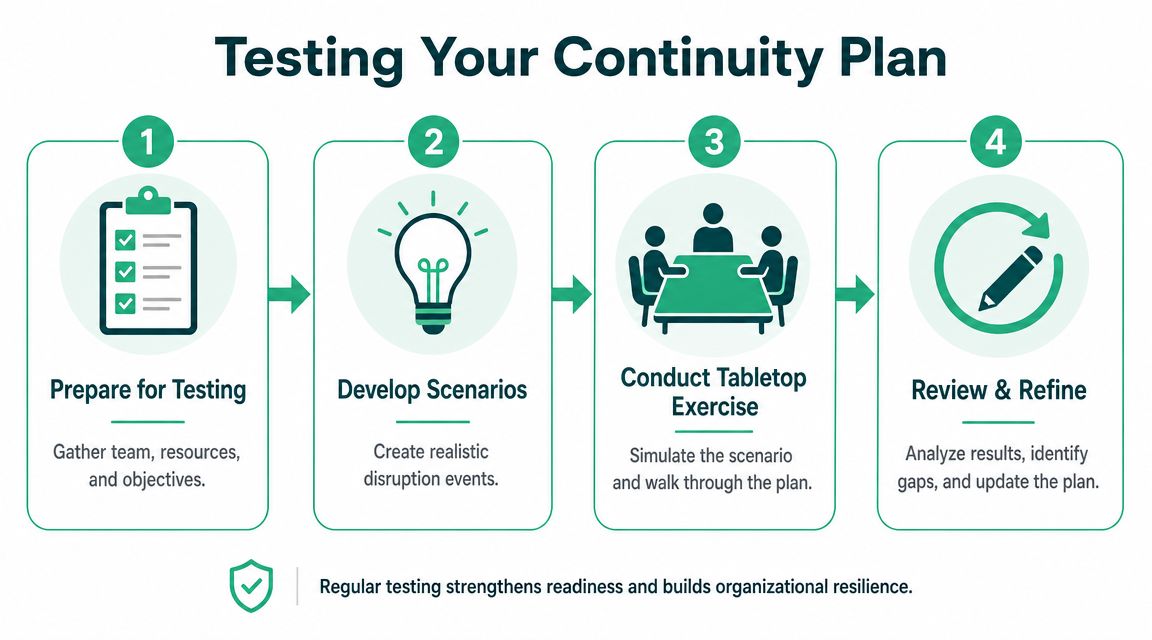
A tabletop exercise is simple. Get the right people in a room, pick a realistic incident, and walk through what each person would do.
Use a scenario like this:
Your main cloud provider is having a major outage. Customers can't log in. Status updates from the provider are inconsistent. Support volume is rising, and your payment workflow also appears affected.
Then ask your team:
- Who declares the incident
- Who approves customer messaging
- What systems get checked first
- What work can continue manually
- What vendor contacts get used
- What happens if the outage lasts longer than expected
Keep the exercise grounded
Don't let people answer with vague promises like “we'd escalate” or “engineering would handle it.” Ask for names, tools, and actions.
A useful tabletop usually follows this sequence:
- Set the scenario: Keep it realistic. Cloud outage, ransomware, or network failure are all valid.
- Walk the timeline: Start with first detection, then move through the first hour, next few hours, and recovery.
- Force decisions: Ask who has authority to fail over, pause releases, or notify customers.
- Record gaps: Missing contacts, unclear owners, and broken assumptions are the gold.
The point of a test is to find where the plan is weak. If everyone leaves saying it went perfectly, the exercise probably wasn't honest enough.
If your team is still building broader readiness, this guide for preparing for cyber threats is a useful companion because continuity and incident response overlap in real life.
What auditors will ask for
They usually don't want a dramatic exercise report. They want evidence that you tested, found issues, and fixed them.
Use a short test record like this:
| Test item | What to document |
|---|---|
| Scenario used | Cloud outage, ransomware, network failure, or other disruption |
| Participants | Names and roles |
| Key decisions | Who declared the incident and what was approved |
| Gaps found | Missing contacts, unclear steps, vendor blind spots |
| Actions assigned | Owner and due date for each fix |
That last column matters. If issues are found and never assigned, the test was theater.
Meeting SOC 2 HIPAA and ISO Compliance
If you're doing SOC 2, HIPAA, or ISO 27001 work, your continuity plan is evidence. Not marketing evidence. Audit evidence.
The shape of that evidence is pretty consistent. American Public University's continuity planning guidance lays out the core milestones as defining scope, identifying critical processes, performing a BIA, assigning roles, documenting strategies, and testing. That lines up closely with what auditors expect because continuity has moved beyond narrow disaster recovery into a broader operational resilience discipline.
What auditors usually want to see
They want the plan to tie directly to business operations, not just IT recovery.
That means your records should show:
- Scope: What systems, teams, and processes the plan covers
- Critical process identification: Which services matter most
- BIA output: Why some systems are prioritized over others
- Recovery strategies: What the team will do
- Roles and testing evidence: Who responds and proof the plan has been exercised
Continuity plan to compliance mapping
Use a simple table like this during audits.
| BCP Component | SOC 2 Trust Service Criteria | HIPAA Security Rule | ISO 27001 Annex A Control |
|---|---|---|---|
| Scope and objectives | Supports control design and governance evidence | Supports contingency planning scope | Supports documented information and planning controls |
| Critical process inventory | Supports risk-focused operational coverage | Supports identification of essential ePHI-related operations | Supports business continuity and availability planning |
| BIA and recovery priorities | Supports risk assessment and response evidence | Supports data backup and disaster recovery planning decisions | Supports impact-based continuity planning |
| RTO and RPO definitions | Supports availability and recovery expectations | Supports restoration priorities for critical systems and data | Supports recovery objectives and resilience design |
| Roles and communication paths | Supports incident handling accountability | Supports workforce responsibility during contingency events | Supports assigned responsibilities and communication procedures |
| Testing records and updates | Supports monitoring and control effectiveness | Supports plan review and revision evidence | Supports continual improvement and exercise evidence |
Don't hand auditors a dead document
A lot of startups lose time in audits because the continuity plan exists, but nothing around it proves it's being used. The document has old names, old vendors, and no testing log.
That's why your evidence set should include more than the plan itself:
- Current approval record: Show who owns it and when it was reviewed
- Recent exercise notes: Even a basic tabletop summary helps
- Corrective action log: Show that gaps led to changes
- Dependency record: Especially important for cloud and SaaS vendors
For teams dealing with assurance work, secure SOC 2 compliance pentesting often sits next to continuity evidence because auditors and customers want both recovery planning and security validation.
Auditors rarely get impressed by length. They get impressed by consistency. If your continuity plan, incident records, and test notes all tell the same story, you're in good shape.
From Planning to Proactive Security Testing
A continuity plan helps you recover after something breaks. It does nothing to prove your defenses will stop a preventable outage in the first place.
That's where a pentest, pen test, or penetration test fits. If your web app, API, cloud environment, or external attack surface has weaknesses, an attacker can turn those into the exact downtime your continuity plan is built to handle. Recovery matters. Prevention is cheaper.
For startup teams, speed and cost matter more than slide decks. You need penetration testing that finds real issues, maps clearly to compliance needs, and gets the report back fast enough to act on it. You also want actual humans doing the work, not a low-value scan repackaged as “manual testing.”
The right penetration testing partner should be able to explain findings in plain English, move quickly, and show relevant certifications like OSCP, CEH, and CREST. If you're a SaaS company chasing SOC 2, HIPAA, PCI DSS, or ISO 27001, that mix matters. It helps you validate the controls your continuity plan assumes are already solid.
If you need a fast, affordable Affordable Pentesting engagement, start with their contact form. Their team focuses on manual pentests, penetration tests, and pen testing for startups and SMBs, with reports delivered within a week and work performed by certified pentesters including OSCP, CEH, and CREST professionals.