.svg)
You’re probably dealing with one of two bad options right now. Either security happens late, costs too much, and holds up releases. Or your team ships fast and hopes nothing ugly shows up in prod, in an audit, or in a customer security review.
That tradeoff is old and unnecessary. DevOps security testing works when you stop treating security like a yearly event and start treating it like part of software delivery. The catch is cost. The DevSecOps market was valued at $3.73 billion in 2021 and is projected to reach $41.66 billion by 2030, with a 30.76% CAGR, while 68% of SMBs cite high tool costs as their top adoption blocker according to HackerOne’s DevOps security challenges overview.
Startups and SMBs don’t need a bloated enterprise stack to do this well. They need a sane pipeline, a few solid automated checks, and a real human pentest, pen test, or penetration test at the right time. That gets you faster releases, cleaner audits, and fewer expensive surprises.
Building Security Testing Into Your DevOps
Security gets expensive when you bolt it on at the end. A founder signs a contract, a customer asks for proof, the compliance deadline shows up, and suddenly a traditional firm wants a big budget and a slow timeline just to tell you about issues a basic scanner could’ve flagged weeks ago.
That’s the wrong model. DevOps security testing should sit inside your daily workflow, not outside it. If code moves through pull requests, builds, staging, and deployment, security checks should move through the same path.
Why the old model fails
Traditional audits are slow because they happen too late. By then, the code is already merged, the dependencies are already shipped, and the cloud setup is already live. Fixing issues at that point creates friction between engineering, security, and whoever owns compliance.
A better approach is integrating security into development early enough that developers can fix issues while the work is still fresh. That’s the practical value of DevSecOps for smaller teams. You avoid the giant cleanup project right before launch or audit season.
Practical rule: If security only starts after staging is “done,” you’re already paying too much for it.
What a lean setup looks like
You do not need to buy every category of tool on day one. Most SMBs should start with a simple stack and a clear process:
- Scan code early: Run static checks before bad patterns spread through the repo.
- Check dependencies automatically: Open source risk is real, and it’s easy to miss without automation.
- Test running apps in staging: That catches what source-only tools never see.
- Review cloud and config changes: Misconfigurations cause avoidable pain.
- Use manual pentesting strategically: Save human expertise for the flaws automation misses.
This is also a compliance move, not just a security move. If you’re aiming for SOC 2, PCI DSS, HIPAA, or ISO 27001, auditors want evidence that security controls are repeatable. A DevOps pipeline with built-in checks gives you that evidence without turning every release into a fire drill.
What founders should demand
Ask simple questions. Does the process slow shipping? Does it create proof for audits? Does it catch obvious mistakes before a customer or attacker does? If the answer is no, strip it down and rebuild it.
You want a workflow that’s affordable, boring, and reliable. That’s what good devops security testing looks like.
Choosing Your Automated Security Testing Tools
Teams often get stuck here because vendors make everything sound mandatory. It isn’t. You need coverage, not clutter.
Think in layers. One tool reads code. One checks the parts you installed from somewhere else. One attacks the running app like a low-effort hacker would. Another can combine runtime context with code context if you’ve got the budget and need.
The four tool categories that matter
| Tool Type | What It Is | What It Finds | Best For |
|---|---|---|---|
| SAST | Static analysis of source code before the app runs | Coding flaws, insecure patterns, risky functions | Pull requests, build stage |
| DAST | Dynamic testing against a running app | Runtime issues, exposed endpoints, weak auth flows, input handling problems | Staging environments |
| SCA | Software composition analysis for dependencies | Known issues in open-source packages and libraries | Every build and dependency update |
| IAST | Instrumented testing while the app runs | Findings with runtime context inside the application | Mature teams that want deeper signal |
What each one does in plain English
SAST is code review done by a machine. It reads your source files and flags risky patterns before deployment. That makes it useful early, but it also means it can miss issues that only appear when the app is running.
DAST is closer to a basic attacker simulation. It pokes at the live app from the outside. If your login flow, file upload, or exposed admin path has a problem, DAST has a chance to catch it.
SCA checks the software you didn’t write. That matters because most modern apps rely on packages, libraries, and containers. If one of those has a known issue, you want to know before production does.
IAST gives deeper context, but it’s usually not the first purchase for a budget-conscious team. It can be valuable later if you already have the basics in place and you want better signal.
Don’t buy enterprise pain by accident
A lot of teams overspend because they buy tools before they define rules. That leads to alert spam, duplicate findings, and engineers ignoring everything.
Use this decision filter instead:
- Pick tools developers will tolerate: If results are unreadable, the tool will become shelfware.
- Favor easy CI integration: GitHub Actions, GitLab CI, and Jenkins support matters more than flashy dashboards.
- Start with open-source or low-cost options: OWASP ZAP is a practical DAST starting point. Many teams can pair that with lightweight dependency scanning and basic code analysis before paying for premium platforms.
- Avoid overlapping tools too early: Two scanners that produce the same noisy output are not “defense in depth.” They’re wasted budget.
For teams working heavily with APIs, this practical guide to API security testing from Cleffex Digital ltd is useful because it frames testing around how real apps expose risk, not just how tools market features.
A cheap stack that still works
For a startup or SMB, a reasonable first pass looks like this:
- Code scanning first: Add SAST to pull requests or build jobs.
- Dependency checks next: Scan packages and container images automatically.
- Run DAST in staging: Don’t point it at half-built local environments and expect clean results.
- Add manual review where context matters: Auth, payments, tenant separation, admin actions, and workflow abuse always deserve extra attention.
If you want a practical walkthrough on combining these checks without turning your pipeline into molasses, this guide on security testing automation is a good reference point.
Automation should catch common mistakes cheaply. Human testing should handle the weird, dangerous stuff.
What these tools won’t do
No scanner understands your business the way an attacker does. A tool may tell you a route exists. It won’t always understand that one customer can view another customer’s invoice if a parameter changes. That’s why automation is the floor, not the whole program.
Use tools to reduce obvious risk and save time. Don’t expect them to replace judgment.
Integrating Security Into Your CI/CD Pipeline
A security tool that isn’t wired into delivery is just another dashboard nobody checks. The whole point is to make testing automatic so engineers don’t need to remember it.
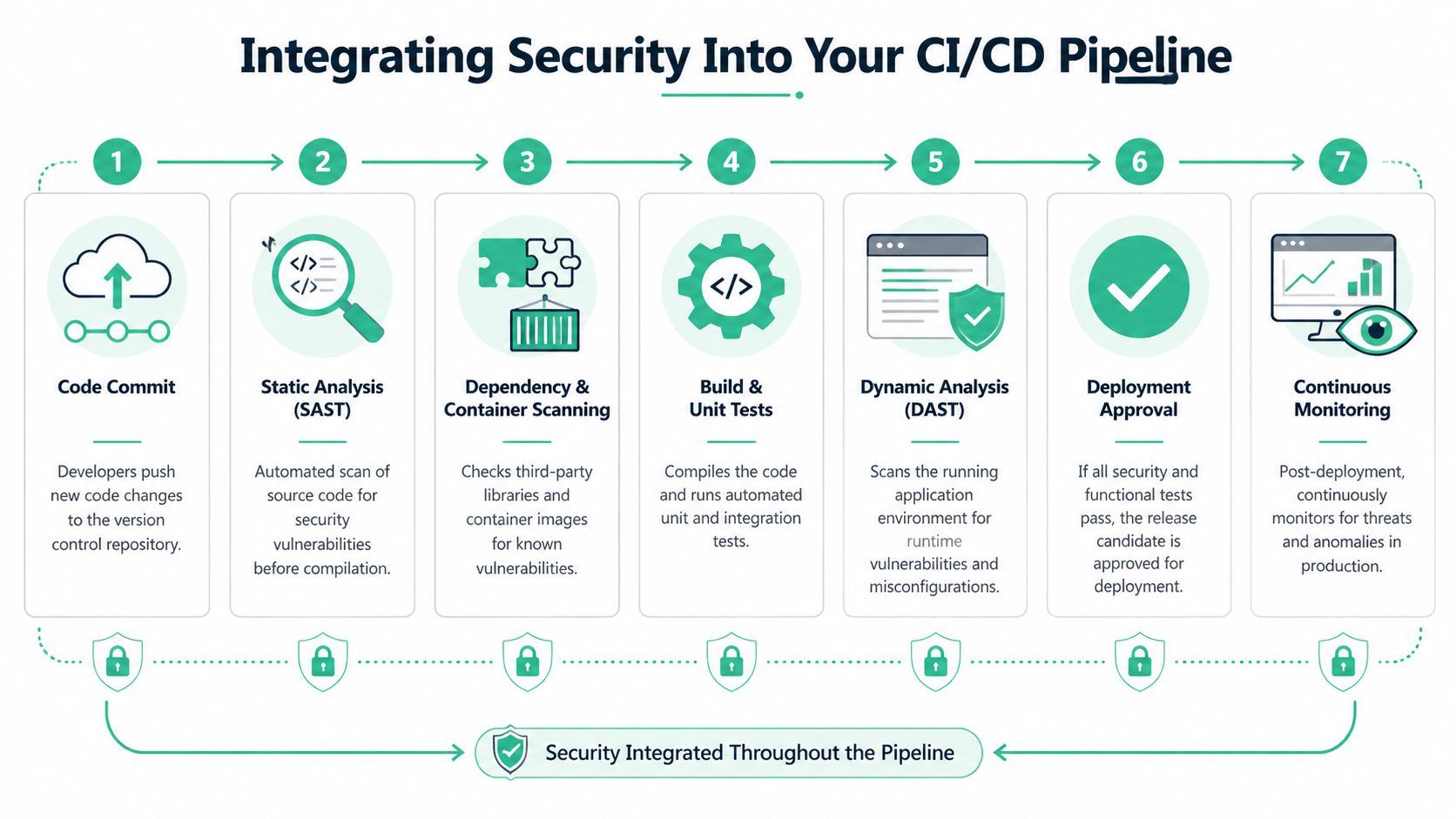
The standard flow is simple. In a typical DevSecOps workflow, the Build phase is for SAST and dependency scanning, the Testing phase is for DAST and IAST, and the Operations phase is for Infrastructure as Code scanning. This layered approach helped Capital One fix issues 85% faster, as described by TestingXperts’ DevOps security testing workflow guide.
Put the right scan in the right stage
This process is often overcomplicated. You don’t need twenty security jobs. You need a few checks placed where they make sense.
At code commit or pull request
Run SAST. Run dependency checks. Fail early on obvious high-risk issues so bad code never gets normalised.At build time
Scan dependencies again if needed and include container checks if you build images. This is the point where packaged risk starts becoming deployable risk.In staging or QA
Run DAST against a working environment. If you use IAST, it also belongs here. Test the app while it behaves like a real app.Before infrastructure changes go live
Scan IaC templates and secrets handling. Don’t let risky cloud settings ship just because the application code looked clean.After deployment
Monitor logs, alerts, and behavior over time. Security testing doesn’t end because deployment succeeded.
A practical GitHub Actions mindset
You don’t need fancy YAML to get the logic right. Think in jobs and gates.
- Fast checks first: Put the cheapest and fastest scans near the start.
- Block only on findings that matter: If every medium-level alert fails a build, developers will hate the pipeline and find ways around it.
- Reserve deeper scans for staging: DAST belongs where the app is running and test data is safe.
- Make output visible: Findings should land where engineers already work, not in a buried vendor portal.
That setup gives you a pipeline that supports shipping instead of arguing with it. If you need a practical example of how continuous checks fit into delivery, this overview of continuous security testing is worth reading.
Where teams usually mess this up
Some teams run every scanner on every commit. That sounds disciplined. It usually creates slow builds, noisy output, and skipped checks.
Others do the opposite. They scan once a quarter, call it “security,” and act surprised when basic problems slip through. Neither approach is serious.
Put fast, cheap checks early. Put heavier tests where they have enough context to be useful.
What good integration feels like
Engineers should get feedback close to the change that caused the issue. Security leads should see trends, not random snapshots. Founders should know releases aren’t being blocked by avoidable chaos.
That’s the standard. If your current setup can’t do that, simplify it until it can.
Automating Scans And Managing False Positives
More scanning does not automatically mean better security. Sometimes it means your team is buried in junk alerts and starts clicking past them.
That problem is real. Recent reports from 2025-2026 say developers can burn out from over 5 security scans per commit, with false positives in SAST and DAST averaging 40%. The emerging shift smart approach uses AI to prioritize risk and has been shown to reduce remediation time by 45%, according to Codefresh’s DevSecOps best practices coverage.
Scan smart, not nonstop
A noisy pipeline trains developers to ignore security. Once that happens, your expensive tools become theater.
“Shift smart” is a better rule than blind “scan left” dogma. You still test early, but you stop pretending every finding deserves equal attention.
How to reduce alert noise
Start with tuning, not buying. Most scanner pain comes from weak configuration, duplicated tools, or bad thresholds.
- Reduce duplicate checks: If two tools flag the same issue category, keep the one your team trusts more.
- Triage by exploitability: Customer-facing auth flaws matter more than edge-case warnings in dead code.
- Use different gates for different stages: A pull request doesn’t need the same burden as a release candidate.
- Suppress known acceptable cases carefully: Document why something is ignored, who approved it, and when it should be reviewed again.
Build quality gates people respect
A quality gate is just a rule that says “this build stops here.” Keep those rules strict, but few.
Good gates usually block on clear, meaningful conditions. For example:
- Critical authentication or authorization findings
- Known risky dependencies in shipped components
- Exposed secrets or unsafe config patterns
- Repeat findings that were supposed to be fixed already
Bad gates block on everything. That turns security into background noise.
If your developers spend more time arguing with scanners than fixing real issues, your pipeline is misconfigured.
When AI prioritization helps
Risk scoring can help if you use it to sort findings, not to avoid thinking. A decent prioritization layer can surface the issues with business impact first, especially when teams are dealing with API-heavy apps, containers, and frequent releases.
But don’t hand your judgment to an AI label and call it done. Someone still needs to ask basic questions. Is this endpoint public? Does this flaw expose customer data? Can a low-privileged user abuse it? That’s how you separate paper cuts from real attack paths.
A practical weekly rhythm
This works well for lean teams:
- Daily: Run fast scans on new code and dependencies.
- Per release candidate: Run deeper dynamic checks in staging.
- Weekly: Review recurring false positives and tune rules.
- Before audit windows or major launches: Add focused manual validation where business logic matters.
That rhythm gives you signal without crushing delivery. The point of devops security testing isn’t to create more reports. It’s to help your team fix the right problems while there’s still time.
Proving Security With Metrics And Reporting
Executives don’t care how many scans ran. Auditors don’t care how many dashboards you bought. They care whether risk is going down and whether you can prove your process works.
That means your reporting needs to show movement, not activity. Key DevOps security metrics include false positive rates, compliance time per application, and vulnerability discovery rate per cycle. Tracking them well can lead to outcomes like Microsoft’s 40% bug reduction and IBM’s 10x faster delivery speed, as noted by Saltworks on measuring DevOps security success.
The metrics that actually matter
Don’t lead with “we ran scans on everything.” That’s operational trivia. Lead with metrics that show better control and less waste.
| Metric | Why it matters | What good looks like |
|---|---|---|
| False positive rate | Shows whether tools are helping or wasting engineering time | It trends down as tuning improves |
| Compliance time per application | Shows whether audit prep is getting easier | It drops as evidence collection becomes repeatable |
| Vulnerability discovery rate per cycle | Shows whether testing has enough coverage and whether trends are improving | It is tracked over time, not judged from one release |
What to hand to auditors
Auditors want evidence they can follow. Give them simple records tied to actual controls.
Use a reporting packet that includes:
- Current scan coverage: Which apps, repos, images, and environments are included
- Remediation history: What was found, when it was fixed, and who signed off
- Exception records: What was accepted temporarily and why
- Penetration testing evidence: Final reports, retest notes, and remediation status
- Policy mapping: Which technical checks support SOC 2, PCI DSS, HIPAA, or ISO 27001 controls
That’s a much stronger story than screenshots from scattered tools.
Centralize or suffer
If findings live in five different portals, reporting becomes manual and painful. Centralize the data, even if that just means one internal dashboard and one issue tracker your team uses.
The point isn’t fancy visuals. The point is consistency. Security, engineering, compliance, and leadership should all be able to answer the same questions from the same source of truth.
Good reporting shortens audits because people stop arguing about where the facts live.
What not to report
Avoid vanity metrics. Raw scan counts, giant vulnerability totals, and tool-by-tool screenshots create confusion. They can even make your program look worse because they show volume without context.
A smaller set of meaningful metrics wins every time. Show whether tool noise is dropping. Show whether compliance evidence is easier to produce. Show whether your release cycle is finding issues earlier instead of later.
That’s what a mature devops security testing program looks like to a CISO, an auditor, and a buyer doing vendor due diligence.
Why You Still Need A Manual Penetration Test
Automation catches patterns. Humans catch intent.
That distinction matters because attackers don’t think in scanner categories. They look at how your app works. They chain small mistakes together. They abuse logic, trust assumptions, weak workflows, role boundaries, and weird edge cases that no off-the-shelf scanner fully understands.

What automation misses
A scanner can tell you a parameter exists. A human penetration tester can notice that changing it exposes another customer’s records. A tool can spot a missing header. A human can figure out that your approval workflow can be bypassed in a way that breaks your business.
That’s why a real pentest, pen test, or penetration testing engagement still matters even if you already automated SAST, DAST, and dependency checks.
When a manual test matters most
Manual testing is especially important when your app includes:
- Authentication and role logic: Access control failures are often contextual.
- Payments or billing flows: Workflow abuse matters more than generic scanner output.
- Tenant separation: SaaS products need someone to test for cross-account exposure.
- Admin actions and internal tools: Privileged workflows create unusual attack paths.
- Compliance pressure: Auditors often want a real penetration test report, not just automated scan output.
If you want a plain-English breakdown of what a real engagement includes, this guide on what penetration testing is covers the basics clearly.
Why speed and affordability matter
A slow penetration testing vendor can wreck release plans just as badly as no testing at all. If reports show up too late, your team loses context and remediation drags. If pricing is inflated, founders postpone testing until it becomes urgent, which is the worst time to buy it.
The better model is straightforward. Automate the common stuff continuously, then use a focused manual pentest before major releases, customer reviews, or compliance milestones. Ask for testers with certifications like OSCP, CEH, and CREST. Those certs don’t guarantee quality on their own, but they do show baseline rigor.
The best penetration test isn’t the longest one. It’s the one that finds real risk, explains it clearly, and gets you an actionable report fast.
What good manual testing delivers
A good tester gives you more than a vulnerability list. You should get proof of impact, clear reproduction steps, practical remediation advice, and a report your engineering team and auditor can both understand.
That’s the complement to automation. Machines give you breadth. Humans give you depth.
DevOps Security Testing Frequently Asked Questions
You don’t need a giant budget to get this right. You need a small number of sensible controls, disciplined automation, and manual testing where it counts.
Here are the questions teams usually ask once they stop listening to vendor noise.
| Question | Answer |
|---|---|
| What is devops security testing in simple terms? | It means checking code, dependencies, running apps, and infrastructure as part of software delivery instead of waiting until the end. Security becomes part of the pipeline. |
| Do startups really need this? | Yes. Startups move fast, change often, and usually have fewer people to catch mistakes manually. That makes lightweight built-in testing more important, not less. |
| What should we automate first? | Start with SAST and dependency scanning in pull requests or builds. Then add DAST in staging. Keep the setup simple enough that engineers won’t bypass it. |
| Can open-source tools be enough? | Often, yes, especially early on. Open-source and low-cost tools can cover a lot of common risk if they’re configured well and reviewed regularly. |
| How often should we run a pen test or pentest? | Run a penetration test before major releases, after meaningful architectural changes, and when compliance or customer reviews require it. Also test when auth, payments, or tenant boundaries change. |
| Why isn’t automation enough? | Automated tools miss business logic flaws and context-specific attack paths. A human tester can chain issues together and think like an attacker. |
| How do we keep developers from hating security tools? | Tune scanners, reduce false positives, and avoid blocking builds for low-value noise. If findings are relevant and clear, engineers will engage with them. |
| What should we show auditors? | Show consistent evidence. That means scan results, remediation tracking, exception handling, and manual penetration testing reports tied to your controls. |
| How do we keep costs under control? | Don’t buy too many tools. Use automation for broad coverage, then spend on focused manual pen testing where human judgment adds the most value. |
| What’s the biggest mistake SMBs make? | They wait too long. Security gets much harder when it starts right before an audit, enterprise deal, or production incident. |
The practical formula is simple. Automate early checks. Keep alerts sane. Run a fast, focused pentest before it matters. Document everything.
If you need a fast, affordable pentest, pen test, or penetration testing partner for SOC 2, PCI DSS, HIPAA, or customer due diligence, Affordable Pentesting is built for startups and SMBs that are tired of slow timelines and overpriced security firms. Use their contact form to get a scoped engagement, work with certified testers, and get audit-ready results without dragging your team through a bloated enterprise process.