.svg)
Knowing your Ubuntu version is more than just a number; it’s a critical security check. Using a find ubuntu version command line check is the first step in any real security audit or penetration test. An outdated version means unsupported software and an open door for attackers.
Why Ubuntu Version Checks Are So Important
For IT managers, CISOs, and startup founders, checking the Ubuntu version is a must-do security task. An out-of-date system is a goldmine for attackers because it stops getting security patches. This leaves your servers and data exposed to known exploits that have already been fixed in newer releases.
An unsupported version like Ubuntu 18.04 LTS is a prime target for a pen test. Without security updates, it becomes vulnerable to every new exploit discovered after its end-of-life date. Our OSCP and CEH certified pentesters find these vulnerabilities immediately during a penetration test.
Understanding the link between your OS version and real-world threats is your first line of defense. This simple decision tree shows how checking your version impacts your security.
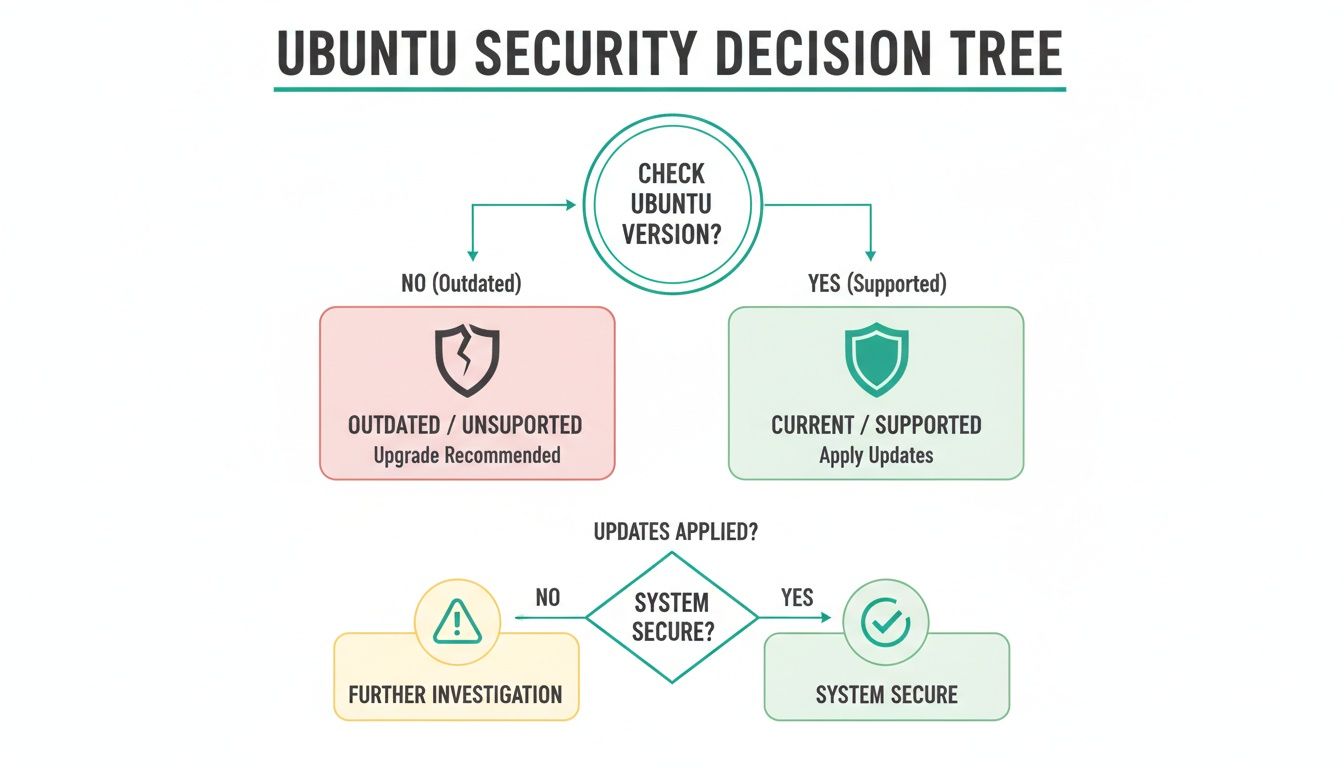
The image makes it clear: an outdated version leads straight to a compromised system. A supported version is the foundation of a secure environment. This simple check is a core part of any effective security program and our vulnerability management best practices.
The Fastest Way to Check Your Ubuntu Version
When you need to know the Ubuntu version right now, lsb_release -a is your best command. It’s the quickest and most reliable find ubuntu version command line method out there. You get a clean, simple output with no fluff, making it perfect for a fast security check.
This is the first command our certified pentesters (OSCP, CEH, CREST) run. It instantly reveals critical details to map out a system's security posture. An outdated system is the number one entry point for attackers, and this command tells us exactly what we're up against in a pen testing engagement.
To check your version, open your terminal and type the command.
lsb_release -aThe output gives you an easy-to-read summary of your system's identity.
No LSB modules are available.Distributor ID: UbuntuDescription: Ubuntu 22.04.3 LTSRelease: 22.04Codename: jammyEvery line gives you a crucial piece of the puzzle. The Description and Release numbers tell you if your system is supported. A single command instantly clarifies if you're running a stable version or something older, which is a major security risk.

For IT managers facing a compliance audit, this command is gold. It provides instant, verifiable proof of your system's version. This quick check helps you stay ahead of security threats and makes pentesting much more effective.
Alternative Commands for Deeper System Details
Sometimes, the release number isn't enough for a full security picture. Our OSCP and CREST certified pentesters often need to dig deeper, especially when gathering evidence for a SOC 2 or HIPAA audit. This is where alternative commands become essential.

During a penetration test, every detail gives us an advantage. Having multiple ways to get the Ubuntu version from the command line ensures no stone is left unturned. This is a critical step in our affordable pentesting process, helping us deliver a thorough report to you within a week.
One of the most reliable methods is reading the /etc/os-release file. It's a standard file on most modern Linux systems that identifies the OS without a special command.
cat /etc/os-releaseThis command shows the file's text directly in your terminal. Because the output is predictable and easy to parse, it’s perfect for automated scripts during a pen test.
Another powerful tool is hostnamectl. It gives you a great summary of the operating system, kernel, and architecture all at once.
hostnamectlThe output neatly organizes the most critical information you need. For IT managers, this command is a game-changer, providing key data points for any security audit or penetration test in one go.
Find Your Kernel Version to Prevent Exploits
The Linux kernel is the core of your system, and its version is critical security information. Attackers love finding kernel vulnerabilities because one exploit can grant them full access. Knowing your kernel version isn't just a technical task—it's a mandatory security check.
When our pentesters—who hold certifications like OSCP and CREST—start an assessment, checking the kernel version is one of the first things they do. For compliance audits like SOC 2, auditors will almost always require proof that you are running patched kernels.
The uname command is the most direct way to get kernel information. To find just the kernel release number, use the -r flag.
uname -rThis gives you a clean output showing the exact version. For example: 5.15.0-88-generic. If you need a more complete picture, the -a flag provides all available uname information in a single line.
Knowing these details is essential for risk assessment. An out-of-date kernel can expose your systems to massive threats. A quick version check can be the difference between a secure system and an open invitation for an attacker, and it's a key part of our affordable vulnerability scanning service.
How Version Checks Drive a Penetration Test
How does a simple version check drive a penetration test? It’s often the very first thing our pentesters do. An outdated system is a huge red flag and frequently the easiest way for an attacker to get in.
When we find a server running an older Ubuntu release, it tells our team there are likely dozens of unpatched vulnerabilities. This single piece of information shapes the entire pen test. It lets us simulate the exact attacks that real-world hackers would use against your infrastructure.
As soon as our OSCP and CEH-certified pentesters spot an outdated system, they cross-reference that version with public vulnerability databases. This is a targeted hunt for known exploits, allowing us to test for weaknesses that actually matter. An affordable pentest validates that your patching is working, giving you proof for compliance audits.
For any CISO or IT manager, this perspective is crucial. To see how we do this, check out our guide on conducting an internal penetration test. Our focus is always on speed, delivering your report within a week so you can fix issues fast.
Ubuntu Version and Security FAQs
You've figured out your Ubuntu version. Now what? Knowing what to do with that information is what separates a secure system from a vulnerable one. Here are some direct answers to common questions.
LTS stands for Long Term Support. Think of LTS versions as the stable, battle-tested choice for production servers, backed by five years of security updates. Standard releases are for developers and have a short support window. For any business, LTS is the only real option for servers with sensitive data.
If your version is outdated, your top priority is to upgrade to a supported LTS release. An outdated system is a huge security liability and a guaranteed way to fail compliance audits. An affordable penetration test can show you exactly how an attacker would exploit your outdated system, with reports delivered in about a week.
You should check your Ubuntu version at least quarterly. A manual find ubuntu version command line check is crucial for your most critical assets. These checks are also mandatory before any security assessment, compliance audit, or pen testing engagement.
Ready to validate your security and meet compliance requirements? Affordable Pentesting provides fast, high-quality penetration testing for businesses that need to move quickly. Get your comprehensive report in just one week by reaching out through our contact form.