.svg)
IT Security Audit for Startups and SMBs
You're probably in the same spot as most founders and IT leaders when an IT security audit lands on the roadmap. The customer wants proof. The compliance deadline is close. Your team is busy shipping product, not building a giant audit machine from scratch.
Here's the blunt truth. Most audit pain comes from bad scope, weak evidence, slow remediation, and overpriced penetration testing that shows up late and finds little. If you want the fastest affordable path to a clean audit and a clean pentest report, you need a tighter process, not more paperwork.
A good IT security audit is not just a scanner run. It's a full review of your security infrastructure, policies, and practices, and that includes governance and procedures, not just tech settings, as explained by Fortinet's security audit overview. Treat it like an operations project with a clear finish line.
Defining Your Audit Scope and Goals
A founder gets told, “We need a security audit,” and the team immediately starts pulling every policy, every system, and every old tool into the same pile. That is how audits get expensive, slow, and messy.
Your first job is to narrow the target.
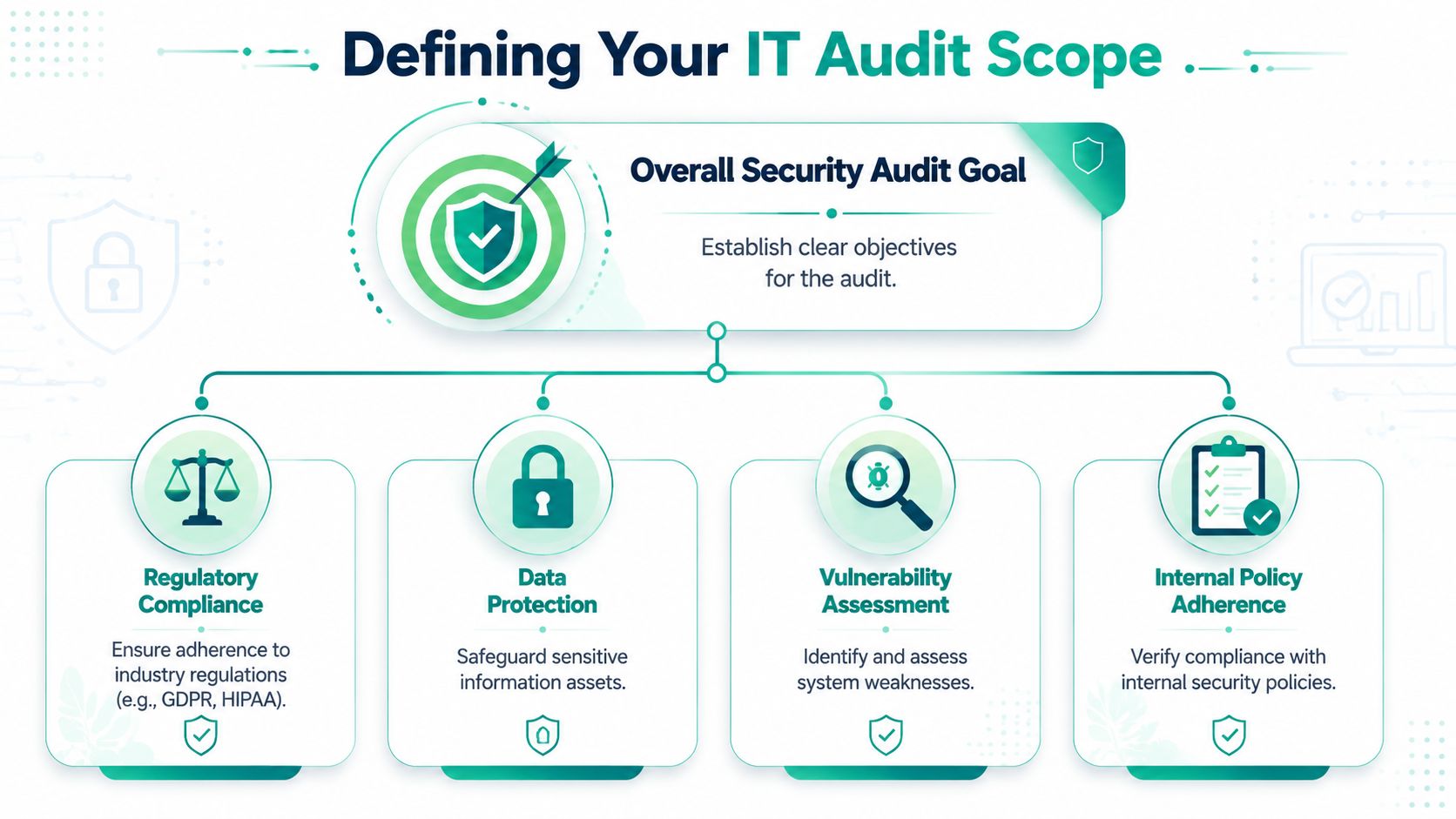
If you do not define scope early, the audit turns into a hunt across systems that have nothing to do with the deal, the compliance requirement, or the customer ask in front of you. Start with the business outcome. Are you trying to pass SOC 2, answer a security review for a large prospect, renew cyber insurance, or prove your app can handle customer data safely? Pick one primary goal. That goal decides what gets audited and what stays out.
Pick the systems that matter
Do not audit your entire company because it feels safer. Audit the systems that can expose sensitive data, break trust with customers, or fail a control your auditor will test.
For a startup or SMB, that usually means a tight set of assets tied to production, access, and change management:
- Customer data systems: production databases, storage, backups, support platforms, analytics tools
- Admin control points: SSO, MFA, cloud accounts, VPN, password managers, endpoint admin tools
- Code and release systems: GitHub, GitLab, CI/CD, infrastructure-as-code, deployment workflows
- Regulated or customer-facing workflows: payment processing, health data handling, vendor access, logging
That is enough for a useful audit. It also keeps your pentest focused, which cuts cost and shortens turnaround.
A bloated scope is one of the fastest ways to waste money with a large audit firm. Start narrow. Expand only if a customer requirement, framework, or auditor makes a clear case.
Define success before anyone starts collecting evidence
Write one short scope statement in plain English. Example: “We are auditing the systems and controls that protect customer data in our production application and internal administrative access.”
Then write the finish line. Be specific. “Pass the customer security review.” “Complete audit fieldwork with no major evidence gaps.” “Get a pentest report that shows no critical findings and a clear remediation path for lower-severity issues.”
This keeps the team from drifting into side quests.
Use one simple rule. If an engineer or admin cannot explain why a system is in scope in one sentence, cut it until there is a real reason to include it.
You also need a time boundary. Define whether the audit covers today's environment, the last quarter of control activity, or a full year of evidence. Small teams get in trouble here because they choose a broad date range, then spend days digging through logs and screenshots that no one asked for.
For practical reality checks outside pure compliance language, this guide on how to secure your Indiana business IT infrastructure is useful because it stays grounded in actual systems and operating habits.
One more recommendation. Pair scope with a fast, limited pentest early, not at the very end. A focused test against your production app, auth flow, and exposed admin paths gives you time to fix obvious problems before the formal audit wraps. That is the affordable path for startups. Tight scope, clear goal, fast evidence collection, then a pentest sized to what actually matters.
Mapping Your Company Assets and Controls
Once scope is locked, build an inventory. This does not require fancy software. A spreadsheet, a shared doc, and one honest meeting with engineering and IT will get you farther than a bloated asset tool nobody maintains.
Most startups already know their core stack. The problem is that knowledge lives in people's heads. An auditor can't inspect someone's memory.
Build a simple asset register
Create one row per asset. Keep it boring and useful. Your columns should include asset name, owner, purpose, data type, where it lives, who has admin access, whether MFA is enforced, whether encryption is used, whether logging exists, and how backups are handled.
Good examples of in-scope assets:
- Cloud infrastructure: AWS, Azure, or Google Cloud projects used for production
- Identity systems: Okta, Google Workspace, Microsoft Entra ID, password managers
- Code and deployment tools: GitHub, GitLab, Jenkins, CI/CD runners
- Business systems: Jira, Slack, Zendesk, finance tools, HR platforms, endpoint management
That list gets your whole environment onto one page. Once it's visible, the audit gets easier fast.
Map controls to each asset
For each asset, note the controls that already exist. Don't write essays. Write facts. “MFA enforced for admins.” “Production database encrypted.” “Backups tested.” “Access review done by engineering manager.” “Privileged access limited to named users.”
Teams often discover gaps that were hiding in plain sight. A database may be encrypted but nobody knows who can access snapshots. A ticket system may have SSO but no role review. A cloud account may have logs enabled but nobody checks them.
The fastest audits happen when the asset list and the control list match. The slowest ones happen when your team has one and not the other.
There's another practical reason to maintain this inventory. Disposal and replacement matter too. If your company retires laptops, servers, or storage devices, you need a traceable record of what left your environment and how it was handled. That's why this piece on how to secure IT asset disposition with audits is worth reading. It highlights the part teams forget until an auditor asks.
Use owners, not departments. “Engineering” is not an owner. “Priya, Platform Lead” is an owner. If no person owns the asset, the control will fail in practice.
Choosing Your Audit and Pen Testing Methods
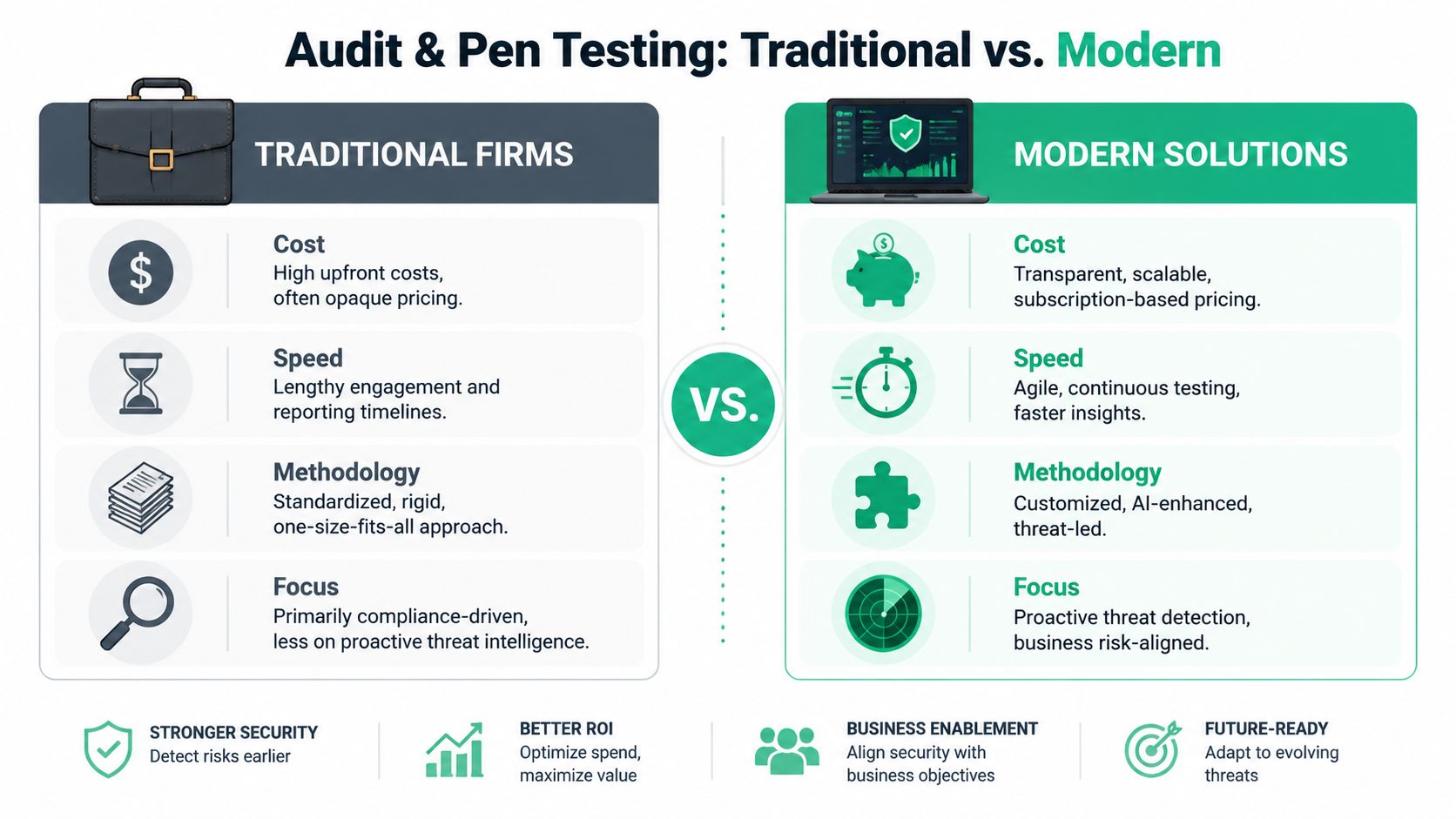
Teams waste the most money through these practices. They hire a traditional firm, wait forever, sit through a shallow scan dressed up like a real assessment, and then get a report with generic findings they already knew about.
You don't need that. You need an audit method that matches your size and timeline. For most startups and SMBs, that means automated checks for basic coverage plus a manual pentest, pen test, penetration test, or penetration testing engagement performed by certified humans who know how apps break in real life.
What scanners catch and what they miss
Scanners are useful. They spot missing patches, exposed services, weak TLS settings, and obvious software flaws. Keep them. But scanners don't think like attackers. They don't follow business logic, abuse role mistakes, or chain small weaknesses into a real compromise.
That's why manual penetration testing matters. A good tester checks how login flows work, how permissions break, whether tenant separation holds, whether secrets leak, and whether your edge cases open a path an attacker can use.
The best small-team setup looks like this:
| Method | Best use | Weakness |
|---|---|---|
| Automated scan | Fast baseline checks | Misses logic flaws |
| Manual pen test | Real attack paths | Needs skilled testers |
| Config review | Cloud and identity controls | Doesn't prove exploitability |
| Evidence review | Audit readiness | Doesn't find technical bugs by itself |
What to demand from a pentesting vendor
Ask direct questions. Who does the work? What certifications do they hold? Do they provide a report your auditor can use without rewriting everything?
Look for pentesters with OSCP, CEH, and CREST backgrounds. Those certifications don't guarantee quality, but they're a strong filter. Also ask whether the work is manual, whether they test authenticated areas, and how fast they can deliver the final report.
Vendor filter: If a firm can't clearly explain how its manual pen test differs from a scan, move on.
For SOC 2, this part is not optional. Auditors explicitly require a penetration test to validate that your technical controls are secure against real-world attacks, and skipping it results in immediate failure of the audit, according to Splashtop's IT security audit guidance. That should settle the “can we skip penetration testing this year?” debate.
If your product is web-based, start with affordable web app pentesting. Web apps are where startups usually carry the most customer risk, and that's where a fast manual penetration test creates the most audit value.
Big firms sell prestige. Startups need speed, affordability, and findings that are helpful.
Running Assessments and Collecting Evidence
Monday morning, your engineer is pulling screenshots from Okta, your DevOps lead is exporting AWS settings, and your pentest report just landed. By Wednesday, an auditor will ask a simple question: can you prove your controls exist and work? This phase is where startups either stay organized or burn a week chasing missing evidence.
The rule is simple. Freeze the audit target before anyone starts testing.
Teams get into trouble when they change scope in the middle of the assessment. Someone remembers an old admin panel. Someone asks to add mobile. Someone wants HR systems reviewed too. That turns a clean audit trail into a pile of mismatched screenshots, partial test results, and evidence that no longer lines up with the stated scope.
Keep two things separate: what you are assessing, and the work used to assess it. Define the systems, controls, users, and time period first. Then run the review. If you need to add something later, log it as a scope change and treat it separately. Do not slip it into the same evidence set.
Keep criteria separate from testing
A startup audit does not need perfect process. It needs a process that holds up under scrutiny.
Use this order every time:
- Lock the in-scope systems and control list
- Assign one owner for each evidence item
- Run the technical checks and collect exports, screenshots, and reports
- Store everything in one folder with clear names and dates
- Flag gaps immediately instead of waiting for the auditor to find them
That discipline saves money. It also keeps your pentest from turning into an open-ended consulting project.
Gather proof an auditor can read
Good evidence is boring on purpose. It is clear, dated, and tied to a specific control. Your auditor should not have to guess what a screenshot shows or whether a setting came from production.
A clean evidence pack usually includes:
- Access proof: SSO settings, MFA enforcement, privileged group membership, role exports
- System proof: Encryption settings, backup configuration, logging status, endpoint policy screenshots, vulnerability scan results
- Operational proof: Change approvals, incident tickets, onboarding and offboarding records, policy acknowledgments
- Pen test proof: Statement of work, final report, remediation tracker, retest results if fixes were validated
Name files like an adult. “Okta_MFA_Production_2026-06-25.png” is useful. “screenshot-final-v2.png” is how evidence gets lost.
One more rule. Collect evidence from the live system of record whenever possible. Exports beat copied text. Admin console screenshots beat pasted settings in a doc. Ticket IDs beat verbal explanations.
A simple startup example makes this clear. Your company runs a SaaS app on AWS, uses GitHub for code, Okta for identity, and Jira for change management. The IAM role export shows who has production access. The Okta admin view confirms MFA policy enforcement. Jira records show deployment approvals. The pentest report documents what was tested, what was found, and whether exposed attack paths were validated. That package tells a consistent story.
If your product is internet-facing, include a review of external security for startups. Public attack surface gets attention first because attackers and auditors both start there.
Do not over-collect. Fifty random screenshots are weaker than ten pieces of evidence that clearly map to the control list. The goal is not volume. The goal is proof that survives questions.
Analyzing Findings and Building a Remediation Plan
Friday afternoon, the report lands. Twenty findings. Three look scary, six sound technical enough to get ignored, and the founder wants to know what matters before the next customer security review. Your job is to cut through that fast.
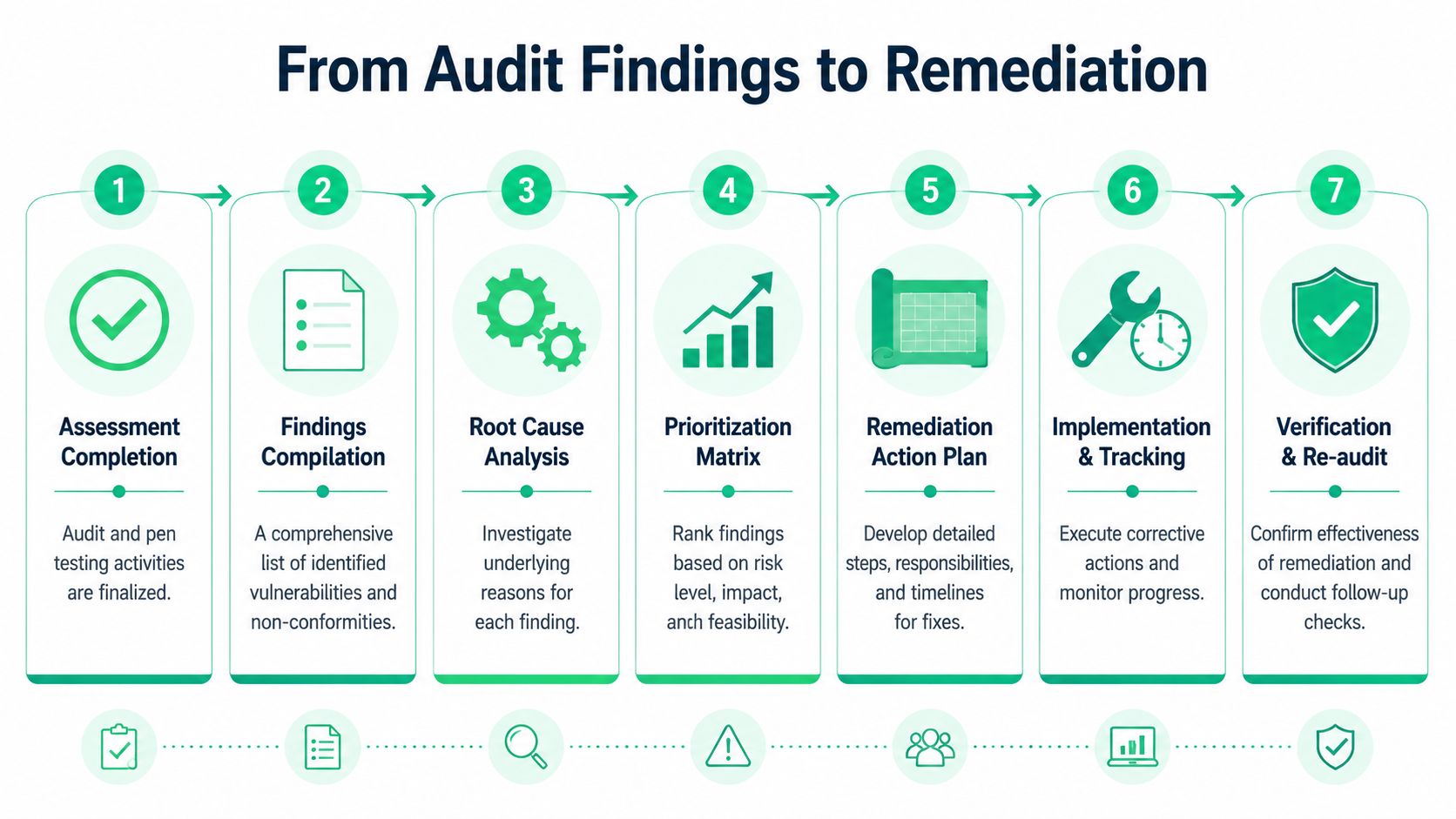
A finding list is only useful if it turns into assigned work, verified fixes, and a cleaner retest. That is the standard. Start there.
Triage findings by business risk
Rank findings by impact and exposure, not by how dramatic the report sounds. A broken authorization check in production beats a low-risk header issue every time. Public-facing flaws beat internal edge cases. Anything tied to customer data, admin access, billing, or identity moves to the top.
Use a simple model your team can apply in ten minutes:
- Fix now: Issues that can lead to account takeover, data exposure, privilege abuse, or internet-facing compromise
- Fix this cycle: Weaknesses that raise risk but do not create an immediate path to breach
- Schedule with an owner: Lower-risk items that still need closure, usually platform hardening or process cleanup
- Accept with written justification: Rare exceptions where the fix causes real business damage and compensating controls are already in place
Write each finding in plain English. “Support admins can export customer data without approval” gets action. “Insufficient access control due to contextual enforcement gaps” gets ignored.
Build a tracker that drives fixes
Use Jira, Linear, Asana, or a spreadsheet. The tool does not matter. The fields do.
Every remediation item should include:
- the issue
- the affected system
- the business risk
- the owner
- the fix
- the due date
- the verification method
- the retest status
One rule matters more than the rest. If a finding has no owner and no verification step, assume it is still open.
Do not stop at patching. Re-scan, re-test, or manually validate the fix based on the original issue. Teams regularly close tickets after a config change, then learn during retest that the exposure is still there, the fix only worked in staging, or a second attack path still exists. That is how startups burn time and pay for extra audit cycles.
Split the plan into quick wins and structural fixes. Rotate exposed keys, close public buckets, tighten security groups, and remove stale admin accounts immediately. Put bigger work, like redesigning role boundaries or fixing broken tenancy checks, into a separate track with milestones. Fast, affordable audits depend on this split. You clear obvious risk quickly, then use a focused retest or quick-turn pentest to confirm the high-value fixes without waiting on a giant consulting engagement.
Show the auditor two things. What you already fixed, and what is scheduled with named owners and dates. That is how you show control and get through the audit without pretending your environment is flawless.
Preparing Your Team For Auditor Interviews
Your controls can be solid and your pentest can come back clean enough to ship to customers. Then an auditor interviews three people, gets three different answers about access reviews or offboarding, and your audit slows to a crawl.

This step trips up startups all the time. The failure is usually not some exotic technical flaw. It is a basic credibility problem. Your docs say one thing, your team says another, and the auditor starts pulling on that thread.
Train people to answer clearly, not perfectly
Do not hand people a script. Auditors can spot rehearsed nonsense fast.
Give each person three things:
- the real process they follow
- where the evidence lives
- who owns the process if the auditor wants more detail
That is enough.
For example:
- Engineer: Explains how code changes are reviewed and where approval records are stored
- HR lead: Explains onboarding and offboarding steps and where signed acknowledgments or tickets live
- Founder or exec: Explains who owns security decisions and how risk gets reviewed
- IT manager: Explains MFA, access reviews, endpoint controls, and incident response steps
Run a 30-minute mock interview with the exact people likely to get pulled in. Ask plain questions. “How do you remove access for a terminated employee?” “Who can approve production access?” “How do you confirm backups completed?” If two people answer differently, do not coach around it. Fix the process, the document, or both.
Make every answer trace back to evidence
Auditor interviews are not a test of confidence. They are a test of consistency.
If your policy says quarterly access reviews happen, the team should know who runs them, what system tracks them, and what evidence proves they happened. If your docs say encryption is enabled by default, your settings, screenshots, and system configuration should match that claim.
Keep answers short. Tell the truth in simple language. “I own the review. We do it quarterly in Google Workspace. The last review is saved in this folder.” That answer works. Long explanations usually mean the process is unclear or undocumented.
Keep the interview group small and relevant
Do not drag half the company into audit prep. Pick the handful of people who own the controls in scope and prepare them well.
For startups and SMBs, that usually means five or fewer people. A founder, an engineering lead, the person handling IT or cloud access, someone covering HR workflows, and whoever manages security operations. If you are pairing the audit with a fast-turnaround pentest, keep the pentest contact in the loop too so they can explain remediation status cleanly. Affordable Pentesting for compliance works best when the technical findings and the human answers line up.
A one-hour prep session can save days of follow-up, extra evidence requests, and a messy audit report. That is the cheap win. Use it.
Deciding Between a DIY Audit and Outsourcing
This decision is simpler than people make it. If your team has time, audit experience, and enough technical depth to run a proper penetration testing process and evidence review, DIY can work. If you're short on any of those, outsourcing is usually cheaper than the delay and rework you'll create by doing it badly.
A DIY audit gives you control and can save cash upfront. It also eats management time, creates blind spots, and often stretches far beyond the original deadline. Founders underestimate that cost constantly.
When DIY makes sense
DIY works best when your environment is small, your scope is narrow, and your buyers are asking for a basic security review rather than a formal compliance outcome. It also helps if someone on your team has already managed an audit and knows how to produce evidence without chaos.
DIY is a decent fit when:
- Your stack is simple: One product, one cloud environment, limited admin users
- Your timeline is flexible: You can afford iteration and cleanup
- Your team knows audits: Someone understands controls, evidence, and remediation tracking
When outsourcing is the smarter move
Outsource when speed matters, when the audit has real business consequences, or when your team is already overloaded. That includes SOC 2 prep, PCI DSS work, HIPAA-related reviews, customer-driven pen test requests, and enterprise sales cycles where the report needs to be clean and credible.
A specialized firm helps when:
- You need fast turnaround: Slow reports kill deals
- You need real pentesting: Manual testing beats checkbox scanning
- You need audit-ready output: Reports and retests need to stand up to scrutiny
If you're weighing the tradeoff, Affordable Pentesting for compliance is the kind of model that makes sense for startups and SMBs. You get focused expertise without paying for a giant consulting machine you don't need.
The decision framework is simple. Do it yourself if your team has the time, the skill, and the patience to manage scope, evidence, interviews, remediation, and a real pen test. Outsource if the deadline matters and you want the shortest path to a credible result.
If you need a faster path to a clean IT security audit, Affordable Pentesting is built for that reality. They help startups and SMBs get affordable manual pentests, practical compliance support, and audit-ready reports without the bloated pricing and slow timelines that make traditional firms so frustrating.