.svg)
Sample IT Risk Management Plan Guide
You're probably here because an audit is coming, leadership wants a risk plan, and nobody has time to build a giant document nobody will read again. That's the trap. Days are often wasted filling out a sample IT risk management plan, which is then dumped into a shared folder and forgotten.
That approach burns time, weakens audits, and leaves essential security work untouched. A risk plan should help you decide what to fix first, who owns it, what evidence you need, and where a pentest, pen test, or penetration test fits into the picture.
Stop Building Risk Plans That Gather Dust
A static plan is useless. If your sample IT risk management plan only exists to satisfy an auditor, you built paperwork, not a security process.
The worst version of this is common in startups and SMBs. Someone copies a template, lists a few obvious risks, assigns vague owners like “IT team,” and calls it done. Then a customer asks for evidence, an auditor asks for updates, or a serious flaw lands in production, and the whole thing falls apart.
Why most plans fail fast
The problem isn't the template. The problem is how people use it.
A real plan has to drive decisions. It should tell you which risks matter now, which ones can wait, who is on the hook for fixing them, and what proof you'll show when someone asks whether the fix worked.
Practical rule: If your plan doesn't change budget, priorities, or remediation work, it isn't a risk plan. It's admin theater.
Cheap-looking templates create expensive problems. Teams end up duplicating work for audits, scrambling for evidence, and paying for security work too late because they never tied the plan to actual testing.
What a useful plan actually does
A solid risk plan acts like an operating system for security decisions. That matters because a risk management plan is commonly structured around risk identification, risk assessment, risk treatment, and risk monitoring/reporting, and in practical IT programs it often expands into a broader cycle that includes implementation, resourcing, mitigation, and review, as described by Secureframe's overview of risk management structure.
That's the difference between a shelf document and something you can run every month.
A useful plan should do these jobs:
- Prioritize work: It forces the team to stop treating every issue like an emergency.
- Assign ownership: Every risk needs a named person, not a department.
- Support audits: Auditors want evidence of repeatable handling, not a pretty spreadsheet.
- Justify testing: If a risk says your app might expose sensitive data, a penetration testing engagement becomes a practical validation step, not a random expense.
The blunt recommendation
Keep the document simple. Make the process strict.
Use a lightweight register, a clear review cadence, and plain language your ops team, founder, and auditor can all understand. Then connect high-priority risks to real validation work like pentesting. Otherwise you're just guessing whether the risk is still there.
The best risk plans are boring to read and hard to ignore.
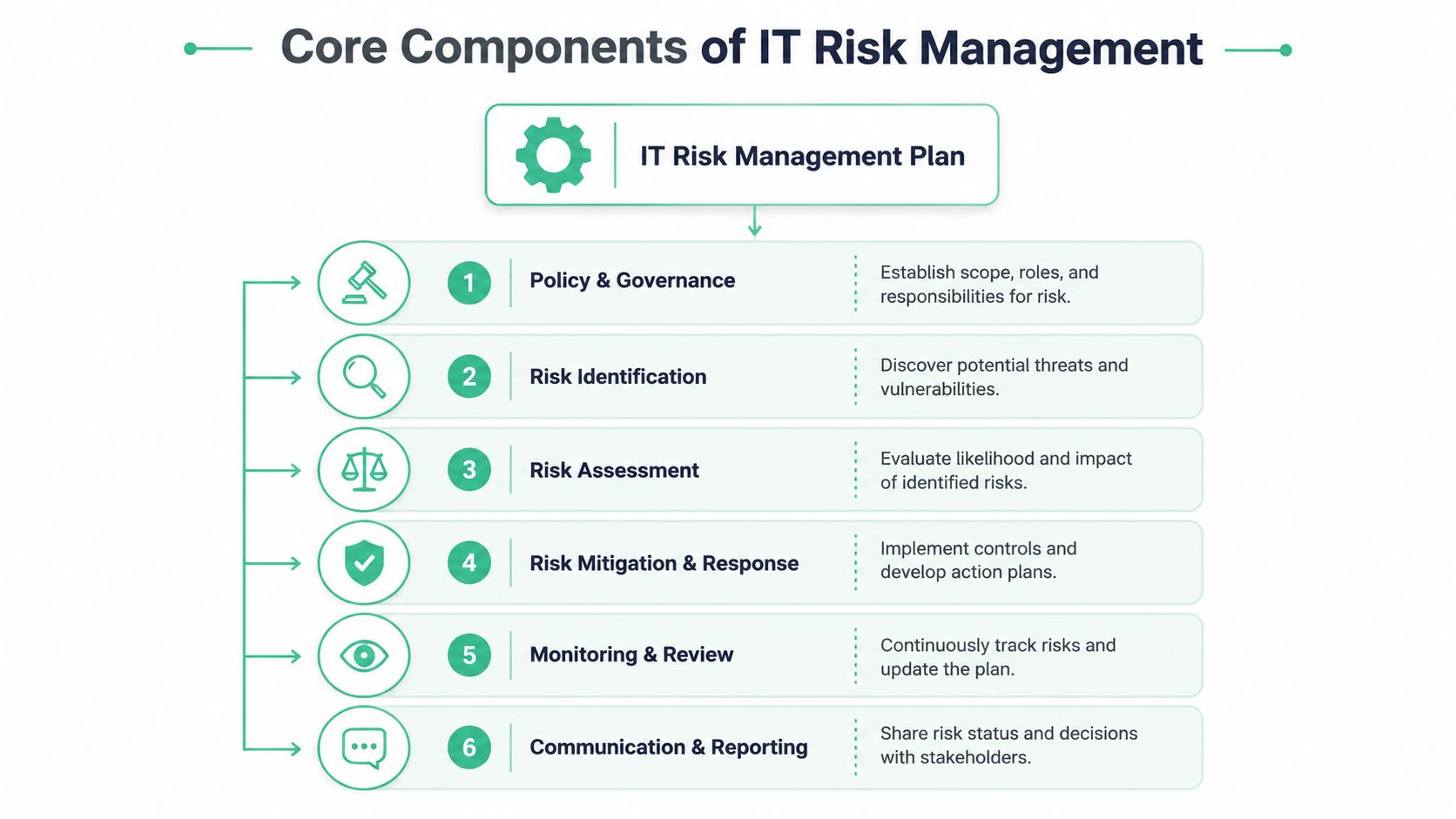
Core Components of a Practical Risk Plan
Start with the parts people usually skip. That is why so many risk plans collapse the moment an auditor asks who owns a control, what systems are covered, or how a high-risk item gets validated.
Start with scope and governance
If scope is fuzzy, everything after it gets worse. Scoring becomes inconsistent. Ownership gets vague. Audit evidence turns into a scramble.
Write the boundaries in plain English. List the systems, data, teams, vendors, and business processes the plan covers. Call out exclusions too. If your production app is in scope but internal marketing tools are not, say it clearly.
Then assign named accountability.
- Plan owner: Maintains the plan and runs the review cycle
- Risk owners: Own specific risks and remediation work
- Leadership approver: Accepts risk or approves budget to fix it
- Technical validators: Confirm controls work
That last role matters more than startups admit. A control written in a policy is not proof. If a risk involves your application, understanding web app vulnerabilities and testing for them is part of validation, not a nice extra.
Use a repeatable lifecycle
Good plans run on a loop. They do not depend on somebody remembering to reopen a spreadsheet before an audit.
Your lifecycle should stay simple and strict:
| Step | What it means in plain English |
|---|---|
| Identify | Find what can go wrong |
| Assess | Decide how serious it is |
| Respond | Choose the treatment |
| Assign | Name the person responsible |
| Track | Monitor deadlines, status, and blockers |
| Review | Re-score the risk as systems and threats change |
This is what makes the plan a working system instead of dead paperwork. If your team cannot explain where a risk sits in that cycle right now, the plan is already stale.
Define response rules early
Teams waste time arguing about response options after a serious issue shows up. Set the rules before that happens.
Use four standard responses:
- Avoid: Stop the activity causing the risk
- Mitigate: Reduce likelihood or impact with controls
- Transfer: Shift part of the exposure through contracts or insurance
- Accept: Document why the risk remains and who approved it
Be strict about acceptance. It needs a named approver, a reason, a review date, and evidence that the team considered cheaper fixes first. “We were busy” is not risk treatment. It is negligence with better branding.
A plan without response rules burns time, inflates audit pain, and lets obvious risks sit untouched.
Define the fields that make the plan usable
A practical plan needs standard fields. Without them, every risk entry turns into a custom format and nobody trusts the register.
Include these fields in every record:
- Risk statement
- Affected asset or process
- Likelihood
- Impact
- Current controls
- Planned action
- Owner
- Due date
- Validation method
- Review date
- Status
The validation field is where a living plan separates itself from template theater. If the mitigation says MFA is enforced, verify it. If the mitigation says your customer-facing app no longer exposes sensitive data, test it. That is where affordable pentesting earns its keep. It gives you evidence that the risk dropped, not wishful thinking.
Keep the language simple
Write for operators, founders, engineering leads, and auditors. Skip policy sludge and security theater.
Short sections. Clear decisions. Named owners. Review dates. Real validation.
That is the structure that holds up under audits and still helps the team make decisions during normal weeks.
How to Identify and Assess Risks Quickly
Risk identification doesn't need a workshop marathon. You already know where most of your problems live. Production systems, customer-facing apps, identity systems, laptops, backups, vendors, and rushed changes.
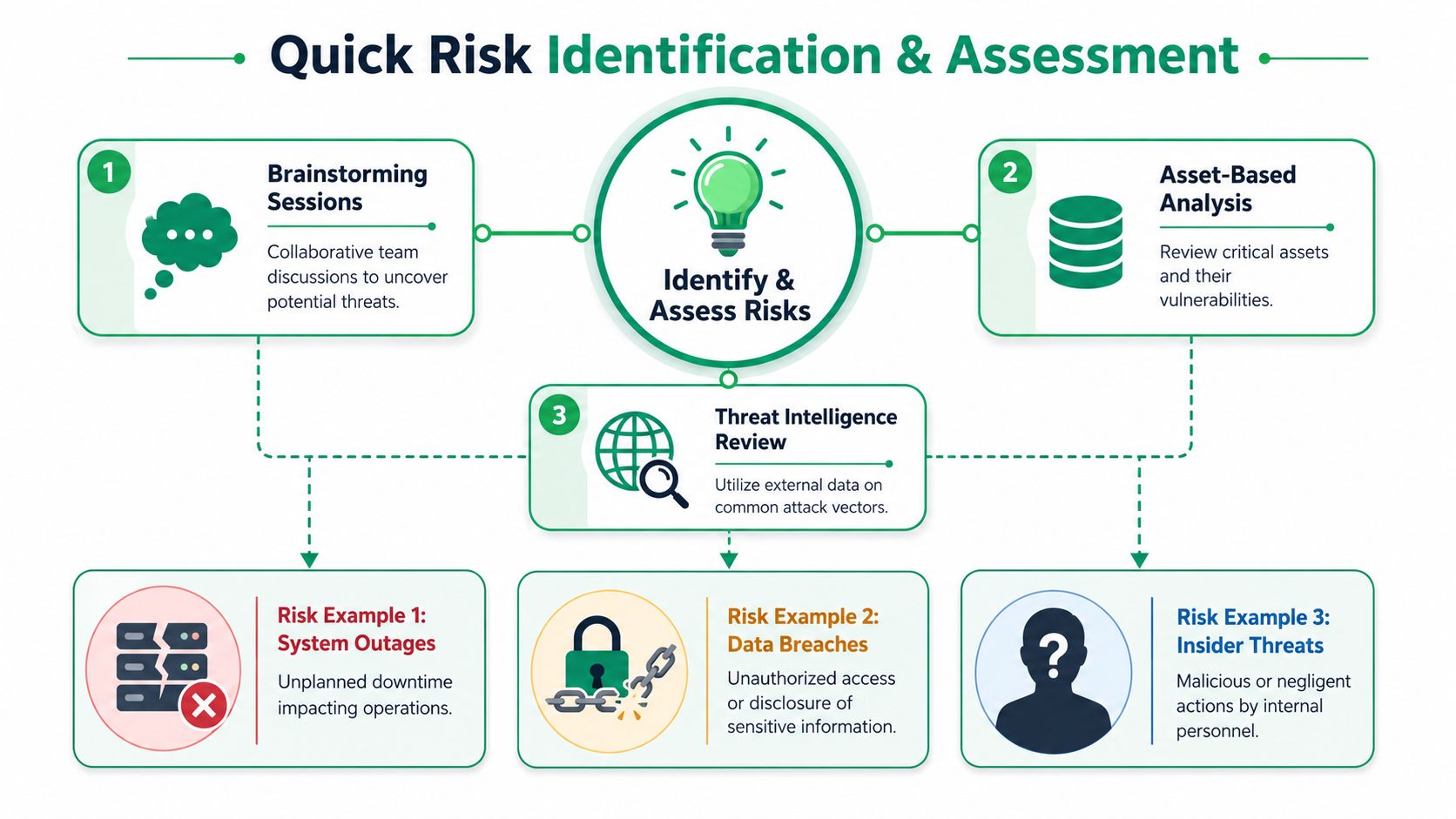
Use three fast discovery methods
Start with what your business depends on. You don't need a giant taxonomy to get useful results.
Use these methods first:
- Brainstorm operational failures: Ask what would interrupt revenue, customer access, or internal operations.
- Review critical assets: Look at systems holding sensitive data, authentication flows, admin access, and internet-facing services.
- Check known exposure areas: Web apps, APIs, cloud storage, vendor access, and weak internal processes show up constantly.
For teams building software, this often means starting with your application layer. If your product handles logins, uploads, payments, or customer records, spend time understanding web app vulnerabilities before you pretend your risk list is complete.
Score risks without overcomplicating it
You do not need a complex formula. You need consistency.
Guidance on risk matrices commonly uses likelihood and impact scoring, either as simple labels or as quantitative scales such as 1–3, and some IT templates also call out high probability as 70%+ chance for urgent action, according to Systems X guidance on IT risk plan templates.
That's enough structure for most SMBs.
Use a basic approach like this:
| Factor | Low | Medium | High |
|---|---|---|---|
| Likelihood | Uncommon | Could happen | Likely soon |
| Impact | Minor disruption | Noticeable business pain | Major security, audit, or operational damage |
Then decide what gets immediate action. Keep the conversations grounded in business effect, not just technical severity.
Ask better questions
Bad risk sessions produce vague garbage like “cyberattack” or “data issue.” That tells nobody what to do.
Ask sharper questions instead:
- Where could unauthorized access happen?
- What breaks if this vendor disappears tomorrow?
- Which systems would hurt us most if they go down?
- What could fail an audit because evidence is missing?
- Where are we trusting a control we haven't tested?
Those questions produce actionable risks. “Web app access control flaws expose customer records” is useful. “Security breach” is not.
If a risk statement doesn't point toward an owner and a next action, rewrite it.
Don't confuse lists with prioritization
A long list feels productive, but it usually hides indecision. What matters is ranking the few risks that deserve attention now.
That's where teams should be brutal. If a risk could affect customer data, production availability, or audit readiness, move it up. If it's speculative and low-impact, monitor it and move on.
You're not trying to predict everything. You're trying to stop the obvious, expensive failures first.
Building Your Risk Register and Mitigation Plans
Your risk register is the part people will use, or ignore, when something breaks. Build it like an operating tool, not a document you show once during an audit and forget.
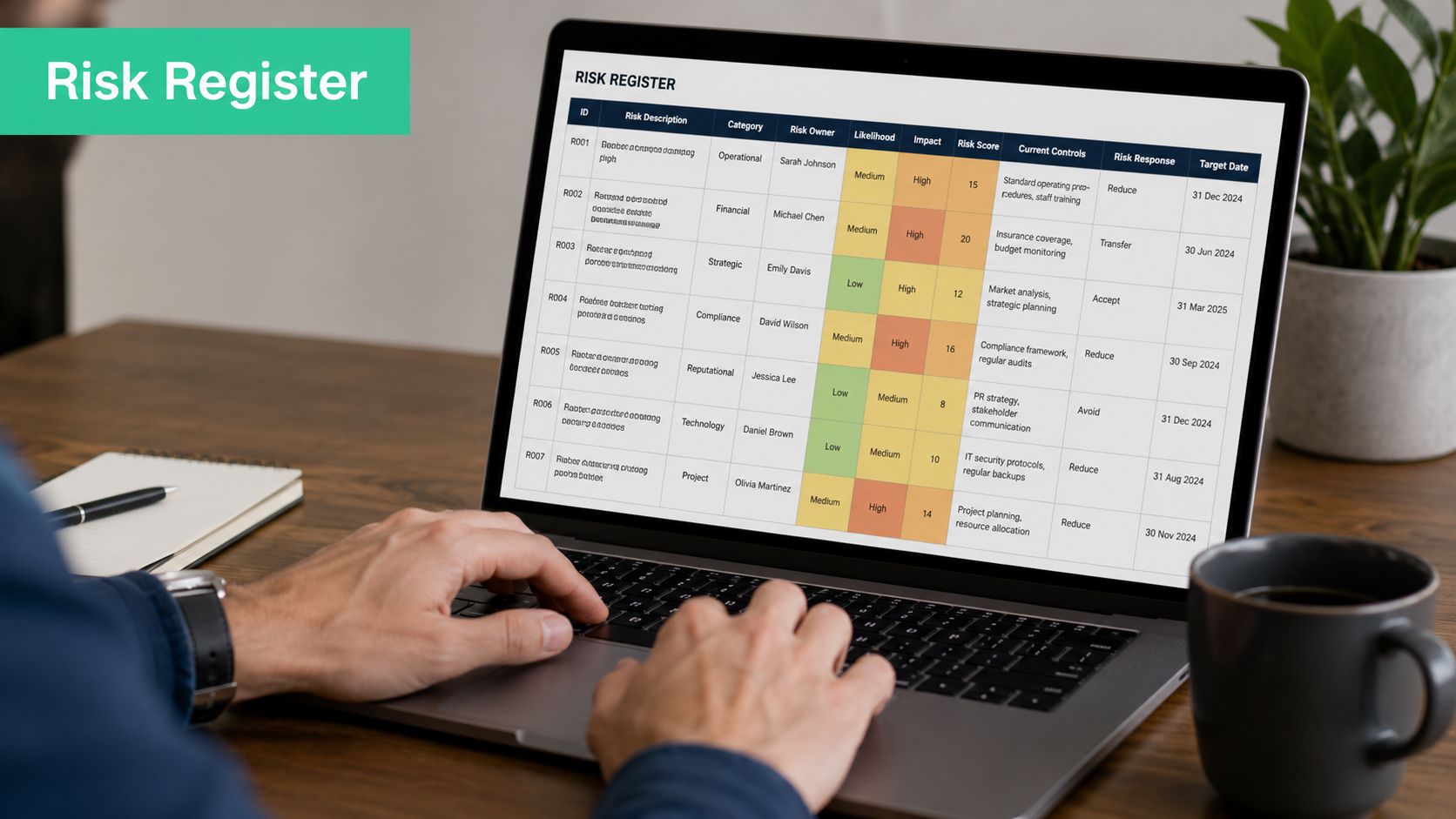
What the register must include
A useful sample IT risk management plan follows a simple cycle. Record the risk, rate it, assign an owner, choose a response, set a due date, and schedule a review. If any of those pieces are missing, the register turns into a stale list of worries.
Keep the format simple. A spreadsheet works fine for many startups and SMBs. Expensive GRC software will not save a sloppy process.
Minimum fields should include:
- Risk statement
- Affected asset or process
- Likelihood
- Impact
- Priority
- Risk owner
- Response type
- Mitigation action
- Due date
- Status
- Evidence or validation note
If you need a starting point, use Affordable Pentesting's template as a base and customize it for your environment instead of downloading another bloated spreadsheet full of tabs no one will maintain.
Choose a response and be specific
Weak mitigation language wastes time. “Improve security” means nothing. “Monitor issue” usually means nobody owns it.
Write actions that someone can execute and verify. If you want a simple explainer on standard risk mitigation strategies, that framework is helpful. Your register still needs plain, system-specific actions tied to a real owner and a deadline.
Use entries like these:
| Weak entry | Better entry |
|---|---|
| Fix web risk | Patch authentication logic, retest access controls, close by owner date |
| Monitor vendor | Reassess vendor security questionnaire and contract controls at next review |
| Improve backups | Validate restore process and document evidence in control repository |
That level of detail matters because a living plan has to survive handoffs, staff changes, and audit questions. If a new team member reads the register, they should know what to do next without scheduling another meeting.
Where pentesting fits
High-priority technical risks need validation, not optimism. A team can mark a fix as complete and still leave the actual attack path wide open.
A pentest, pen test, or penetration testing engagement becomes useful here. If your register says a customer-facing app may allow privilege abuse, injection, broken access control, or insecure admin workflows, the mitigation should include remediation and independent testing to confirm the issue is gone.
Manual penetration testing is especially useful when:
- The risk involves a public-facing app: Automated scans miss context and chained flaws.
- You've already fixed something serious: You need to know whether the fix closed the path.
- An auditor wants evidence: A real report carries more weight than a spreadsheet comment.
- A release changed the attack surface: New features create new exposure.
Cheap testing that produces a recycled scanner export is a bad deal. Pay for qualified testers who can validate business risk, reproduce the flaw, test the fix, and explain the result clearly enough for engineering and audit teams to use.
The register should answer one blunt question for every major risk. How will we know this is fixed?
That question keeps the plan alive. It also connects risk planning to practical testing, which is exactly what many SMBs skip until an audit, customer questionnaire, or incident forces the issue.
Connecting Your Plan to Compliance and Audits
Auditors don't care that your plan looks polished. They care whether it maps to requirements, shows ownership, and produces evidence.

Build compliance mapping into the register
Most sample templates miss the hard part. A major gap in many samples is compliance mapping. They often don't explain how to map risks and controls across frameworks like SOC 2, PCI DSS, and ISO 27001, document compensating controls, and keep the plan audit-ready without duplicating work, as described by Inflectra's discussion of risk management plan gaps.
So fix that directly in your register.
Add fields such as:
- Relevant framework
- Control reference
- Compensating control note
- Evidence location
- Audit owner
This lets one risk support multiple requirements. A single access control risk may map to customer commitments, security controls, vendor obligations, and internal policy requirements. That's how you stop building separate evidence trails for every framework.
Show how the control works in reality
Auditors have seen enough screenshots and policy PDFs to last a lifetime. They want to see that you identified a risk, decided on a response, assigned responsibility, completed the work, and validated the result.
That means your evidence should include things like:
- Updated risk status
- Owner signoff
- Remediation notes
- Change records
- Testing results
For many regulated teams, a penetration testing report is one of the clearest artifacts in the stack because it connects identified exposure to actual validation. If compliance is a major driver, use focused SOC 2 pentesting services as part of the evidence chain rather than waiting until the last minute and scrambling for a report.
Avoid duplicate audit work
Teams waste money maintaining one spreadsheet for security, another for the auditor, another for leadership, and then manually reconciling them when deadlines hit.
Don't do that.
Use one master register and tag each risk to the frameworks it supports. Then pull filtered views for different audiences. Security sees the remediation backlog. Leadership sees top risks and blocked actions. Auditors see mapped controls and evidence.
A plan becomes audit-ready when the same record supports operations, leadership review, and control evidence.
That's the point. One living process. Multiple outputs.
Turning Your Plan Into an Active Program
A sample IT risk management plan only becomes useful when someone runs it on a schedule. Otherwise it's just a nicer-looking list.
The big miss in most templates is operationalization. Many show how to list risks, but they stop short of the living process. Modern guidance pushes teams toward continuous monitoring, with practices like monthly reviews, executive reporting, and remediation deadlines, as outlined in Vistrada's guidance on operational cybersecurity risk planning.
Run a simple operating rhythm
You do not need expensive GRC software to make this work. You need discipline.
Set a recurring review meeting. Monthly is a strong default for most SMBs with active systems and customer obligations. Use the meeting to review open high-priority risks, overdue mitigation items, newly introduced changes, and evidence gaps.
Then assign one person to own the register. Not a committee. One accountable owner.
Use a short checklist
Keep the program lean and repeatable:
- Review the top risks regularly: Re-score them if conditions changed.
- Track deadlines hard: If mitigation slips, escalate it.
- Update leadership with a one-page summary: Focus on major risks, blockers, and decisions needed.
- Reassess after major changes: New product releases, vendor onboarding, infrastructure shifts, and acquisitions should trigger review.
- Validate controls in live environments: For important technical risks, use pentesting, penetration testing, or a targeted pen test to confirm fixes and spot blind spots.
Don't let the document drift
Most plans go stale because no event forces an update. Build triggers into the process.
Good triggers include new internet-facing features, major architecture changes, sensitive data expansion, new compliance obligations, and serious incidents. If one of those happens, your team should revisit the relevant risks right away, not at the next annual review.
Security programs mature when risk reviews become routine, not ceremonial.
That's the whole game. Simple structure. Real ownership. Measurable follow-through. Testing where it matters.
If you need a pentest, pen test, or penetration testing partner that doesn't drag the process out or charge like a giant consulting firm, talk to Affordable Pentesting. Their certified pentesters, including OSCP, CEH, and CREST professionals, focus on practical findings, fast turnaround, and reports you can effectively use for remediation and compliance. If you're tired of overpriced scans, weak findings, and slow timelines, use the contact form and get a quote that fits an SMB reality.