.svg)

You need a security assessment. Your auditor is asking for proof. Your enterprise customer wants a report. Your team is already overloaded. Then the old-school security firms show up with slow timelines, bloated scopes, and pricing that feels detached from reality.
That model doesn't work for most startups and SMBs.
A web application vulnerability assessment is usually the right place to start. It gives you a practical view of what's exposed, what's broken, and what needs attention before an attacker or auditor finds it first. But don't confuse “assessment” with “scan and forget.” For compliance-sensitive teams, automation alone leaves holes.
The problem is simple. You need something fast enough to fit this quarter, affordable enough to get approved, and real enough to stand up to scrutiny.
Your Guide To Web Application Security
If you're chasing SOC 2, PCI DSS, or HIPAA, the biggest mistake is treating a scanner report like a full security review. That's how teams end up with a PDF full of alerts and still fail the test.
For compliance-driven organizations, automated scanners alone create a dangerous blind spot. The NSA has emphasized that these tools miss critical flaws like IDOR and access control vulnerabilities, which require manual testing and are specifically scrutinized by auditors, as noted in this web application security assessment overview.
What founders usually get wrong
Most stressed-out teams do one of two things.
- They buy a cheap scanner report and assume it counts as a meaningful review
- They hire a traditional penetration testing firm and wait far too long for a report they needed last week
- They delay the whole project because neither option fits the budget or the timeline
All three paths cause the same problem. You stay exposed while pretending progress is happening.
Practical rule: If the output is only automated findings, you have a visibility tool, not a serious validation of security controls.
What a smart first step looks like
A web application vulnerability assessment should answer basic, urgent questions fast.
- What can an attacker reach: Login flows, exposed endpoints, admin functions, and risky inputs
- Which findings are real: Not every scanner alert matters, and some dangerous flaws won't show up in a tool at all
- What must be fixed first: The issues tied to sensitive data, account access, and compliance scope come first
- What evidence will satisfy the audit trail: Clear findings, proof, and remediation guidance
Affordable manual pentesting is often the right approach. You still use tools like Burp Suite, OWASP ZAP, and authenticated scanning to move quickly. But certified humans review the results, test the flows that matter, and verify what's exploitable.
That's the difference between checking a box and getting a report you can use.
Vulnerability Assessment Versus A Penetration Test
People mix these terms up all the time. That confusion wastes money.
A vulnerability assessment is like hiring a building inspector to check every door, window, and lock for obvious weaknesses. A penetration test, or pen test, is when a security professional tries to get inside and prove what an attacker could do.
Security Testing Services Compared
| Service Type | Primary Goal | Best For |
|---|---|---|
| Vulnerability assessment | Find and prioritize weaknesses across the application | Teams that need a practical first pass and remediation roadmap |
| Automated scan | Quickly flag known issues and misconfigurations | Frequent checks during development or between formal reviews |
| Penetration test | Validate real-world exploitability through manual testing | Compliance, customer assurance, and higher-risk applications |
| SAST | Review source code for insecure patterns before release | Development teams fixing issues early |
| DAST | Test a running application from the outside | Staging or production-like environments |
What each service actually gives you
A vulnerability assessment aims for breadth. It casts a wide net, finds likely issues, and organizes them so your team can act. This is the right starting point when you need clarity fast.
A penetration test goes deeper. The tester chains issues together, abuses logic flaws, probes authorization, and asks the question that matters most: can someone break in, move around, or access data they shouldn't?
Automated scans are useful, but they don't think. They don't understand your pricing workflow, your role model, or your customer account edge cases. They just compare patterns.
If you're still choosing between automated scans and pentests, use a simple rule. If you only need visibility, scan. If you need evidence, context, and proof of risk, get a manual pen test or penetration testing engagement.
A scanner tells you where a lock looks weak. A pentester checks whether it actually opens.
Where buyers waste money
Teams overspend when they buy a full enterprise penetration testing package before they've even scoped what matters. They underspend when they rely on an unauthenticated scan and call it done.
The right sequence is usually straightforward.
- Start with a focused web application vulnerability assessment
- Use automation to cover the obvious and repeatable
- Add manual pentest work where business logic, auth, and compliance matter
- Retest after fixes so you can close the loop
That approach is cheaper, faster, and more useful than either extreme.
Our Fast Web Application Assessment Process
Your auditor wants evidence. Your developers want a report they can fix against. You want this done before the next customer asks for proof. A fast assessment process should serve all three.
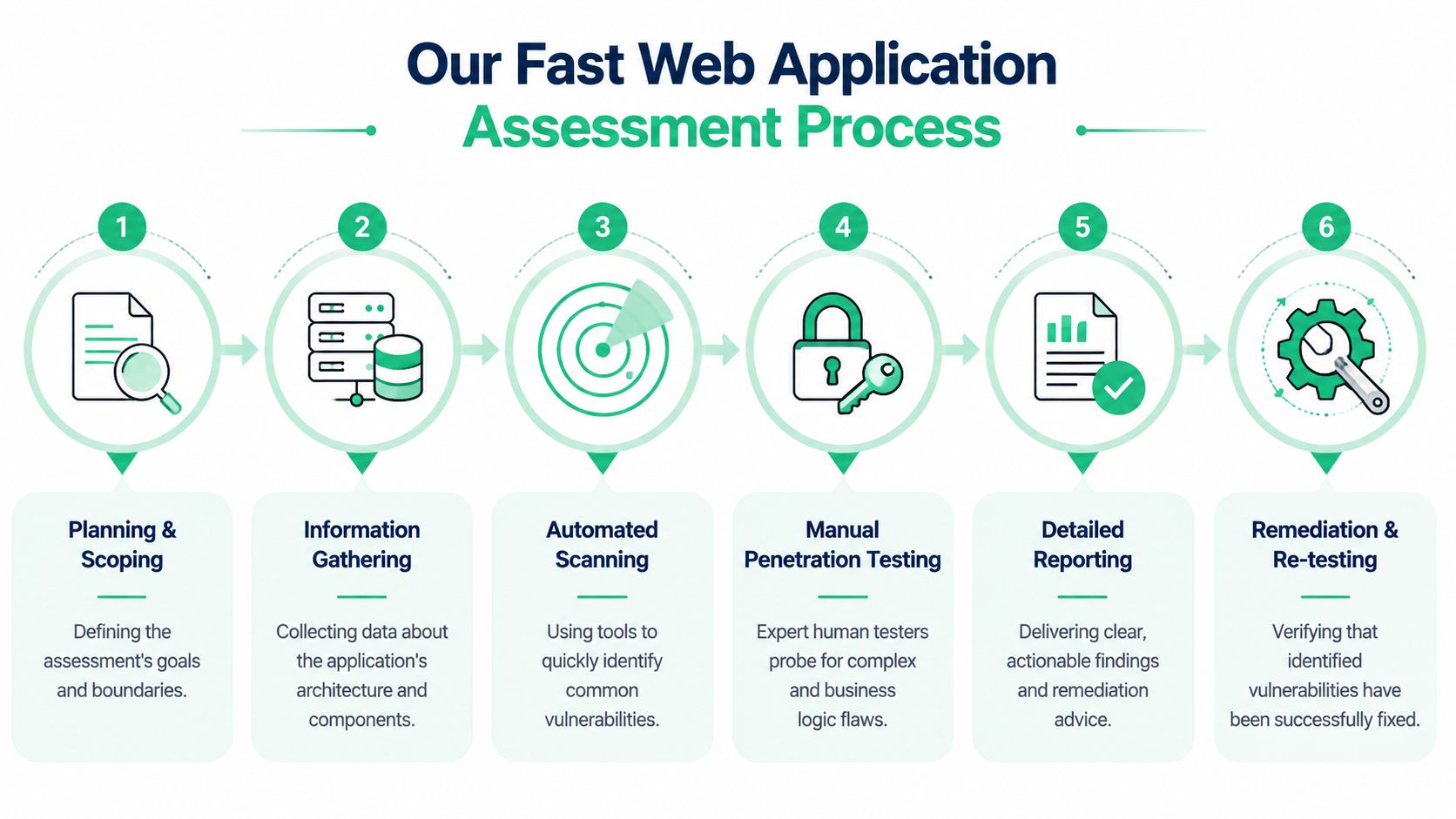
Start with scope, not guesses
Fast does not mean sloppy. It means cutting out wasted effort.
The process starts by defining the application, the environments, the user roles, and the workflows that matter for security and compliance. That includes login, password reset, privileged actions, tenant separation, payment flows, admin functions, and any API endpoints tied to sensitive data. If scope is vague, the test drifts, the report gets noisy, and your team pays for hours that produce little value.
Good testers map the app before they start firing tools at it. They review routes, parameters, exposed functionality, and trust boundaries. They look for the places where a real attacker would focus first.
For SaaS companies, that usually means account boundaries, role checks, and administrative controls. If that is your situation, a SaaS pentest for SOC2 and HIPAA should verify far more than a login page and a scanner export.
Use automation for coverage, then verify by hand
Tools are useful for speed. They catch common issues, flag weak headers, spot missing controls, and surface input handling problems across a large attack surface.
They do not understand your product.
A scanner will not know whether a user can switch tenant IDs and view another customer's invoice. It will not notice that a discount workflow can be abused, or that a support role can reach admin-only actions through a hidden endpoint. Those are the flaws that create real exposure and real audit trouble.
Manual testing is where the assessment becomes credible. The OWASP Web Application Security Testing Guide lays out active testing methods for issues such as SQL injection, access control failures, and authentication weaknesses. That is the standard worth following if you want more than a checkbox exercise.
Manual review usually focuses on:
- Authentication flaws: weak login logic, insecure session handling, broken password reset flows
- Authorization gaps: horizontal and vertical access control failures
- Business logic abuse: workflow bypasses, pricing manipulation, account takeover paths
- Input exploitation: SQL injection, stored XSS, command execution, unsafe file upload and processing
This is the practical middle ground that startups and SMBs need. Pure automation misses too much. Full enterprise-style testing is often too slow and too expensive for a team that just needs a reliable result now.
Confirm findings, report clearly, retest fast
Once issues are verified, the tester documents the exact flaw, where it lives, how it was reproduced, what it could lead to, and how to fix it. Then your developers patch the problem, and the fix gets retested.
That retest matters.
Without it, you have an open loop, a stale report, and no clean evidence for compliance or customer review. The process should move quickly from scoped testing to clear findings to validation of fixes, without weeks of meetings and procurement theater.
Tester skill matters here too. Certifications such as OSCP, CEH, and CREST are not a guarantee, but they are a useful signal that the person doing the work can go beyond canned scanning and test the application like an attacker would.
How To Understand Your Assessment Report
A bad report creates more work than the vulnerabilities themselves. If your developers can't tell what happened, your compliance team can't explain it, and your leadership can't prioritize it, the report failed.
A useful web application vulnerability assessment report should be plain English first, technical detail second.

What a good report should include
You want a report that answers five basic questions.
- What is the issue: Name the flaw clearly
- Where was it found: Page, endpoint, parameter, or workflow
- How was it verified: Evidence, requests, responses, screenshots
- Why does it matter: Business impact, not just technical wording
- How do we fix it: Specific remediation guidance
If any of those are missing, expect confusion during remediation.
Evidence matters more than jargon
Scanner exports are noisy. They often dump raw findings without proving exploitability. A real report should show the path from test to evidence.
That usually includes:
- Screenshots: Visual proof of the issue or access gained
- Request and response logs: What the tester sent and what the app returned
- Affected roles or accounts: Which user types were involved
- Reproduction notes: Enough detail for your team to verify the issue internally
The best report reads like a bug ticket your engineers can act on, not like a graduate thesis on security theory.
A simple example finding
Here's the kind of language you want.
Finding: User A could change a numeric account reference in a request and view User B's billing data.
Impact: Unauthorized access to customer financial information. This creates customer trust risk and likely compliance problems.
Evidence: Authenticated request showed one user retrieving another user's records after a simple parameter change.
Fix: Enforce server-side authorization checks on every object request. Don't rely on hidden fields or client-side controls.
That's readable. It tells engineering what broke and tells management why it matters.
Don't obsess over the score alone
Most reports include CVSS or another severity method. That's useful, but it's not enough by itself. A medium-rated issue in a payment workflow can matter more than a high-rated issue buried behind multiple restrictions.
Good reports translate technical severity into business decisions. They tell you whether a flaw threatens customer data, audit outcomes, or core operations. That's the difference between a report that gets filed away and one that gets fixed.
Prioritizing Risks To Fix What Matters
Many teams don't fail because they found too little. They fail because they found too much and froze.
The fastest way to burn time is to fix vulnerabilities in severity order without asking where the business gets hurt. Technical scores matter, but they don't run your company. Context does.

Fix based on exposure and impact
The remediation gap is real. The mean time to fix critical vulnerabilities is 65 days, while attackers often exploit them within 15 days of discovery, according to the Edgescan 2023 Vulnerability Statistics Report. That means prioritization isn't an academic exercise. It's survival.
Use this order instead:
- Internet-facing flaws first: If it's exposed, move it up
- Access control and authentication next: Account abuse causes direct damage fast
- Sensitive data paths after that: Payment, health, admin, and customer record functions need attention
- Low-context scanner noise last: Especially if exploitation looks unlikely
Ask the questions attackers ask
Before your team fixes anything, ask:
- Can an outsider reach this?
- Can a basic user escalate privileges?
- Does this touch regulated or customer-sensitive data?
- Would exploitation create an audit problem or customer incident?
If the answer is yes to any of those, don't bury it in the backlog.
A lot of web platforms also inherit risk from the content and admin systems around them. If your stack includes a complex CMS, this breakdown of top 5 enterprise CMS security risks is a useful companion read because it connects platform decisions to real application exposure.
Build a sane workflow
Don't make developers decode a giant spreadsheet on their own. Turn findings into a clear queue.
- Immediate fixes: Exploitable issues tied to auth, access, or sensitive records
- Planned sprint work: Important flaws that need code changes and testing
- Compensating controls: Temporary protections like WAF rules while code fixes are in progress
- Validation: Retest after remediation so you know the fix worked
If your team needs a repeatable process after the first report, these vulnerability management best practices help turn one assessment into an ongoing routine.
Meeting Compliance With Vulnerability Assessments
Auditors don't ask for security testing because they enjoy paperwork. They ask because policies don't prove controls work.
That's why a web application vulnerability assessment matters for SOC 2, PCI DSS, HIPAA, and ISO 27001. It gives you evidence that someone looked at the actual system, tested the exposed attack surface, and documented what needs fixing.
Why compliance frameworks care
Across a large sample of web applications, 49% contained detectable vulnerabilities like SQL Injection and Cross-Site Scripting, and automated scanners alone found medium-to-high risk issues in 86% of sites, according to these web application security statistics. That's the backdrop compliance frameworks are reacting to. Web apps break often enough that auditors expect testing, not assumptions.
Here's the practical mapping:
- SOC 2: You need evidence that security controls are monitored, tested, and improved. A vulnerability assessment supports that story, and a pen test strengthens it.
- PCI DSS: Requirement 11 focuses on testing security systems and processes. If card data touches the application, testing isn't optional.
- HIPAA: Risk analysis and risk management expectations mean you need a defensible process for finding and reducing weaknesses in systems handling protected health information.
- ISO 27001: Vulnerability management and technical validation support the broader control environment. Policies alone won't carry the audit.
What auditors actually want to see
They usually want clear artifacts:
- Defined scope: What app, environment, and roles were reviewed
- Methodology: How testing was performed
- Findings list: Prioritized issues with evidence
- Remediation status: What was fixed, accepted, or scheduled
- Retest results: Proof that critical issues were rechecked
If you can't hand an auditor a readable report and explain what you fixed, your security work won't land the way you think it will.
Assessment first, pentest when stakes rise
For many SMBs and startups, an assessment is the practical first move because it creates order. It tells you what exists, where the obvious risk sits, and what needs manual validation next.
But if you're heading into a formal audit, handling regulated data, or answering an enterprise security review, manual penetration testing usually becomes necessary. Auditors and customers want evidence that a qualified human tried to break the app, not just a tool run.
When You Need An Affordable Pentest
There's a point where a basic assessment stops being enough.
If you're signing larger customers, going through a formal SOC 2 review, storing sensitive health or payment data, or trying to prove your app is safe to a skeptical buyer, you need more than scanner output. You need a manual pentest, pen test, or penetration test that shows what a real attacker could do.
Clear signs it's time
Move up to manual penetration testing when:
- Your auditor asks for stronger evidence
- Your customer security questionnaire asks for a recent pen test
- Your product has role-based access, workflows, or APIs that automation won't understand
- Your team needs a report with proof, remediation guidance, and retesting
This doesn't mean you need an overpriced enterprise engagement with months of delay. It means you need the right scope, certified testers, and a report you can use quickly.
What to look for in a provider
Keep it simple.
- Certified testers: OSCP, CEH, and CREST are strong indicators
- Manual validation: Not just scan output wrapped in a logo
- Fast turnaround: You need the report while it still matters
- Clear remediation support: Your developers should know exactly what to do
- Reasonable scope and pricing: Especially if you're a startup or SMB
A web application vulnerability assessment is the right first step. An affordable pentest is the right next step when the risk, the customer, or the audit requires stronger proof.
If that's where you are, skip the bloated process. Use the contact form and get the testing started now.
If you need a fast, affordable report from certified pentesters for SOC2, PCI DSS, HIPAA, or a customer security review, Affordable Pentesting is built for that use case. Submit a request through the contact form, scope the web application, and get a practical penetration testing engagement moving without the usual delay.