.svg)
You're probably here because someone dropped “We need HIPAA compliance” on your desk and acted like that cleared things up.
It didn't.
Now you're stuck sorting through legal language, overpriced consulting proposals, and vague advice that somehow says a lot without telling you what to do next. That's the part that frustrates most IT managers, CISOs, compliance leads, and startup founders. HIPAA itself isn't the hard part. The hard part is figuring out what matters, what's noise, and how to prove your security controls without burning months and budget.
Introduction to HIPAA Cybersecurity for Businesses
If you're asking what is HIPAA in cyber security, keep it simple. HIPAA is the rulebook that tells certain healthcare organizations and their vendors how to protect electronic patient data.
That means if your company creates, receives, uses, or maintains electronic protected health information, you're not dealing with a nice-to-have security program. You're dealing with a regulated environment where access, storage, transmission, incident handling, and vendor oversight all matter.
Most firms make this sound harder than it is because complexity sells. They hand you a giant gap assessment, drag out timelines, and give you a report so padded with fluff that your auditor still asks the same basic questions. That approach is slow, expensive, and usually disconnected from how your systems work.
What most teams actually need
You need a clean answer to four questions:
- What data counts: Find the systems, apps, laptops, cloud workloads, and vendors that touch ePHI.
- What HIPAA expects: Put reasonable administrative, physical, and technical safeguards around that data.
- What can break: Identify where attackers, mistakes, or weak processes could expose ePHI.
- What proves it: Validate the controls with a real pen test, not just policy documents.
Practical rule: If you can't point to where ePHI lives, who can access it, and how that access is tested, your HIPAA program is still half-built.
The fast path forward
Here's the practical path. Scope your ePHI. Lock down access. Review vendors. Build an incident response process that your team can follow under pressure. Then run a pentest, or pen test, against the systems that matter.
That last part gets skipped too often. A policy says what should happen. A penetration test shows what an attacker can do. If you need to move fast for a customer security review, audit request, or contract requirement, that distinction matters a lot.
Understanding the Core HIPAA Security Rules
Your team finds suspicious access to a shared mailbox with patient data on Tuesday. By Thursday, leadership wants to know whether it triggers HIPAA, legal wants dates, and IT is still figuring out what was exposed. That is why you need the core HIPAA rules clear before an incident, not during one.
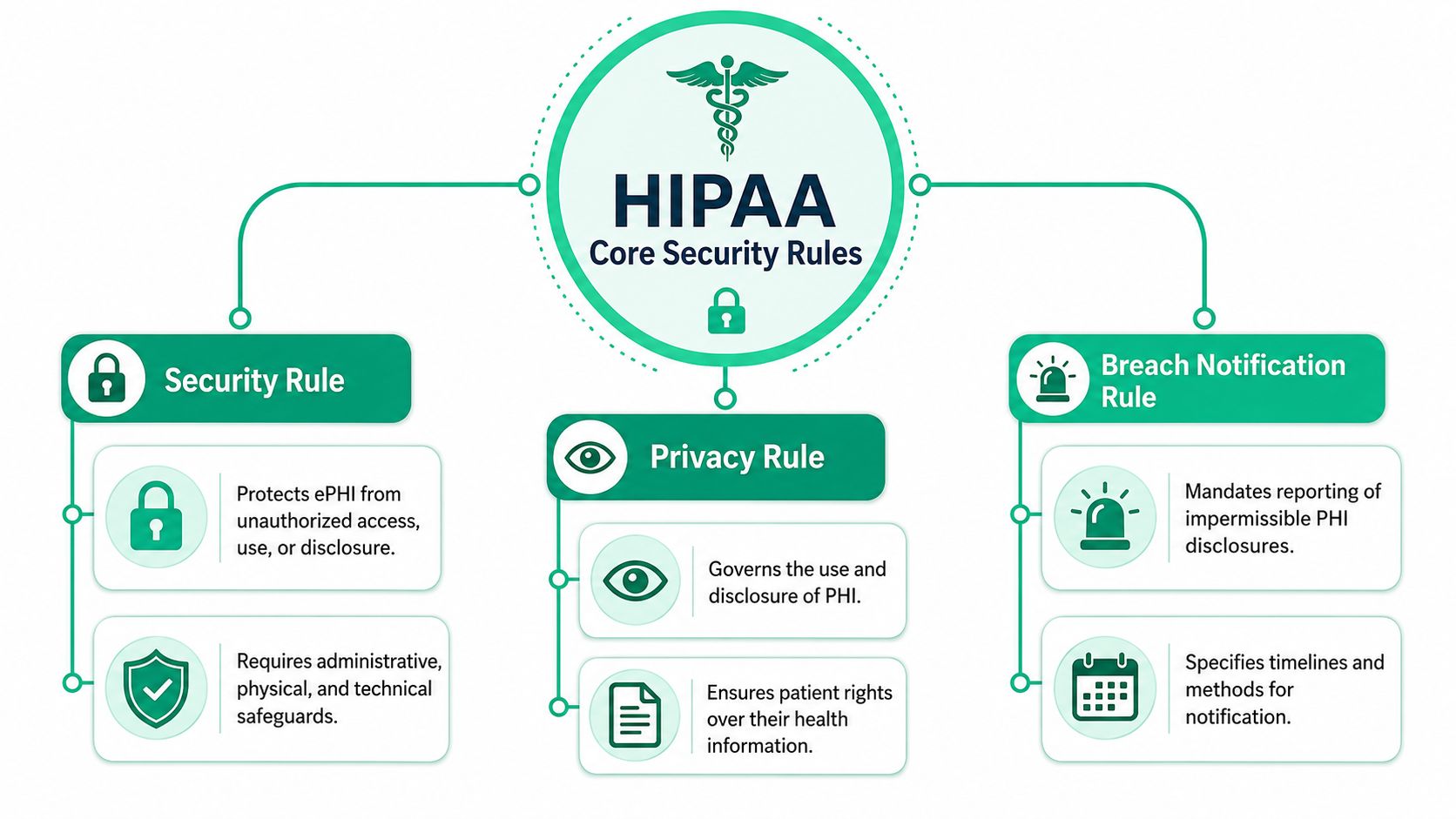
HIPAA is not one giant requirement. For day-to-day security decisions, three rules matter most: the Security Rule, the Privacy Rule, and the Breach Notification Rule. If you run a small healthcare company, SaaS platform, clinic, or health startup, this matters even more. You do not need a six-month consulting project. You need to know which rule drives which action so you can set controls, test them fast, and keep costs under control.
The timing matters. HIPAA became law in 1996, and the Security Rule later established national requirements for protecting electronic protected health information, as explained in HHS guidance on the HIPAA Security Rule.
Security Rule means secure ePHI in real systems
The Security Rule is the rule your IT and security staff will touch constantly. It applies to electronic protected health information, or ePHI, and it pushes you to secure the systems that create, store, process, or transmit it.
That includes your cloud apps, endpoints, email, identity stack, backups, logs, and vendor-connected workflows.
For SMBs, this is the rule that usually exposes the gap between policy and reality. A consultant can hand you a polished document. An attacker goes after exposed admin panels, stale accounts, weak MFA coverage, flat networks, and misconfigured storage. If you want practical HIPAA compliance, start here and validate these systems with targeted testing instead of paying for vague advice.
Privacy Rule means control access and disclosure
The Privacy Rule is often treated like a legal issue, but it affects technical design directly. It governs how protected health information is used and disclosed, which means your access model, internal permissions, exports, support workflows, and shared files all need to line up with it.
Small teams often face harsh consequences.
A startup may move fast with a shared inbox, broad admin rights, and support staff who can see far more data than they need. That setup is convenient. It also creates avoidable exposure. If your application, help desk, or reporting process gives employees more data than their role requires, you have a privacy problem and a security problem at the same time.
Breach Notification Rule means the clock starts fast
The Breach Notification Rule decides what happens after unsecured PHI is exposed. Covered entities must notify affected individuals without unreasonable delay and no later than 60 days after discovery, as stated in the HHS Breach Notification Rule summary.
That deadline is not your main problem. The actual problem is confusion in the first 48 hours.
Teams waste time arguing over whether data was involved, which systems were touched, whether a vendor owns part of the response, and who signs off on notifications. Slow, expensive consulting firms rarely fix that. A focused security program does. You need clear ownership, usable logging, scoped asset inventory, and a fast way to test whether an attacker could reach ePHI in the first place.
HIPAA failures usually start with basic operational mess. Unclear ownership, weak access control, bad visibility, and no tested response plan.
What these rules mean for a lean security team
Keep it simple:
- Security Rule: Secure the systems and workflows that handle ePHI
- Privacy Rule: Limit who can use or view health data
- Breach Notification Rule: Investigate quickly and notify on time if unsecured PHI is exposed
That is the working model. Learn those three jobs, assign ownership, and test the environment that handles patient data. That gets an SMB much closer to real HIPAA compliance than another oversized binder ever will.
The Three Required HIPAA Safeguards Explained
HIPAA doesn't tell you to buy one magic tool and call it done. It requires a framework of administrative, physical, and technical safeguards to protect ePHI, and the Security Rule is built around confidentiality, integrity, and availability, as described in HHS laws and regulations guidance.
That's the part many teams overcomplicate. These safeguards are just three buckets for how you protect health data.
Administrative safeguards in plain English
Administrative safeguards are the rules your people follow. These encompass policies, training, risk decisions, access approvals, onboarding, offboarding, and vendor oversight.
If your company has good tools but no process for who gets access and when it gets removed, your administrative controls are weak. Attackers love that kind of mess because it leaves old accounts, excessive permissions, and unclear ownership.
Physical safeguards still matter
Physical safeguards pertain to the physical environment. Office access, locked rooms, workstation placement, laptop handling, and device disposal all fit here.
A lot of startups ignore this because they think “we're cloud-first” means physical risk goes away. It doesn't. A stolen laptop with cached access or exposed files is still your problem.
Technical safeguards are where testing helps
Technical safeguards are the controls typically considered first. Access control, logging, authentication, encryption, secure transmission, and system hardening belong here.
A penetration test becomes useful. You stop guessing whether the controls work and start checking whether an attacker can bypass them.
| HIPAA Safeguards at a Glance | What It Is | Simple Example |
|---|---|---|
| Administrative | Policies, procedures, and workforce management | Requiring approval before granting access to patient records |
| Physical | Protection for facilities, devices, and workspaces | Locking laptops and restricting server room access |
| Technical | Security controls inside systems and networks | Using encryption, audit logs, and role-based access |
A simple way to think about it
Use this mental model:
- Administrative is people and process
- Physical is buildings and devices
- Technical is systems and data controls
If one of those is weak, your HIPAA posture is weak. You don't need a giant consulting deck to understand that. You need clear ownership, sensible controls, and proof they hold up.
How to Conduct a HIPAA Risk Analysis
A HIPAA risk analysis is where organizations should typically begin. Not because auditors like the phrase, but because you can't protect data you haven't found.
Treat it like a treasure hunt. Your job is to locate every place ePHI is created, received, stored, processed, or transmitted, then figure out what could go wrong in each place.

Start with where ePHI lives
Don't begin with a policy template. Begin with systems.
Look at your EHR, billing platform, support tools, cloud storage, employee laptops, backups, messaging tools, and any third-party vendor touching patient data. If ePHI moves through it, it belongs in scope. A focused HIPAA Security Risk Assessment should document those data flows clearly enough that an outsider can follow them.
Then map threats and weak spots
Once you know where the data is, ask simple questions.
- Who can access it: Are permissions limited or broad and messy?
- How is it exposed: Email, cloud shares, local devices, vendor portals, APIs?
- What can fail: Misconfigurations, lost devices, weak passwords, poor logging, stale accounts?
- What happens during an incident: Can your team contain, investigate, and recover without chaos?
This doesn't need to sound academic. It needs to be usable.
If your risk analysis can't help you decide what to fix next week, it's paperwork, not security.
Prioritize what matters first
Not every finding deserves the same urgency. Systems with direct ePHI exposure, external access, weak authentication, or third-party dependencies usually deserve immediate attention.
A good risk analysis gives you a repair list. It tells you where to tighten controls, what to monitor, what to test, and which systems need a pen test before an auditor or customer asks harder questions.
Using Penetration Testing for HIPAA Compliance
A risk analysis tells you where problems might exist. A pentest tells you whether an attacker can exploit them.
That's why penetration testing matters for HIPAA. Security paperwork might satisfy a checklist for a moment, but it won't show whether your login flow, cloud configuration, exposed app function, or internal access path can be abused in actual scenarios.
Compliance is not the same as readiness
HHS provides separate cybersecurity guidance for covered entities and business associates dealing with cyber-related security incidents, which makes the point clearly: execution matters, not just policy awareness. It also reinforces a hard truth. Compliance does not automatically equal resilience, and teams can look compliant on paper while still being unprepared for containment, restoration, and forensics, as reflected in HHS cybersecurity guidance.
That gap is where a penetration test earns its keep.
What a good pen test validates
A useful pen test checks whether your technical safeguards hold up under pressure. It can help validate things like:
- Access control: Can a normal user reach data or functions they shouldn't?
- Authentication: Are login protections easy to bypass or abuse?
- Segmentation: Can an attacker move from one system to another too easily?
- Exposure paths: Do cloud apps, APIs, laptops, or third-party connections create obvious openings?
This is why many teams use penetration testing for healthcare organizations as a practical proof point when preparing for HIPAA reviews.
Why traditional firms annoy everyone
You already know the problem. Big firms often charge like you're a hospital chain, move like they have all quarter, and return a report loaded with recycled findings that barely help your team fix anything.
For SMBs and startups, that model is broken.
If you need a report within a week for an audit, customer review, or board request, you need a team that can scope fast, test manually, and write clear findings without three rounds of account-manager theater. Certified testers with OSCP, CEH, and CREST backgrounds matter here because they know how to think like attackers and still write reports your auditor and engineering team can both use. Affordable Pentesting is one example of a provider focused on manual testing for compliance-driven teams that need speed and lower cost.
A cheap automated scan is not a penetration test. A slow enterprise consulting engagement isn't the only alternative.
Common HIPAA Mistakes and Costly Penalties
Friday afternoon, your team spots suspicious access to a system that stores patient data. By Monday, leadership wants answers, legal wants facts, and your customer wants to know whether their data was exposed. If you have not already scoped your ePHI, locked down access, and assigned breach-response ownership, HIPAA turns into an expensive fire drill fast.
That is the pattern SMBs and startups keep repeating. They do not fail because HIPAA is impossible. They fail because they buy slow advice, postpone technical validation, and leave obvious gaps in place for too long.
The mistakes that keep costing teams money
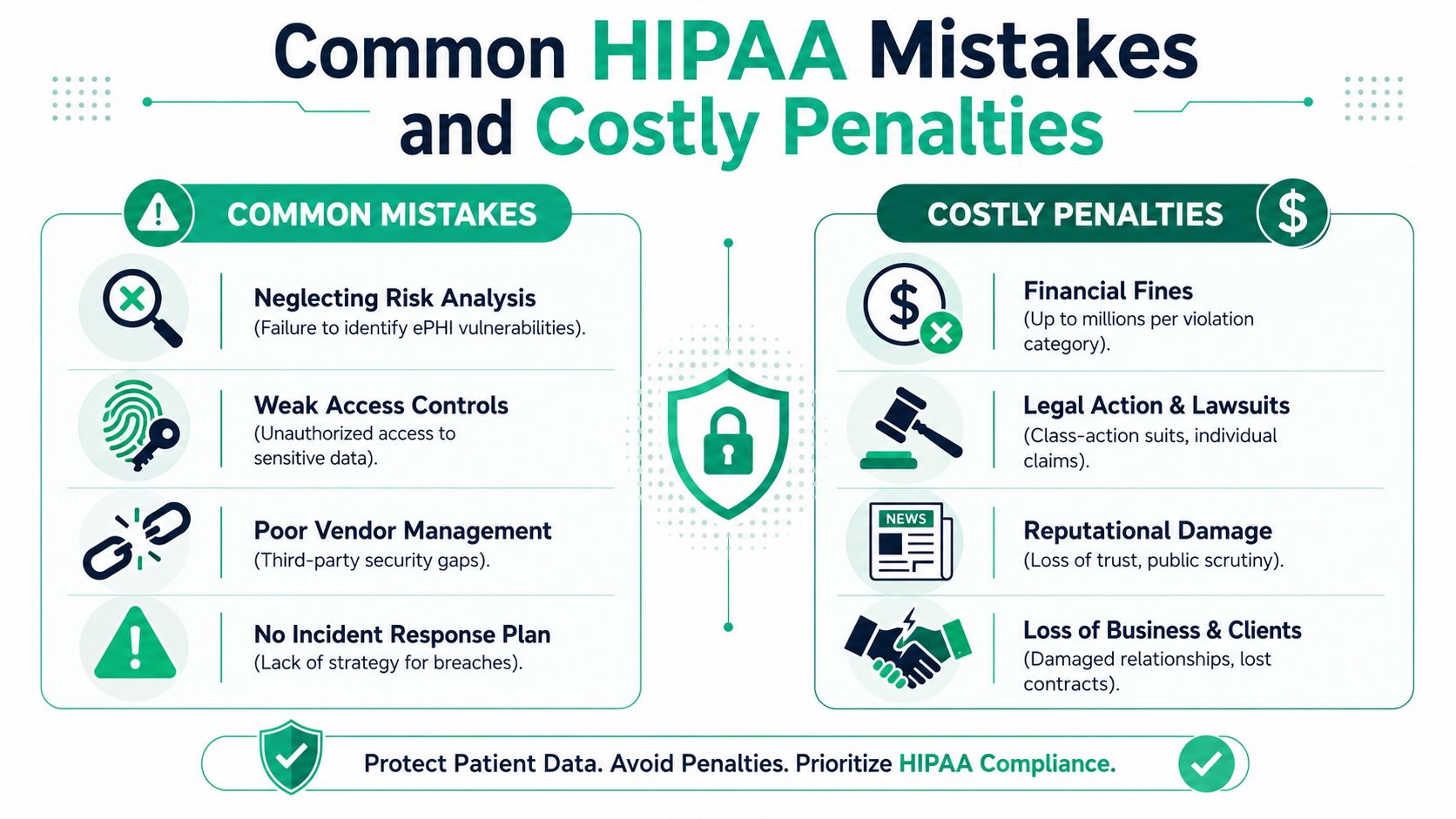
The first mistake is bad scoping. Teams document the primary app and miss the places where ePHI spreads: backups, exports, employee laptops, shared storage, support tools, and vendor platforms. Then they claim compliance over a partial environment.
The second is weak identity and access management. Admin rights pile up. Shared accounts stick around. Departed staff keep access longer than they should. None of that looks dramatic until an incident forces you to explain who could reach what.
The third is poor vendor control. If a third party stores, processes, or can access ePHI, you need clear security expectations, contract terms, and breach responsibilities. Hoping the vendor has it handled is not vendor management.
The fourth is no real breach workflow. Teams waste the first day of an incident arguing about ownership, evidence, legal review, and customer communication. HIPAA does not give you extra time because your internal process is messy. HHS explains the breach notification requirements, including the general rule to notify affected individuals and HHS without unreasonable delay and no later than 60 days after discovery, in its breach notification rule summary.
What the penalty really looks like
The fine gets attention. The operational damage hurts first.
Engineering drops roadmap work to investigate and contain the issue. Leadership starts questioning whether your controls exist on paper only. Customers ask harder questions in security reviews. Sales cycles slow down because nobody wants to trust a vendor that cannot explain how health data is protected.
For smaller companies, that disruption hits harder because the same few people are already covering security, IT, compliance, and vendor reviews.
Fix the common failures before they become reportable incidents
Use a short list and get it done.
- Build a real ePHI inventory, including backups, endpoints, exports, and vendors.
- Remove stale accounts and reduce privileged access.
- Review every vendor that touches ePHI and define breach duties in writing.
- Create an incident process with technical, legal, and executive owners.
- Validate high-risk systems with a penetration test so you are not guessing.
If you need broader context for your internal team, this guide for small business IT security is a useful reference. If you need a faster compliance-focused starting point, begin with understanding HIPAA requirements and then verify the systems that matter most first.
That is how smaller teams stay out of trouble. Skip the bloated consulting cycle, fix the known failure points, and get evidence that your controls hold up.
Your Practical Path to HIPAA Compliance
If you want the short answer to what is HIPAA in cyber security, here it is. It's the security and compliance framework that tells covered entities and business associates how to protect ePHI and respond when things go wrong.
That doesn't mean you need a giant consulting project. It means you need a practical sequence of work that your team can finish.
Keep the process simple
Use this order:
- Find your ePHI footprint across apps, devices, cloud services, and vendors.
- Apply the right safeguards across process, physical handling, and technical controls.
- Run a risk analysis so you know what is exposed and what needs priority.
- Validate with penetration testing so you have evidence, not assumptions.
- Prepare for incidents before your team is forced to make breach decisions under pressure.
If your internal team needs broader context on small-company security and compliance basics, this guide for small business IT security is a useful outside resource. For a more direct compliance view, start with understanding HIPAA requirements and then map those requirements to the systems you run.
Don't overbuy and don't stall
A lot of teams waste money doing too much paperwork before proving anything technical. Others stall because they assume HIPAA compliance has to be slow and expensive.
It doesn't.
Get the scope right. Test the systems that matter. Fix what's exposed. Keep the evidence organized. If you need an audit-ready report quickly, choose a provider that can perform a real pen test, explain the findings in plain English, and turn the report around within a week.
If you need a fast, affordable way to validate HIPAA controls without getting trapped in a bloated consulting cycle, contact Affordable Pentesting through the contact form. A focused manual pentest, clear reporting, and a report within a week is usually what frustrated IT teams needed from the start.