.svg)
Your app is down. Customers can't log in. Your payment flow is stuck because a vendor outage broke a dependency you barely documented. Slack fills up, people start guessing, and the founder asks the worst possible question during an incident: “Who owns this?”
That's what a bad business recovery plan example looks like in real life. Not a missing PDF. Chaos, delay, and expensive confusion.
A good plan does the opposite. It tells your team what fails first, what gets restored first, who makes the call, how you keep serving customers, and how you prove the fix works. If you're a startup or SMB, that matters more than polished policy language. You need something your team can use under pressure, not something that looks nice in a compliance folder.
Why You Need a Recovery Plan Before Disaster Strikes
Most companies don't fail during the outage. They fail in the hour after it starts.
One person is checking backups. Another is messaging a cloud vendor. Someone else is trying to explain the problem to customers without knowing the scope. Meanwhile, nobody has a clean answer on restoration order, fallback process, or approval path. That's how small incidents turn into business-wide messes.

A recovery plan fixes that by forcing decisions before the pressure hits. You decide in advance which systems matter most, who owns recovery, how to reach vendors, what customers need to hear, and what your manual fallback looks like. That's not bureaucracy. That's survival.
What startups usually get wrong
Founders often assume recovery planning is for big enterprises with giant IT teams. That's backwards. Lean teams need it more because they have fewer people, less redundancy, and more operational concentration around a handful of systems.
If your auth provider, CRM, payment processor, support platform, or cloud environment goes sideways, your team can't afford to improvise. You need a short, usable playbook.
- No clear priority order means teams restore whatever is loudest, not what matters most.
- No named owners means everyone joins the call, but nobody leads.
- No tested fallback means the plan dies the moment a SaaS dependency fails.
- No evidence of readiness means auditors, customers, and leadership hear promises instead of proof.
A recovery plan isn't valuable because it exists. It's valuable because your team can execute it while stressed.
There's also a security angle people ignore. Recovery isn't just about restoring uptime. It's about restoring safely. If you bring systems back in a rush without validating controls, you can reintroduce the same weakness that caused the incident or create a new one while patching under pressure.
That's why recovery planning connects directly to how to avoid data breach costs. Fast restoration without discipline can make the damage worse.
What a prepared team looks like
Prepared teams don't look heroic. They look boring, and that's the point.
They know what to do. They know who approves changes. They know which systems can wait. They know which vendors to call. They know how to work manually if a third party goes down. They restore in order, validate what came back, and document what changed.
That's the standard you want. Calm beats clever every time.
The Core Components of a Business Recovery Plan
A recovery plan isn't one giant document. It's a set of practical parts that answer obvious questions.
What breaks first? What hurts most? Who fixes it? How do we restore data? Who do we notify? How do we know the plan still works? If you can answer those, you can build a usable plan.
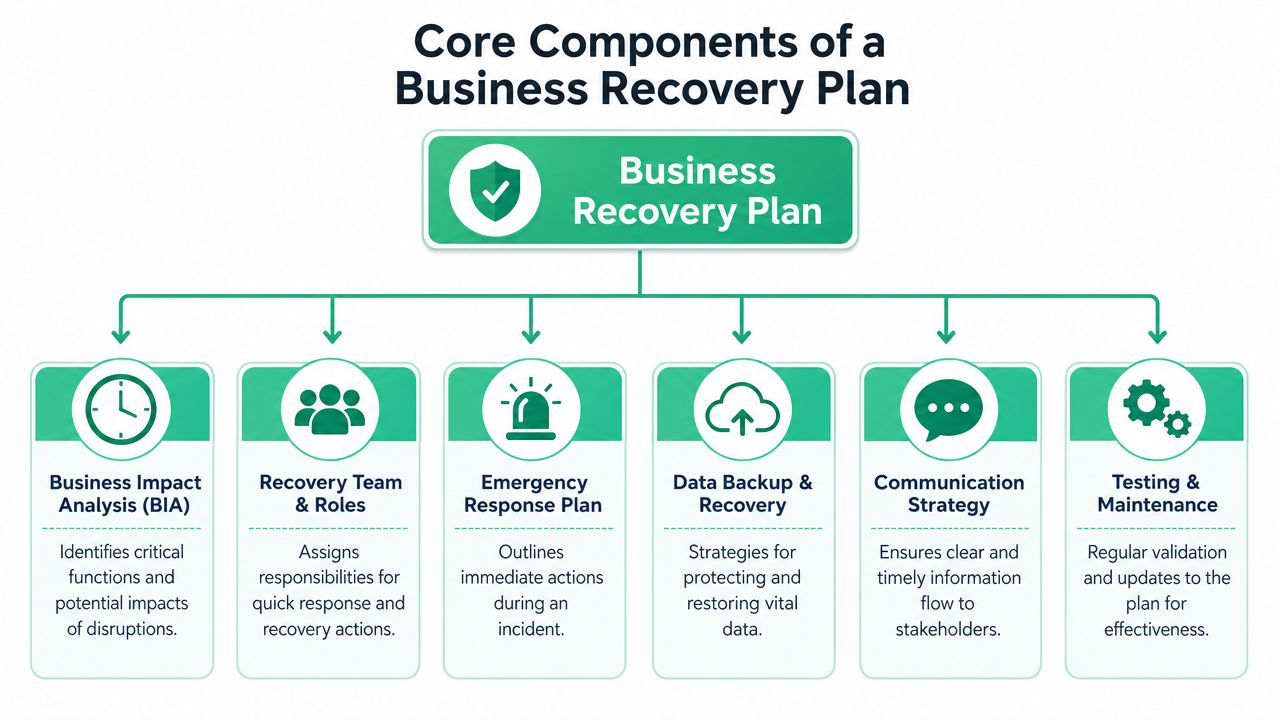
The six parts that matter
Here's the simple version.
| Component | What it answers | Why it matters |
|---|---|---|
| Business impact analysis | What hurts the business first | Sets recovery priority |
| Recovery team and roles | Who does what | Cuts confusion fast |
| Emergency response plan | What happens immediately | Prevents drift in the first moments |
| Data backup and recovery | How data gets restored | Keeps recovery grounded in reality |
| Communication strategy | Who needs updates | Stops mixed messages |
| Testing and maintenance | Does this still work | Keeps the plan alive |
A lot of teams overbuild the wrong section. They spend too much time on generic incident language and not enough on actual restoration steps. Your plan needs less policy filler and more operational detail.
Keep each section brutally practical
Your business impact analysis should answer one question: if this system dies, what stops? Don't make it abstract. List the actual workflow impact. Can customers log in? Can you invoice? Can support verify user identity? Can finance close books?
Your recovery team should list named owners, not departments. “Engineering” is not a person. During an incident, vague ownership wastes time.
Your communication plan should cover staff, customers, vendors, and leadership. It should also name the approved channels. If your normal messaging platform is part of the failure chain, your team needs a backup communication method.
- Business impact analysis: Rank functions by business pain, not internal politics.
- Roles and ownership: Put one owner on each major action.
- Backup sources: List where clean data is located.
- Vendor contacts: Include the outside providers your team depends on.
- Validation checks: Define how you confirm a restored service is fully usable.
Practical rule: If a new hire can't follow the plan during a stressful outage, the plan is too vague.
Don't forget dependencies
Most recovery plans fail at a critical point. The plan covers your servers, your database, and your team, but often forgets the SaaS stack your business runs on.
If authentication, payroll, CRM, ticketing, or billing depends on a third party, that dependency belongs in the plan. If you don't map it, you won't recover around it. You'll just discover it in the middle of the outage, which is the most expensive time to learn anything.
Defining Your Recovery Objectives RTO and RPO
If your plan doesn't define RTO and RPO, it isn't finished. It's just a checklist.
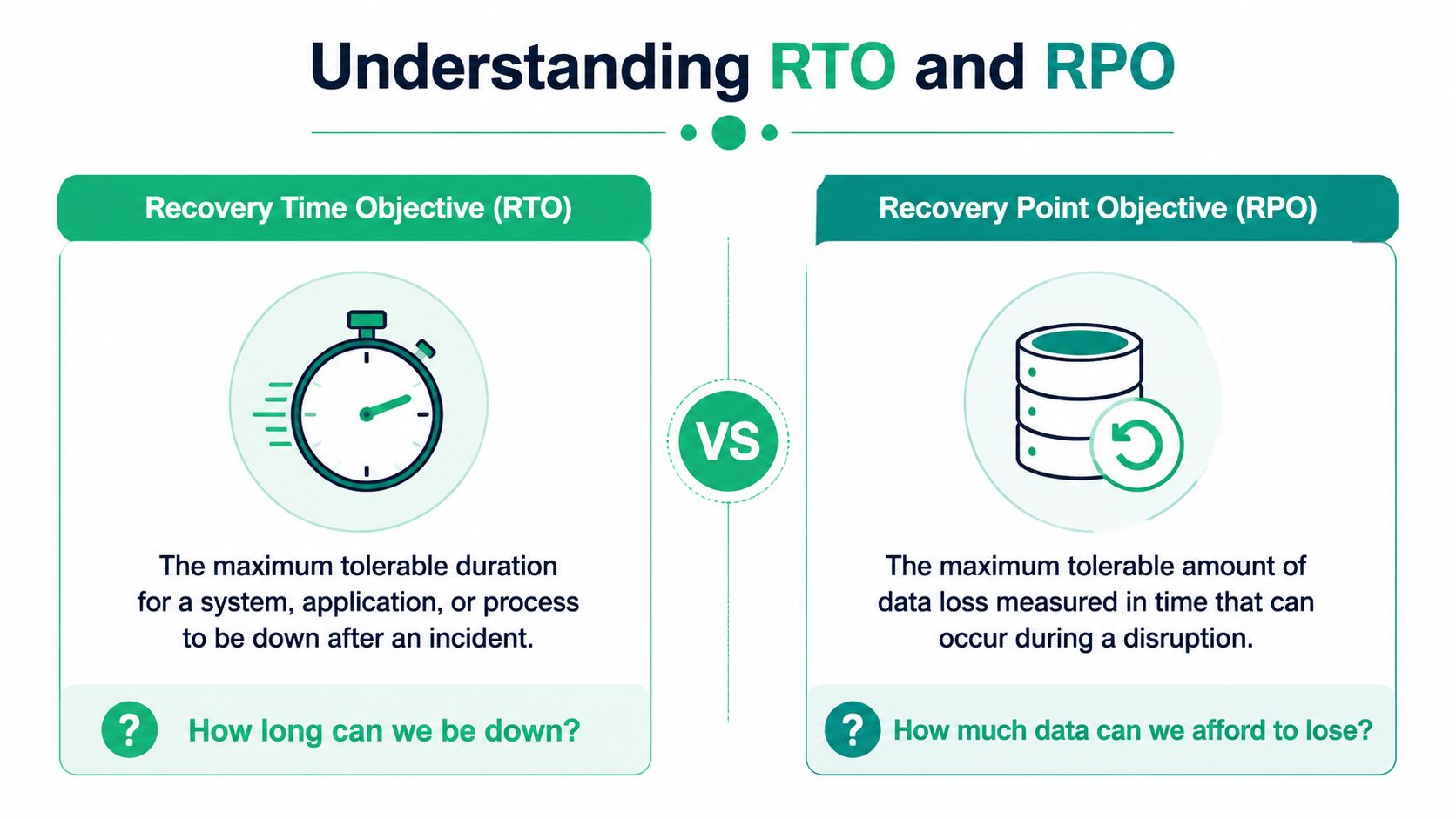
Industry guidance defines RTO as the maximum acceptable time to restore normal operations, and RPO as the maximum acceptable data loss. Practical examples range from 30 minutes to 12 hours for RTO, while RPO is often measured as 1 hour, 3 hours, or 1 day of data, as outlined in Cloudian's recovery planning guide.
Ask the two questions that matter
RTO asks, how long can we be down?
RPO asks, how much data can we afford to lose?
Those questions sound simple because they are. But they force real decisions. If your customer-facing app needs a short recovery window, your team needs a faster and more disciplined restoration approach than it would for an internal reporting tool.
A simple way to think about it
Think of RTO as the timer on the outage. Once that timer runs out, the business impact becomes unacceptable.
Think of RPO as the rewind limit. It tells you how far back you can roll data before the loss becomes unacceptable.
That means different systems get different targets. A login service, payment workflow, or customer portal usually needs a tighter recovery target than an internal analytics dashboard. Not because one is “technical” and one isn't, but because one blocks revenue and customer trust immediately.
- Short RTO systems: Customer access, revenue workflows, identity systems
- Moderate RTO systems: Internal tools teams need the same day
- Longer RTO systems: Noncritical reporting or reference platforms
Why founders should care
RTO and RPO force budgeting discipline. They stop teams from saying “everything is critical,” which is usually a sign nobody has made a hard decision.
They also stop the opposite mistake. Some teams underprotect systems that drive revenue because they haven't translated business pain into recovery targets. Once you define the acceptable downtime and acceptable data loss, the restoration order becomes obvious.
If you can't say how long a system can be down or how much data you can lose, you can't make a sane recovery decision.
Use these targets to settle arguments early. If one app gets a shorter RTO than another, the team restores it first. That's how you avoid wasting time on noncritical assets while customer-facing systems stay broken.
Writing Your Step-by-Step Recovery Procedures
Most recovery plans fail at the exact point where they should become useful. They say what should happen, but not how.
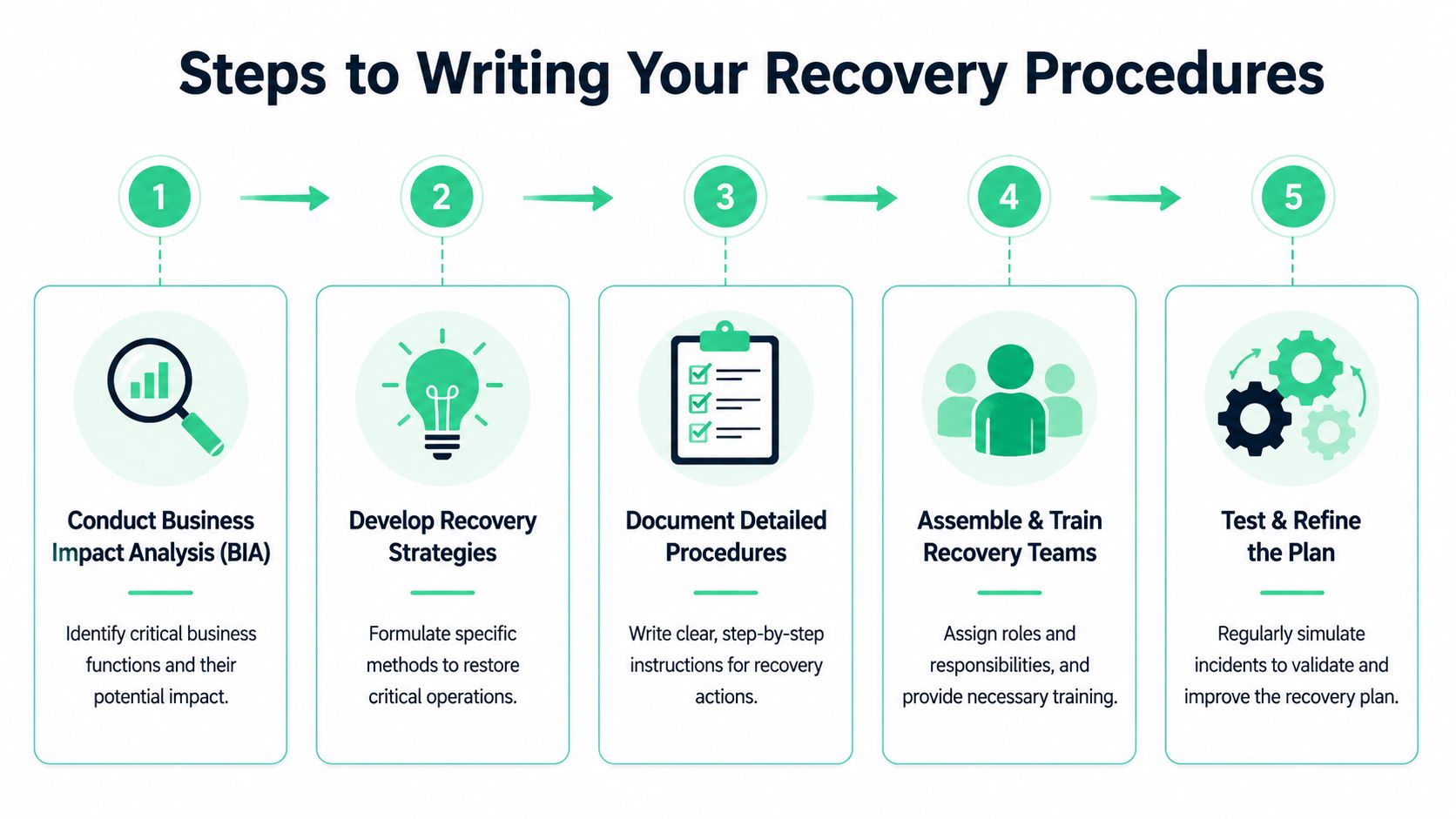
That's why your procedures need to be written in a strict order. Guidance recommends you perform a business impact analysis, define critical functions and dependencies, set RTO and RPO targets, write step-by-step restoration procedures, assign named owners, and then test and update the plan on a recurring schedule, as described by the U.S. Chamber of Commerce recovery planning guidance.
Use one procedure per critical function
Don't write a giant recovery novel. Write separate procedures for each critical function.
A customer login outage is different from a billing outage. A cloud storage failure is different from a support desk outage. If you bundle them into one bloated document, your team won't find the right steps fast enough.
Each procedure should answer these questions:
- What triggers this procedure
- Who owns it
- What systems and vendors it depends on
- What order the team follows
- How the team validates recovery
- What fallback process keeps the business operating
- Who gets notified and when
A workable template
Use something like this for each major workflow.
- Scenario: “Primary authentication provider is unavailable”
- Business impact: “Customers can't log in. Support can't verify accounts through the normal workflow.”
- Owner: “Engineering lead” and named backup
- Dependencies: Auth provider, user database, support platform, status page
- Immediate actions: Confirm outage scope, stop risky changes, open incident channel, contact vendor
- Fallback process: Temporary manual verification path for support, approved customer messaging, limited access workflow if appropriate
- Restoration steps: Bring services back in the right order, verify successful login, verify audit logging, verify support workflow
- Validation: Test with real user paths, confirm staff access, confirm customer notifications
- Post-incident update: Record what failed, what was missing, and what gets changed
That's a real business recovery plan example structure. It's direct, operational, and usable.
SaaS outages need manual workarounds
This is the modern gap. A lot of businesses don't go down because their office flooded or their server failed. They go down because a dependency did.
If your payment processor is unavailable, what can finance do manually? If your CRM is down, how does support track customer issues? If your ticketing platform is gone, where do incoming requests land? If your cloud auth layer breaks, how do admins get emergency access without creating a bigger security problem?
Those answers belong in the procedure, not in someone's memory.
Recent continuity guidance has become more explicit about involving third-party providers and regulatory notifications, and it points toward ecosystem-based recovery instead of internal-only recovery, as discussed in Corodata's continuity planning overview. That's the right direction. Most startups live on third-party services, so the recovery plan has to reflect reality.
For teams that run sensitive data in cloud environments, this is also where data handling matters. If you're documenting fallback and restoration around cloud workloads, this DLP guide for AWS users is a useful companion resource for thinking through data exposure during recovery.
Write the manual workaround before you need it. During an outage, nobody invents a clean process on the spot.
Common procedure mistakes
Teams usually make the same errors.
- They skip owners: A task without a name beside it won't get done fast.
- They ignore validation: Restored doesn't mean usable.
- They miss vendor contacts: You don't want to search billing portals during an incident.
- They forget customer messaging: Silence creates more damage than a short, accurate update.
- They document the ideal path only: Real recovery needs fallback options.
Your procedures should be short enough to use and detailed enough to trust. If they can't survive a messy weekday outage, rewrite them.
Testing Your Plan with Drills and Pentests
A plan you haven't tested is a guess.
Practical continuity guidance keeps making the same point because teams keep ignoring it. Recovery plans fail when they aren't practiced. Good guidance recommends documenting critical systems, dependencies, backup sources, escalation paths, and restoration procedures before an incident, then validating the restored environment and improving the plan after each event, as explained in Atlassian's disaster recovery guidance.
Start with simple drills
You don't need a huge simulation to get value. Start with a tabletop drill.
Pick one ugly but realistic scenario. Your auth vendor is down. Your support system is unavailable. Your cloud console access is restricted. Then walk the team through the recovery procedure step by step. See where they stall.
Good drills expose boring failures. Missing contacts. Wrong assumptions. Backup sources nobody has tested. Internal approvals that take too long. Those are the exact failures that stretch downtime.
- Tabletop drill: Talk through the event and your response.
- Role check: Make each owner explain their action.
- Dependency review: Confirm outside services in the chain.
- Validation run: Prove restored services work.
- After-action update: Fix the document while the lessons are fresh.
Add pentest pressure to the process
Drills test process. A pentest, pen test, or penetration test tests whether your environment and recovery assumptions hold up under attack.
That matters because many outages aren't clean technical failures. They involve unauthorized access, broken controls, weak segmentation, exposed admin paths, or unsafe backup handling. A real penetration testing engagement can show whether an attacker can move through the same systems you expect to recover safely.
Companies learn hard truths: The backup exists, but access control around it is weak. The fallback admin path works, but it's too permissive. The emergency access workflow restores operations, but creates a compliance problem. Scanners won't catch all of that. A manual pentest often will.
If you want to see what useful evidence looks like after a security assessment, review these example pentest reports. The right report should tell you what failed, why it matters, and what to fix next.
Recovery testing should answer two questions. Can we restore operations, and can we restore them without opening a new security hole?
What to prove during testing
You're not just testing whether systems come back. You're testing whether the business can operate again.
Use drills and security testing to prove:
| Test area | What you need to know |
|---|---|
| Restoration order | Critical services come back first |
| Access control | Emergency access doesn't create unsafe shortcuts |
| Backup integrity | Data can be restored cleanly |
| Vendor coordination | Third parties are reachable and useful |
| Communication flow | Customers and staff get accurate updates |
| Evidence quality | You can show what was tested and fixed |
That's what separates a theoretical plan from an operational one.
Meeting Compliance Needs for SOC 2 PCI and HIPAA
Your auditor asks for recovery evidence after a security incident. Your team sends a policy PDF last updated 11 months ago. That fails the smell test immediately.
SOC 2, PCI, and HIPAA reviews all punish the same weakness. Companies treat recovery planning like paperwork instead of an operating system. The fix is simple. Build a plan you can run under pressure, then prove it works with documented tests, ownership, and corrections.
What auditors actually expect
Auditors want to see that recovery matches reality. They check whether your plan reflects your systems, your vendors, your people, and your actual failure points.
That means named owners, system dependencies, communication paths, backup procedures, manual workarounds, and evidence of review. If your cloud provider goes down, your payment processor fails, or a key admin is unavailable, the plan should show what happens next. If it cannot answer those questions, it is not audit evidence. It is a template.
For cardholder environments, recovery planning also needs to line up with access control, logging, segmentation, and restoration of payment workflows. This guide on understanding PCI DSS requirements is a useful reference for teams mapping recovery steps to PCI obligations.
How recovery supports SOC 2, PCI, and HIPAA
Each framework asks for slightly different evidence, but the pattern is consistent. Show that you can restore operations without losing control of sensitive systems or data.
- SOC 2: Document recovery roles, approval paths, critical dependencies, and test records.
- PCI: Show how payment systems are restored without exposing cardholder data or bypassing required controls.
- HIPAA: Document how systems supporting protected health information are recovered, who approves access, and how activity is tracked.
- Vendor oversight: Include third-party contacts, service dependencies, and notification requirements in the plan.
A static document is weak evidence. A tested system is much stronger.
Prove the plan works
The strongest audit posture comes from three things. Drill records, remediation history, and current security validation.
Run recovery exercises. Record what failed. Fix those gaps and keep the evidence. Then validate the environment itself. A recent penetration test, pen test, or pentest gives auditors another layer of proof that your controls were checked in conditions closer to real attack paths, not just policy review.
If you want to pass your next audit successfully, package your recovery plan with exercise results, version history, issue tracking, and security assessment findings. That combination shows discipline. It also saves time during audits because you are handing over proof, not explanations.
Recovery compliance is not about having a binder in a shared folder. It is about showing that your business can take a hit, restore critical services fast, and stay inside the control requirements that matter.