.svg)
Your audit is close. People are scrambling to close tickets, update screenshots, and explain exceptions that should've been handled months ago. Meanwhile, an auditor can walk through your office, see printed customer data on a desk, a screen displaying an active session, or a whiteboard full of sensitive notes, and conclude your control environment is sloppy.
That's why clean desk policies matter. They're cheap, visible, and easy to enforce compared with a pentest, a pen test, a full penetration test, or broader penetration testing work. They won't replace pentesting, pen testing, or a real penetration test from certified testers like OSCP, CEH, and CREST professionals, but they do something just as important for compliance. They show you can handle the basics.
Why This Policy Is Your Easiest Security Win
Your office manager leaves for lunch. A client contract is open on one desk, payroll notes are on a whiteboard, and a laptop at reception is still logged in. An auditor, vendor, cleaner, or visitor only needs 10 seconds to spot a control failure.
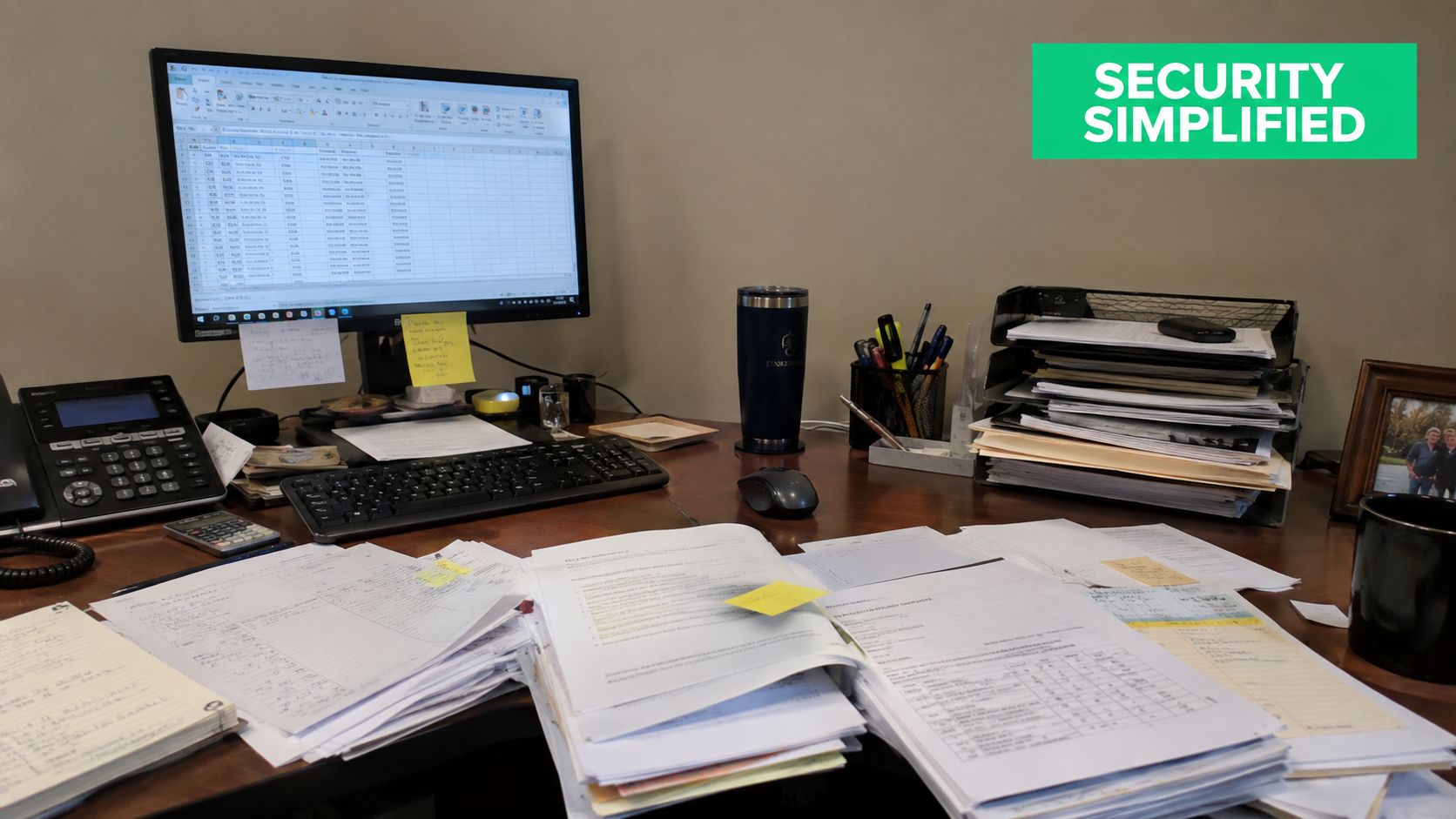
That is why a clean desk policy is such an easy win. It is cheap, visible, and fast to roll out. More importantly, it maps directly to physical and administrative safeguards auditors already expect to see under SOC 2, HIPAA, and PCI DSS.
Founders often spend too much time chasing technical fixes because they sound more advanced. Start here first. A clear desk, locked screen, secure drawer, and shred bin are easier to enforce than almost any other control, and they immediately improve how your security program looks during a walkthrough.
Use this rule in your policy and training:
Practical rule: If a visitor, contractor, cleaner, or coworker can read it, photograph it, or remove it, it is not secured.
The fastest way to make this policy useful is to tie it to named compliance requirements instead of writing vague office etiquette. Here is the simple version.
| Framework | What auditors expect to see | Policy language you can copy |
|---|---|---|
| SOC 2 | Physical access and media are controlled. Sensitive information is not left exposed in shared spaces. | “Employees must clear desks of sensitive paper records at the end of the workday and secure them in approved locked storage.” |
| HIPAA | Protected health information is protected from incidental exposure and unauthorized access. | “Workspaces that handle PHI must secure printed records, log off or lock devices when unattended, and erase visible notes containing patient information after use.” |
| PCI DSS | Cardholder data is physically protected and access is restricted. | “Printed material containing cardholder data must never be left unattended on desks, printers, or meeting tables and must be stored or destroyed using approved methods.” |
That table does two jobs. It gives your team plain-English rules, and it gives auditors language they can trace to a control objective.
You also do not need a complicated launch. You need a one-page policy, lockable storage, confidential disposal bins, auto-lock screen settings, and managers who correct violations the same day they see them. That is a small lift with a clear compliance payoff.
If you want a broader primer on handling sensitive information in day-to-day operations, myhalo's advice on data protection fits well with this approach.
Start with four rules and enforce them every day:
- Lock screens when stepping away: No exceptions for quick breaks.
- Put paper away immediately: Contracts, HR files, medical notes, invoices, and onboarding forms belong in locked storage when not in use.
- Clear visible notes: Erase whiteboards and remove sticky notes that contain sensitive details.
- Dispose of records correctly: Use approved shred bins or confidential disposal for sensitive printouts.
That is why this policy works so well for SMBs. It is simple to explain, simple to inspect, and simple to map to SOC 2, HIPAA, and PCI DSS without buying another tool.
Understanding The Real Risks Of A Messy Desk
A messy desk isn't just ugly. It creates obvious openings for data exposure, internal snooping, and accidental disclosure. The biggest problem is that people underestimate how much damage a quick glance can do.
Visual hacking is the simplest example. Someone walks by, sees a client list, reads a support escalation note, notices a password on a sticky note, or snaps a photo of a whiteboard. According to Barchart's clean desk guidance, a structured clean-desk policy, when fully implemented with staff training and regular audits, can reduce visual hacking risks by up to 70%.
Where The Exposure Actually Happens
Most failures are boring. That's why they happen so often.
- Printed paperwork: Invoices, HR files, patient notes, legal drafts, or customer onboarding forms left in plain sight.
- Logged-in devices: A logged-in laptop at reception or in an open office gives the next person instant access.
- Removable media: USB drives and similar storage left on desks are easy to lose or steal.
- Visible notes: Whiteboards, notebooks, and sticky notes often contain the exact context an attacker wants.
Why Small Lapses Turn Into Big Problems
One exposed document can trigger a compliance issue. One unattended workstation can expose internal systems. One visible spreadsheet can reveal customer records, pricing, payroll details, or regulated data.
A messy workspace is really an access control failure wearing office clothes.
The risk gets worse in shared spaces. Open offices, coworking floors, temporary meeting rooms, and hot-desking setups all increase the number of eyes near sensitive material. Even trusted employees can see information they have no business seeing.
Common Examples Auditors Hate
| Bad habit | What it exposes | Why it matters |
|---|---|---|
| Password on sticky note | Credentials | Defeats digital security controls |
| Client file left open | Personal or financial data | Creates disclosure risk |
| Unlocked screen at lunch | Active session access | Allows misuse without hacking |
| Whiteboard full of project details | Internal secrets or regulated data | Easy to view or photograph |
Many teams get confused, thinking a clean desk policy is about appearance. It's really about limiting unauthorized access in the cheapest possible way.
Crafting A Simple And Effective Clean Desk Policy
An auditor walks past reception at 5:40 p.m. and sees a client file on a desk, a password on a sticky note, and a laptop left active. You do not have a culture problem. You have a policy problem.
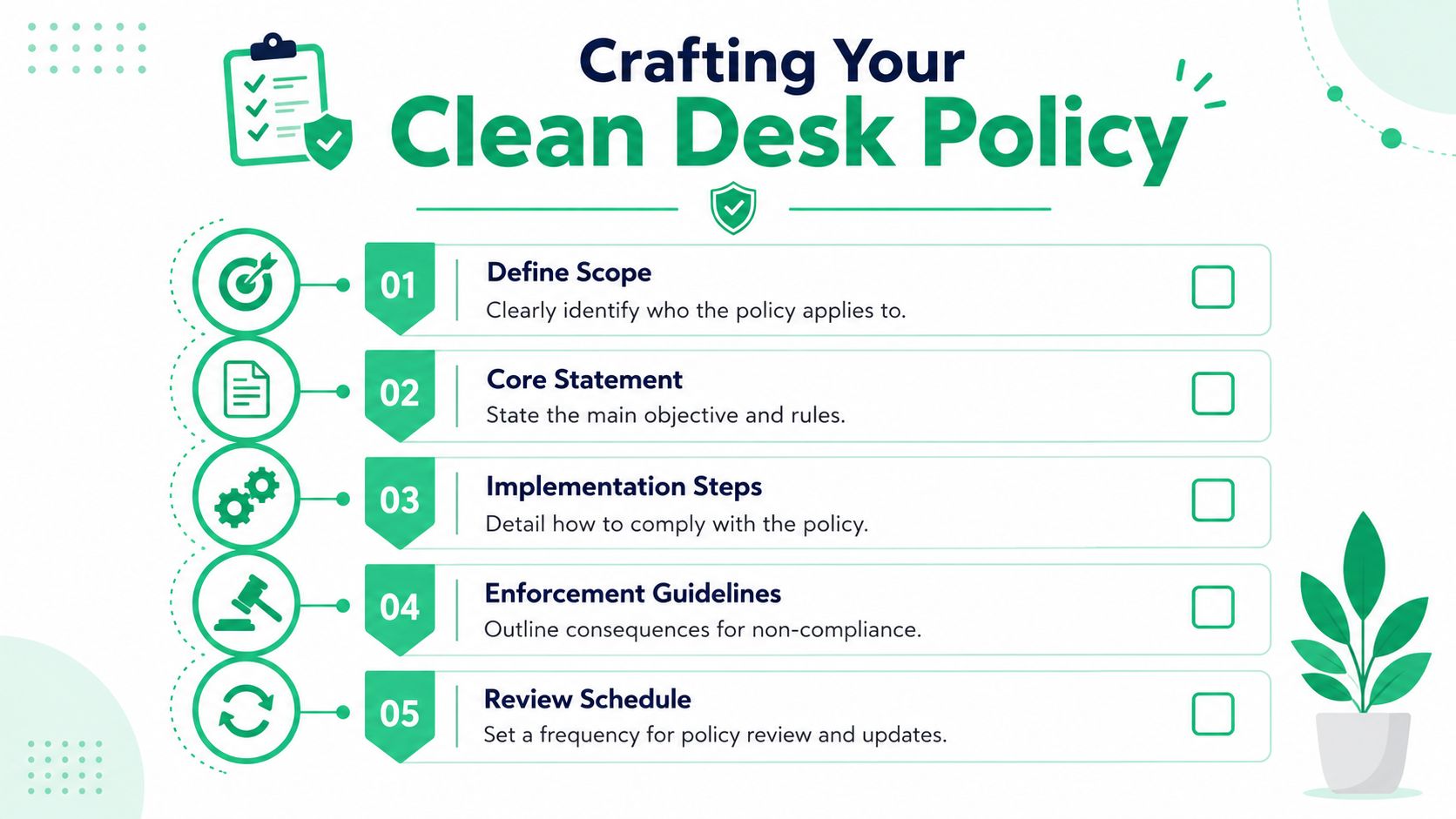
A clean desk policy should fit on one page. If it runs longer, staff will ignore it and managers will enforce it unevenly. Keep five parts only: purpose, scope, required actions, exceptions, and enforcement. If you need a broader documentation base around it, use these templates for compliance policies.
Write rules an employee can follow without interpretation. “Keep your desk tidy” is worthless. “Lock your screen when you stand up” is enforceable. “Store printed customer data in a locked drawer before leaving for lunch” is auditable. That is the standard.
Use Clear Operational Rules
Build the policy around actions your team can see, check, and prove:
- Lock workstations whenever unattended.
- Put paper records with customer, employee, financial, medical, legal, or card data in locked storage when not in use.
- Remove sticky notes that contain passwords, MFA backup codes, account numbers, or internal contacts.
- Clear whiteboards after meetings if they contain internal project details, client information, or regulated data.
- Place confidential paper in approved shred bins. Do not use open trash cans.
- Secure USB drives, external disks, badges, and printed reports before the end of the day.
These rules also support the broader benefits of security compliance because they turn vague physical security expectations into evidence you can show during reviews and audits.
Copy And Adapt This Policy Language
Start with this. Edit the data types and job titles to match your business.
Purpose
This policy reduces unauthorized access, loss, theft, and accidental disclosure of company and customer information by requiring secure handling of physical records, portable media, and unattended workstations.Scope
This policy applies to all employees, contractors, interns, and temporary staff in company offices, shared workspaces, meeting rooms, reception areas, and any offsite location where company information is handled.Required Actions
Staff must lock their screens whenever leaving a workstation unattended. Printed records containing confidential, restricted, customer, employee, financial, medical, legal, or payment card information must be secured in locked drawers, cabinets, or other approved storage when not actively in use. Whiteboards containing sensitive information must be erased after meetings or before the area is left unattended. Portable media must be removed from desks and secured when not in active use.Disposal
Confidential paper records must be placed in approved shred bins or authorized confidential disposal containers. Sensitive notes must be shredded or otherwise destroyed before disposal.Enforcement
Managers are responsible for spot checks in their areas. Repeated violations may result in disciplinary action under the company information security policy.
Define What Can Stay Out
Do not leave this to common sense. Common sense is not a control.
Use a simple allow and deny list:
| Desk item | Allowed when attended | Allowed when unattended |
|---|---|---|
| Keyboard, mouse, dock, headset | Yes | Yes |
| Active notebook or current working file | Yes | No |
| Printed customer records | Yes | No |
| HR, payroll, medical, or legal files | Yes | No |
| USB drives and backup media | Yes | No |
| Password notes, badge copies, MFA codes | No | No |
That table gives managers a simple check and gives auditors a clear rule set.
Add Exceptions Without Gutting The Policy
Some roles need active materials on hand. Fine. Limit the exception and document it.
Use this language:
Active work materials may remain on a desk only while the employee is present and directly using them. If the workspace will be unattended, including breaks, meetings, or end of day, those materials must be secured. Any department that requires alternate handling must document the exception, name the approved storage method, and get management approval.
That last sentence matters. If you do not document exceptions, people will invent them.
A good clean desk policy is short, specific, and tied to the data your business handles. That is how you get adoption, pass audits, and avoid writing the same policy twice.
Connecting Your Policy To Compliance Requirements
Many teams make a clean desk policy and stop there. That's lazy. If you want the policy to help in an audit, map each rule to a compliance control so your auditor, compliance officer, and department managers can all point to the same evidence.
This matters for SOC 2, HIPAA, and PCI DSS because physical safeguards are never just “nice to have.” They support access control, restricted handling of sensitive information, and secure disposal. If you're working on mastering your SOC 2 audit, this is one of the easiest artifacts to document cleanly.
Clean Desk Policy And Compliance Mapping
| Policy Rule | SOC 2 Control Example | HIPAA Safeguard Example | PCI DSS Requirement Example |
|---|---|---|---|
| Lock screen when unattended | Logical and physical access controls that limit unauthorized access | Physical safeguards for workstation use and access | Restrict physical access to systems and data |
| Store paper records in locked drawers or cabinets | Protection of confidential information and physical assets | Facility and workstation safeguards for protected information | Protect media and hardcopy materials containing cardholder data |
| Keep file cabinets closed and locked | Controlled storage of sensitive records | Physical access controls over records | Secure storage of sensitive media |
| Shred confidential documents in approved bins | Secure disposal procedures | Disposal controls for sensitive records | Protect and securely dispose of media |
| Erase whiteboards with sensitive content | Prevent unauthorized viewing of confidential information | Limit incidental exposure in work areas | Reduce physical exposure of cardholder-related information |
| Secure USB drives and removable media | Asset handling and restricted access practices | Device and media controls | Secure handling of removable media |
How To Explain This To Auditors
Don't overcomplicate it. Tell them your clean desk policy supports physical security by reducing unauthorized visibility, improving media handling, and enforcing secure disposal. Then show the policy, training records, audit logs, and any corrective actions.
A lot of security leaders forget the business side of compliance. The value isn't just passing the audit. It's stronger customer trust, cleaner operations, and fewer stupid mistakes. If you need a quick business-level framing, benefits of security compliance lays that out well.
What Auditors Usually Ask For
- The written policy: Approved, dated, and distributed.
- Evidence of training: New hire training, annual refreshers, or acknowledgment records.
- Proof of enforcement: Spot-check logs, incident records, or manager follow-up.
- Physical support: Lockable drawers, cabinets, shred bins, and signage.
A mapped policy saves time because you're not improvising control logic during the audit. You already did the translation work.
Implementing And Enforcing Your Clean Desk Policy
A policy nobody follows is decoration. Implementation is where clean desk policies either become normal behavior or become another ignored PDF in a shared folder.
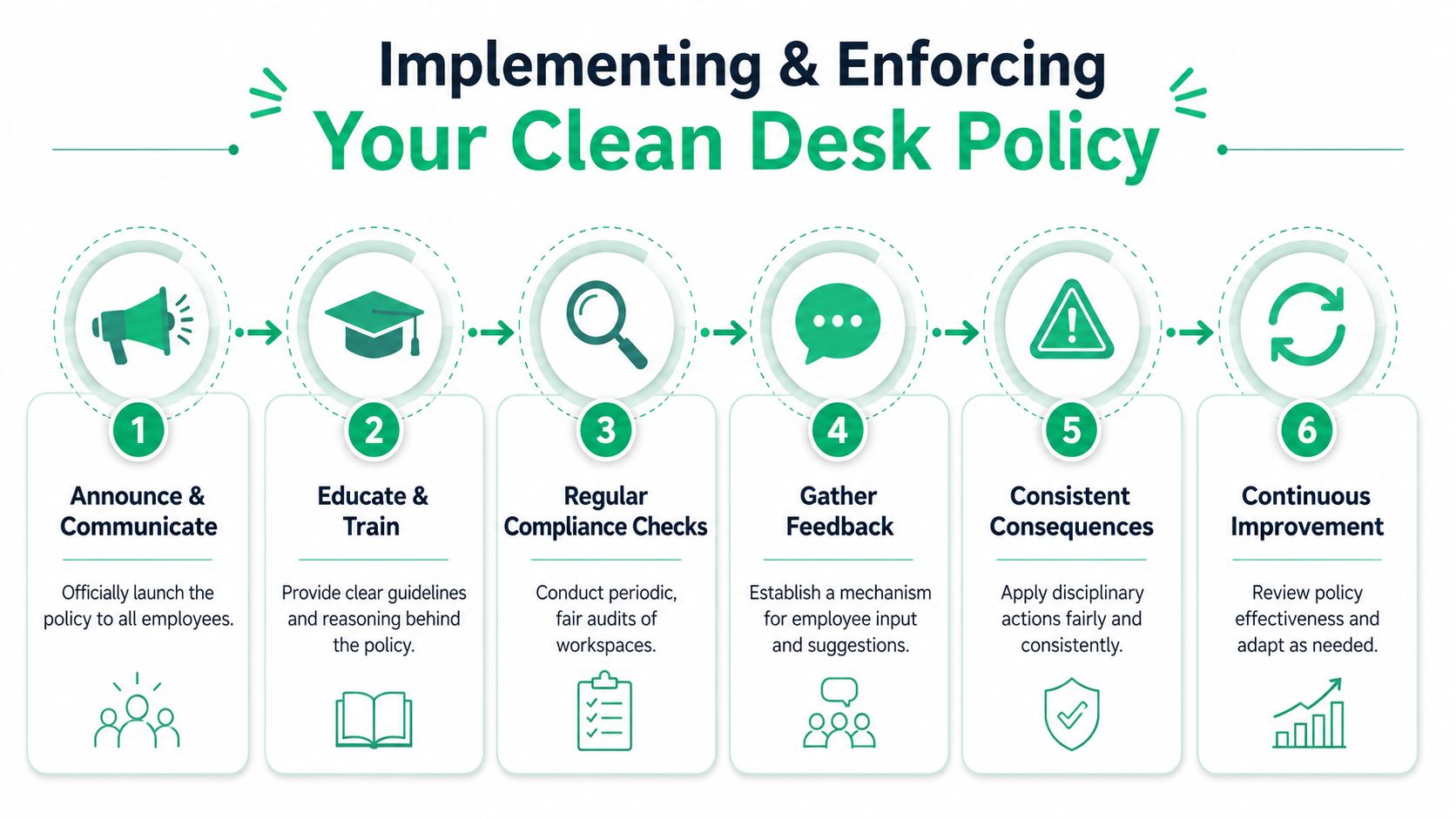
The rollout should be simple. Announce it. Explain why it exists. Give people the storage tools to comply. Then enforce it consistently.
Start With Leaders And Storage
According to DataShield's implementation benchmarks, clean-desk policy success rates can reach 85% when organizations integrate executive buy-in, employee education, and reward mechanisms. The same source says organizations lacking lockable storage report 40% lower compliance rates.
That second point matters. Don't tell employees to secure papers if you haven't provided lockable drawers, cabinets, cupboards, or another practical place to put them. If you're sorting out furniture or filing options, this guide on how to protect important office documents is a decent reference for thinking through lockable storage.
Use A Graduated Enforcement Model
Don't go straight to punishment. Use a sequence people can understand and managers can apply without drama.
- First breach: Friendly reminder with the policy attached.
- Second breach: Mandatory security briefing with the employee's manager aware.
- Third or fourth breach: Customized disciplinary action with leadership involved.
That approach matches real-world enforcement guidance and works because it's fair. People get a chance to adjust, but repeat behavior gets handled.
If enforcement changes by manager, the policy will fail. Consistency matters more than severity.
Keep The Rollout Human
Staff resist rules when they feel arbitrary. Explain the exact risks. Show examples of exposed paperwork, open screens, and visible whiteboards. Keep the message simple: “Clear the desk because exposed data is still exposed data.”
You'll get better adoption if you reinforce the policy in daily workflow:
- Use reminders: Email signatures, desk tents, and posted signs keep the rule visible.
- Train with examples: Show what counts as sensitive material and what proper storage looks like.
- Recognize good behavior: Thank teams that consistently pass checks instead of only calling out failures.
Give Managers A Script
Managers need a short script so enforcement doesn't turn into freestyle HR theater.
“This isn't about neatness. It's about protecting company and customer information. Clear the desk, lock the screen, secure the paper, and use the shred bin. If something makes compliance hard, tell me so we can fix the setup.”
That's enough to make the policy real.
How To Monitor And Audit Policy Compliance
You don't need creepy surveillance to monitor clean desk policies. You need regular checks, a simple log, and a routine that proves the policy is active. If you already use a broader guide to security audits, fold this into that process.
According to Forbes Business Council's practical guide, proactive monitoring includes regular physical inspections by sweep teams after hours, maintaining breach logs for transparency, and reinforcing the policy with constant visual reminders like desk tents and email signatures.
Keep The Audit Process Lightweight
Run after-hours spot checks. Use a security lead, office manager, facilities contact, or designated sweep team. Record what they found, where they found it, and whether follow-up happened.
A basic compliance log should include:
- Date and location: Which office area or team was checked
- Issue found: Unsecured screen, exposed document, unsecured media, whiteboard left visible
- Owner and action: Who was notified and what corrective action was required
- Closure note: When the issue was fixed
Use Monitoring For Improvement
Don't turn this into public shaming. Look for patterns. One team may need more shred bins. Another may need lockable storage. A third may need manager follow-up because the same behavior keeps repeating.
Auditors like evidence that shows the control exists, gets checked, and gets improved. A short breach log and periodic sweep records do that job well.
Frequently Asked Questions About Clean Desk Policies
The policy gets harder when real life shows up. That's where most companies either get practical or get ridiculous.
How Should Remote Staff Follow It
Don't force office rules into a home office without thinking. A 2025 hybrid work study found that 38% of remote employees report "policy-driven friction" where rigid security protocols disrupt workflow, which is why home-office rules need flexibility, not copy-paste office mandates, according to Advanced Business Solutions' discussion of hybrid clean desk friction.
Use a secure zone approach for remote staff. Define where company work can happen, what must be hidden from family members or visitors, and how documents should be stored when not in use. If they don't have a locking cabinet, don't pretend they do. Require alternative secure storage that fits the home setup.
Are Exceptions Allowed For Active Projects
Yes, but keep them narrow. Materials in active use can stay out while the employee is physically present and working. Once they step away or end the day, the exception ends.
That keeps the rule sensible. It also keeps employees from arguing that every pile of paper is “active.”
Who Owns Enforcement
HR shouldn't own this alone. IT shouldn't own this alone either. Department managers enforce day to day, security or compliance defines the standard, and HR supports repeat discipline if needed.
That split works because the manager sees behavior, security understands the risk, and HR handles formal action if the pattern continues.
What About Shared Offices And Hot Desks
Use stricter rules there. Shared spaces need zero ambiguity. Nothing sensitive stays behind. Ever.
If people rotate desks, they should end the day with a fully cleared surface, locked screen, and no paper or media left behind. Shared environments punish loose habits fast.
Should You Punish Every First Mistake
No. Correct it fast, document it, and move on. Save formal discipline for repeated non-compliance or obvious negligence.
A good clean desk policy should feel strict but fair. Employees will follow it if the company provides storage, keeps the rules simple, and applies them evenly.
If you're tightening controls for SOC 2, HIPAA, PCI DSS, or ISO 27001, don't stop at physical policy cleanup. Pair it with a fast, affordable pentest, pen test, or full penetration testing engagement so you can show auditors both physical and technical discipline. Affordable Pentesting helps startups and SMBs get affordable manual pentests from certified pentesters with OSCP, CEH, and CREST backgrounds, with reports delivered within a week through their contact form.