.svg)

Documentation review usually gets dumped on someone two weeks before the audit. The policy folder is a mess, screenshots are old, the access review doc has the wrong system name, and nobody knows whether the incident response plan matches what the engineers use in practice.
That's why teams fail audits they thought they were ready for. The problem usually isn't missing paperwork alone. It's paperwork that can't be defended when an auditor asks the obvious follow-up question: “Show me the proof.”
Why Documentation Review Matters for Your Audit
A lot of teams treat documentation review like spellcheck for policies. That's a mistake. A real documentation review asks a harder question: can this document be validated against what your systems, people, and processes do?
That distinction matters because 68% of SOC 2 and HIPAA audit failures stem from evidence that cannot be validated through technical testing, according to research on compliance audit and cybersecurity gaps. If your policy says access is reviewed, but nobody can match that claim to IAM logs, tickets, approvals, or a pen test scope, your document isn't evidence. It's just text.
Policies must point to proof
Auditors don't want a pile of PDFs. They want a chain of proof. Your policy says multi-factor authentication is required. Good. Now show where it's enforced. Your incident response plan says alerts are triaged. Fine. Now show the tooling, the workflow, and the records.
That's the core shift. Stop writing documents as if they exist for the auditor's checklist. Write them so a technical person can test them.
Practical rule: If a control can't be mapped to a log, screenshot, ticket, config, or test result, it isn't audit-ready.
This is why strong documentation review makes audits faster and cheaper. You spend less time chasing evidence, less time rewriting vague policies, and less time arguing about what “implemented” means.
Validation-ready beats audit-ready
Many organizations aim for audit-ready. I think that's too weak. You need validation-ready documentation. That means every important document should answer four questions clearly:
- What control exists: State the rule in plain English.
- Who owns it: Name the team or role responsible.
- How it's enforced: Tie the rule to a system, workflow, or technical setting.
- How it's proven: Identify the evidence an auditor or pentester can review.
That last point is where many teams break down. GRC writes the policy. Engineering runs the systems. Security runs a penetration test or pen testing engagement later. Nobody connects the dots early, so the audit turns into cleanup work.
Good review cuts expensive rework
A useful documentation review also exposes weak claims before an auditor does. If your network diagram is outdated or your vendor management policy names tools you no longer use, fix it now. If your web app handles sensitive data and your paperwork says one thing while the live app does another, a penetration test will expose that gap fast.
That's not bad news. It's cheaper to find those issues internally than during the audit window, when every delay burns time and budget.
Scoping Your Review to Save Time and Money
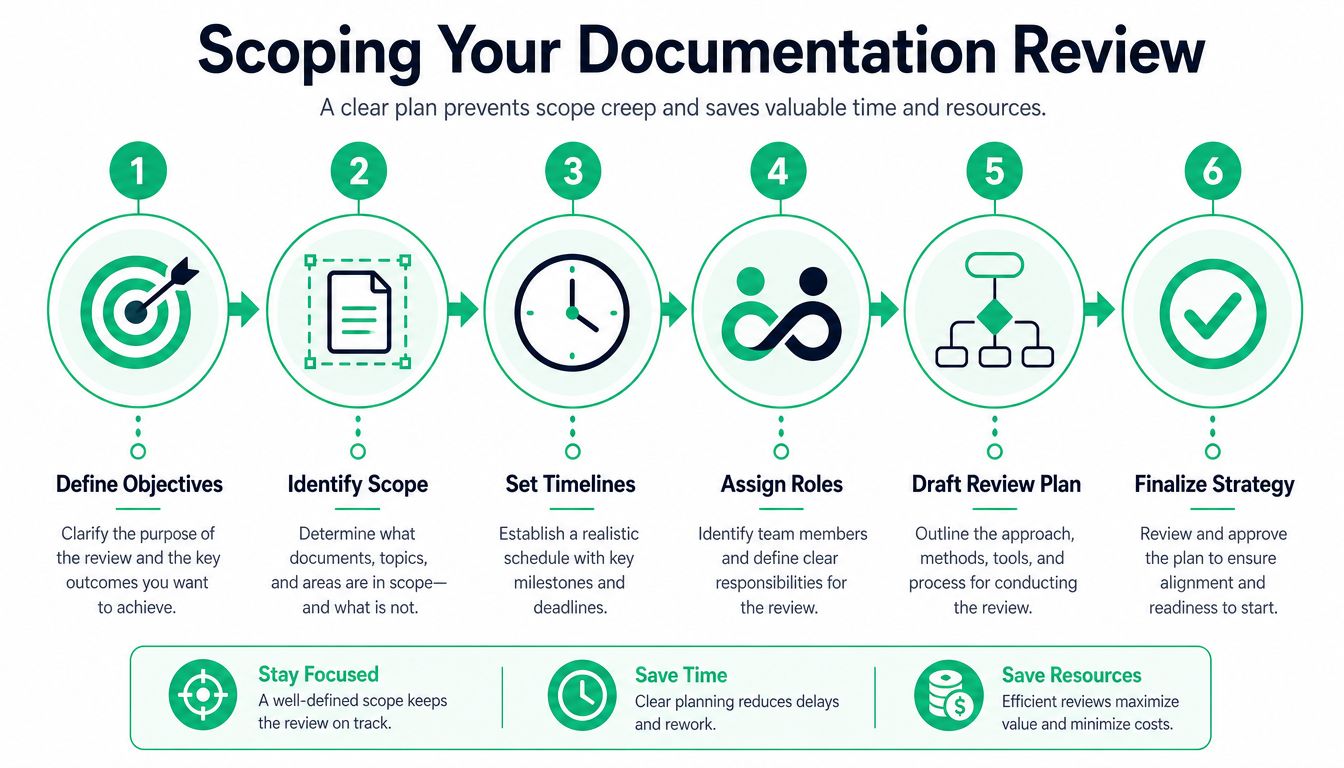
Most documentation review projects go sideways for one simple reason. People start reading documents before they decide what matters.
That's like leaving for a road trip without choosing the destination. You'll move a lot, but you'll waste fuel, time, and patience. Audit prep works the same way. A tight scope keeps your team focused on the systems, controls, and evidence that matter.
Start with the framework and assets
First, decide which framework drives this review. If you're preparing for SOC 2, your evidence set will differ from PCI DSS or HIPAA. If you support multiple frameworks, map overlap first and leave the edge cases for later.
Then list the systems in scope. Don't write “production environment” and call it done. Name the web app, cloud environment, ticketing system, identity platform, logging tools, endpoint platform, and any third-party services that support the control set.
A quick way to keep this organized is to use a simple scope matrix:
| Scope Area | What to Define | What to Avoid |
|---|---|---|
| Frameworks | SOC 2, PCI DSS, HIPAA, ISO 27001 | Mixing every framework into one giant list |
| Systems | Apps, cloud services, identity tools, logging, endpoints | Vague labels like “internal infrastructure” |
| Evidence types | Policies, SOPs, screenshots, logs, tickets, test reports | Asking teams for “everything” |
| Owners | Security, IT, engineering, HR, compliance | Shared ownership with no final approver |
If your team needs a clean starting point, this guide to audit preparation is a practical way to line up scope before evidence requests start flying.
Define boundaries early
A review without boundaries turns into archaeology. Someone asks for one access control policy, then another person adds onboarding evidence, then someone else wants every screenshot from the last year. That's how a one-week task becomes a month.
Use a short scoping statement that answers these points:
- What audit are you preparing for
- Which business units are included
- Which systems store, process, or protect sensitive data
- What time period the evidence must cover
- Which items are explicitly out of scope
That last line matters. If a legacy app isn't part of the attestation boundary, say so. If a new microservice won't be audited this cycle, mark it out of scope unless it impacts an in-scope control.
A short scope document prevents long arguments later.
Match documents to testable controls
Here's where teams save money. Don't collect documents by department. Collect them by control objective.
If you need to prove access management, ask for the access policy, the review procedure, a sample review record, user termination evidence, and the system logs that show the process happened. If you need to prove secure development, ask for the SDLC policy, pull request workflow, code review evidence, and any security testing records tied to the release process.
This approach keeps your future pen test or penetration testing engagement aligned with the paperwork. The tester can validate real controls instead of trying to reverse-engineer your compliance story from scattered docs.
Set review roles before kickoff
Documentation review drags when nobody knows who decides what “good” looks like. Assign a reviewer, an approver, and a system owner for each control area. Keep it simple.
- Reviewer: Checks the document for completeness and clarity.
- Approver: Confirms the control meets audit needs.
- System owner: Verifies the document matches reality.
If one person fills all three roles, expect blind spots. If ten people share them, expect delays.
Your Compliance Evidence Checklist
Most audit requests sound vague until you translate them into concrete files. “Provide access control evidence” isn't helpful. “Send the access control policy, user provisioning procedure, latest access review record, and termination sample” is.
That's the point of a usable checklist. It turns broad control language into documents your team can find and validate.
Keep each review stage short
Reviewers miss obvious problems when the checklist becomes a monster. A strong target is an 8–12 item checklist per review stage, and checklists that exceed 15 items show a 25% drop in accuracy due to cognitive overload, based on documentation review process guidance.
So split the work. Use one short checklist for intake, one for control quality, one for technical alignment, and one for final approval.
Compliance documentation mapping
Use this table to build your request list. It won't replace auditor guidance, but it gives you a practical working set.
| Document / Evidence Type | SOC 2 (CC) | PCI DSS (Req) | HIPAA (Rule) | ISO 27001 (Annex) |
|---|---|---|---|---|
| Information security policy | CC series | Req-based policy support | Administrative safeguards | Annex controls and policy set |
| Access control policy and procedure | Logical access controls | Access requirements | Technical and administrative safeguards | Access control annex areas |
| User access review records | Access review evidence | User access management | Workforce access management | Access review and identity governance |
| Joiner mover leaver evidence | Personnel and access lifecycle | Account management support | Workforce clearance and termination-related controls | HR and access lifecycle controls |
| Incident response plan | Response and monitoring controls | Incident response requirements | Security incident procedures | Incident management controls |
| Incident test records or tabletop evidence | Control operation proof | Response testing support | Procedure validation | Testing and exercising response plans |
| Network or data flow diagram | System description support | Network and cardholder data environment context | Data movement awareness | Asset and network documentation |
| Vulnerability management procedure | Risk and remediation controls | Vulnerability handling support | Security management process | Technical vulnerability management |
| Change management policy and tickets | Change control evidence | Change and configuration support | Administrative process support | Change management controls |
| Logging and monitoring standard | Monitoring controls | Logging-related requirements | Audit controls | Logging and monitoring controls |
| Vendor management policy and reviews | Third-party risk | Service provider oversight | Business associate oversight | Supplier relationship controls |
| Security awareness training records | Personnel controls | Security awareness support | Workforce training | Awareness and training controls |
| Backup and recovery procedure | Availability controls | Resilience support | Contingency planning | Backup and recovery controls |
| Pen test or penetration testing report | Technical validation support | Testing support | Technical safeguard validation | Verification of implemented controls |
What good looks like
A document passes review when it's current, approved, understandable, and tied to evidence. It fails when it's vague, ownerless, or disconnected from the actual environment.
Use this intake filter:
- Current version: Check date, version, and approver.
- Named owner: A department name isn't enough. Assign a real role.
- Clear scope: State which systems, teams, or data the document covers.
- Operational proof: Link to logs, tickets, screenshots, or test records.
- Consistent language: The system names in the doc must match the live environment.
If your policy says “critical systems” but never defines them, your auditor will.
Build evidence packs, not file dumps
Group evidence by control, not by folder path. Put the policy, procedure, screenshot, and record sample together. That makes review faster for internal teams, auditors, and any security partner running a pen test or penetration test against your environment.
It also keeps everyone honest. Once the evidence sits next to the claim, weak controls become obvious fast.
Templates for Requests and Documenting Findings
Busy teams don't ignore documentation requests because they're lazy. They ignore them because most requests are vague, bloated, or written in compliance-speak nobody wants to decode.
Use short, direct requests. Ask for the exact document, the date range, the owner, and the proof that shows the control operated.

Copy and use these request templates
Evidence request for a policy
Please send the current approved version of the Access Control Policy, including version date, approver, and document owner. If the policy references a procedure, include that file too.
Evidence request for operating proof
Please provide the most recent access review record for the production environment, along with the approval trail or ticket that shows the review was completed.
Evidence request for technical alignment
Please send the current incident response plan and identify the tools or systems used to execute it in practice, such as ticketing, alerting, logging, or on-call workflows.
Evidence request for application security
Please provide the latest web application security testing report, along with confirmation of the environment tested and any remediation tickets tied to findings.
If you need a starting point for core policy language, these information security policy templates can help teams stop improvising from old files.
Use a simple findings log
Don't overbuild this. A spreadsheet or ticket queue works if it captures the right fields. I like a findings log with five columns:
| Gap | Risk | Evidence Reviewed | Recommended Fix | Owner |
|---|---|---|---|---|
| Access review record missing | Auditor can't verify control operation | Policy present, no review artifact | Run review, save record, assign cadence | IT |
| Incident plan outdated | Team may follow wrong process during event | Policy references old tools | Update workflow and reapprove document | Security |
| Network diagram incomplete | Scope confusion during audit or pen test | Diagram missing cloud services | Redraw diagram and validate with engineering | Engineering |
Write findings in plain English
A good finding is boring and specific. It says what's wrong, why it matters, and how to fix it. It doesn't use dramatic language and it doesn't hide behind compliance jargon.
- Bad finding: “Control deficiency observed in identity governance artifacts.”
- Better finding: “The access review policy exists, but the team couldn't provide the latest review record for production users.”
That wording gets action. People know what to do next.
Fixing Common Gaps Before Your Auditor Finds Them
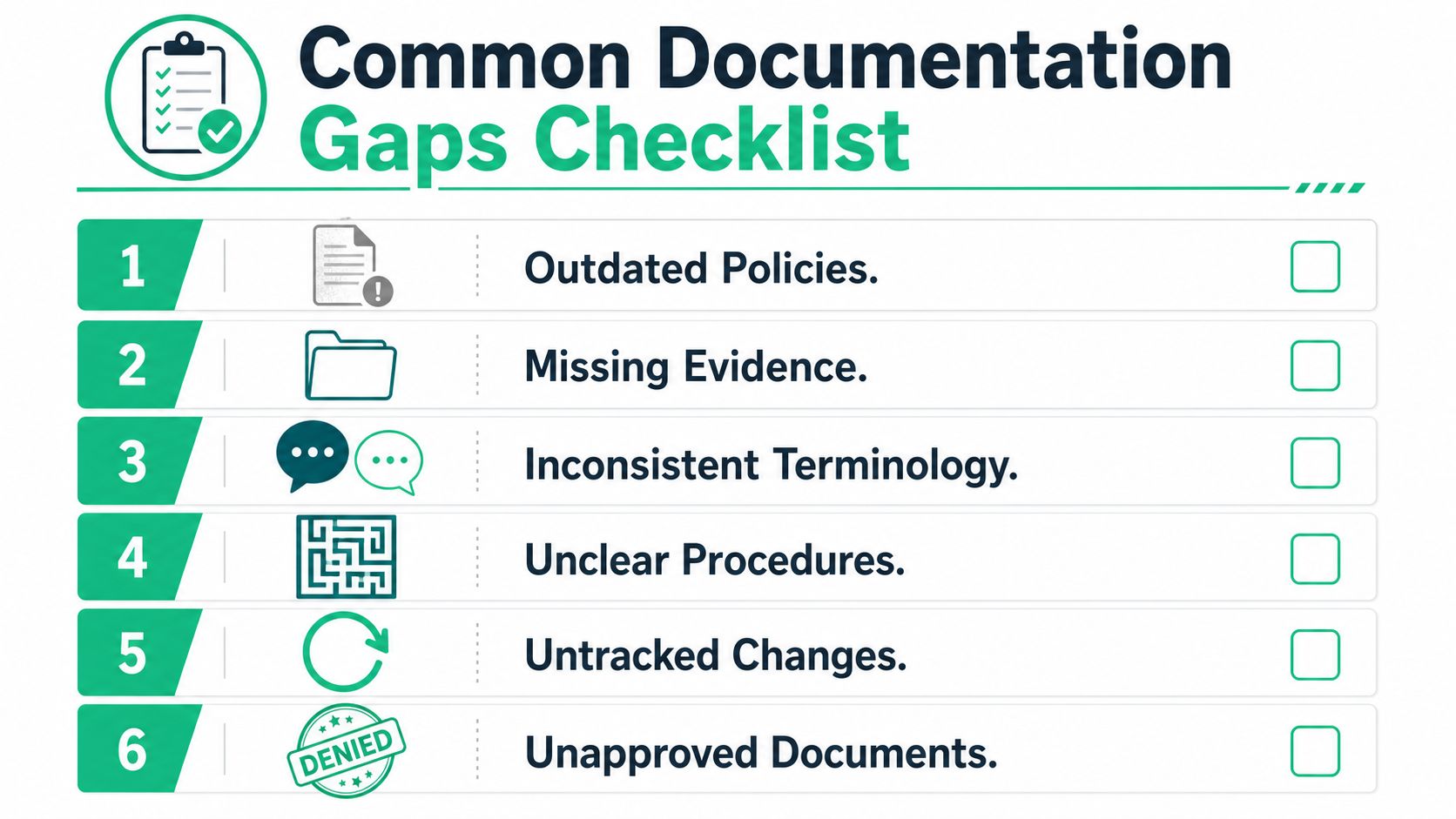
Most documentation problems fit into three buckets. The document is outdated, the evidence is missing, or the document doesn't match reality. None of these are rare. All of them are fixable.
The most dangerous one is drift. Data shows 57% of audit failures in fast-growing tech firms occur because documentation review cycles missed critical changes like new cloud services or staff turnover, according to analysis of documentation mistakes that cause security assessment failures. That's what happens when the business changes faster than the paperwork.
Outdated documents
This is the classic failure. The policy still names an old cloud provider, an old ticketing workflow, or a former security lead. The team may be doing the right work, but the document tells an auditor a different story.
Fix it fast. Review dates, version numbers, named tools, team names, and approvers first. If the file references dead systems or ex-employees, replace those references before anything else.
Missing evidence
This one fools teams because the control may exist. Access reviews happen. Backups run. Security alerts get triaged. But nobody kept a clean artifact that proves it.
Use a symptom, cause, fix model:
- Symptom: Procedure exists, but there's no record of execution.
- Cause: Teams did the work inside tools that weren't preserved for audit evidence.
- Fix: Pull the evidence now, save it in a controlled location, and define who owns collection next cycle.
Good controls fail audits every year because nobody saved the proof.
Mismatched terminology and unclear procedures
A policy says “critical assets.” The inventory says “tier 1 systems.” Engineering says “production services.” Those may refer to the same thing, but an auditor shouldn't have to guess.
Standardize naming across policies, diagrams, tickets, and test reports. If your terminology is messy, borrow ideas from teams focused on optimizing technical documentation strategies so your documents stay readable and consistent as the environment changes.
Another common issue is a procedure that reads like a slogan. “Access is reviewed regularly” is not a procedure. “The IT manager reviews production access in the identity platform, documents approvals, and stores the record in the compliance repository” is.
Untracked changes and unapproved files
Drafts floating around shared drives create audit pain. So do screenshots without dates, diagrams without versioning, and policies updated without approval.
Use a lightweight control process:
- Store final documents in one approved location.
- Require version, owner, and approval on every controlled doc.
- Archive replaced versions instead of overwriting them.
- Tie major environment changes to document review tasks.
That last step matters most in cloud-heavy teams. If engineering adds a new service, someone should check whether the architecture diagram, incident plan, vendor inventory, and security procedures need updates too.
Turning Your Review Into an Audit-Ready Report
A finished documentation review should produce one thing your auditor can understand quickly. Not a hundred files. One summary report that explains what you reviewed, what you found, and what you fixed.
Keep it plain. Auditors appreciate clarity more than decoration.
What the final report should include
Your report should cover:
- Scope: Framework, systems, teams, and review period
- Method: How documents were collected, checked, and approved
- Findings: Gaps found during review
- Remediation status: Fixed, in progress, or accepted risk
- Evidence index: Where the supporting files live
- Technical validation plan: What will be tested through a pen test, penetration test, or other security review
This report becomes the bridge between GRC paperwork and technical proof. That's the whole point of validation-ready documentation.
Pair documentation with technical validation
Documents tell the auditor what should happen. Security testing shows what takes place. You need both.
For many web applications, a single web application penetration test can be completed within 3 to 7 days for between $5,000 and $15,000, based on this 2026 penetration testing cost guide projection. That matters because technical validation doesn't have to mean a giant consulting project. A focused pen test can be fast, affordable, and strong enough to support compliance work when the scope is clear.
Your best audit package is simple. A clean documentation review summary plus a real penetration testing report.
If you're packaging evidence for an auditor, keep the final bundle organized. A basic tool like the Merge Pdf tool can help combine policies, approvals, screenshots, and summary pages into a cleaner review packet without turning your evidence set into chaos.
Make the report useful beyond the audit
A good report also helps your internal teams. Security sees where controls are weak. Engineering sees where docs drift from production. Leadership sees which fixes are done and which ones still carry risk.
That's why I don't like audit-only documentation. It dies right after the auditor leaves. A useful report becomes a working control document for the next review cycle, the next customer questionnaire, and the next pen testing engagement.
If your team also needs a clearer view of final deliverables and auditor-facing output, this overview of SOC 2 compliance reporting helps frame how review evidence fits into the broader reporting package.
A tight report also makes your external testers faster. When the pentest team sees accurate diagrams, defined scope, named assets, and real control claims, they spend less time guessing and more time validating what matters. That means fewer delays, better findings, and reports you can use within the audit window.
If you need affordable manual pentesting, fast turnaround, and reports within a week, Affordable Pentesting is built for that. Their OSCP, CEH, and CREST-certified pentesters help startups, IT teams, and compliance-driven companies turn documentation into real proof through focused pen test, penetration test, and penetration testing services. Use the contact form to get a scoped quote without the usual enterprise price tag or slow timeline.