.svg)
Your tools are firing alerts. Your team is still guessing what happened. That's the problem.
A suspicious login shows up in one console. A malware alert lands in another. Someone in finance reports a weird email. Your cloud dashboard flags unusual activity later that day. None of these alerts are wrong, but they don't tell one story. They give you fragments.
That's where edr vs xdr becomes a practical decision, not a vendor buzzword fight. If you run a lean IT team, support remote users, deal with SOC 2 or HIPAA pressure, or just need security that your staff can operate, you need to know what each tool does and where each one falls short.
Why Your Current Security Alerts Are Failing
Most SMBs don't have a security problem because they lack dashboards. They have a security problem because their dashboards don't talk to each other.
Your endpoint tool sees something odd on a laptop. Your email security tool catches a suspicious message. Your identity provider notices a risky sign-in. Your cloud platform records unusual access. Now your IT manager has four alerts, four interfaces, and no fast way to prove whether this is one attack or four unrelated events.
That's how teams lose time. Not because they're lazy, but because the tooling forces them to play detective across disconnected systems.
Alert overload without context
If you're already buried in tickets, patching, vendor management, onboarding, and compliance tasks, you probably don't have someone sitting around to manually stitch security events together all day. That's why basic alerting often feels useless. It tells you something happened, but not whether it matters.
Practical rule: An alert without context creates work, not clarity.
This is also why many companies start looking into EDR and XDR in the first place. They want less noise, faster triage, and fewer blind spots when an attacker moves from email to endpoint to cloud account.
The real issue is disconnected visibility
EDR and XDR both try to solve this, but they do it at different levels.
EDR focuses on what's happening on the device itself.
XDR tries to connect activity across devices, email, identity, cloud, and network systems.
If your team is still figuring out roles, workflows, and escalation paths, it helps to start with understanding Security Operations Centers. Even if you don't have a full SOC, you still need SOC-style thinking. Who reviews alerts, who investigates, who contains, and who signs off that an incident is closed?
That's the actual backdrop for edr vs xdr. You're not buying features. You're buying a way to turn scattered security signals into decisions.
What Is Endpoint Detection and Response (EDR)
EDR stands for Endpoint Detection and Response. In plain English, it's a security guard assigned to every laptop, desktop, and server you manage.
Its job is simple. Watch the device closely, spot suspicious behavior, and help your team respond fast when something goes wrong.

What EDR actually watches
EDR earns its keep by going deep on the device.
According to Vectra's breakdown of EDR vs XDR, EDR is endpoint-centric by design, and its main strength is host telemetry like process trees, file-system activity, registry changes, driver or kernel events, user activity, and in some products even script or memory execution. That depth makes EDR especially useful for forensic reconstruction and direct containment actions like endpoint isolation, process termination, and file quarantine.
That sounds technical, so here's the simple version. EDR helps answer questions like these:
- What ran on this laptop: A legitimate app, a malicious script, or something pretending to be normal.
- What changed on the system: Files, settings, startup items, or other local behavior that points to compromise.
- What should we do right now: Isolate the endpoint, kill the bad process, or quarantine a file before it spreads.
Where EDR fits best
EDR makes sense when your biggest concern is protecting managed devices and getting strong visibility at the host level. If your environment is mostly employee laptops, desktops, and servers, EDR gives you focused protection without dragging in every other security data source.
That focus is a strength, not a weakness, when your team is small.
EDR is often the right first serious detection tool for companies that need depth on endpoints more than correlation across everything else.
What EDR does not solve
EDR does not magically explain the whole attack story outside the endpoint. If the compromise started in email, involved a stolen login, and later touched cloud systems, EDR may show the endpoint piece clearly while leaving the rest to other tools.
That's the core limit in the edr vs xdr discussion. EDR is very good at answering, “What happened on this machine?” It's not built to be the central brain for your entire environment.
What Is Extended Detection and Response (XDR)
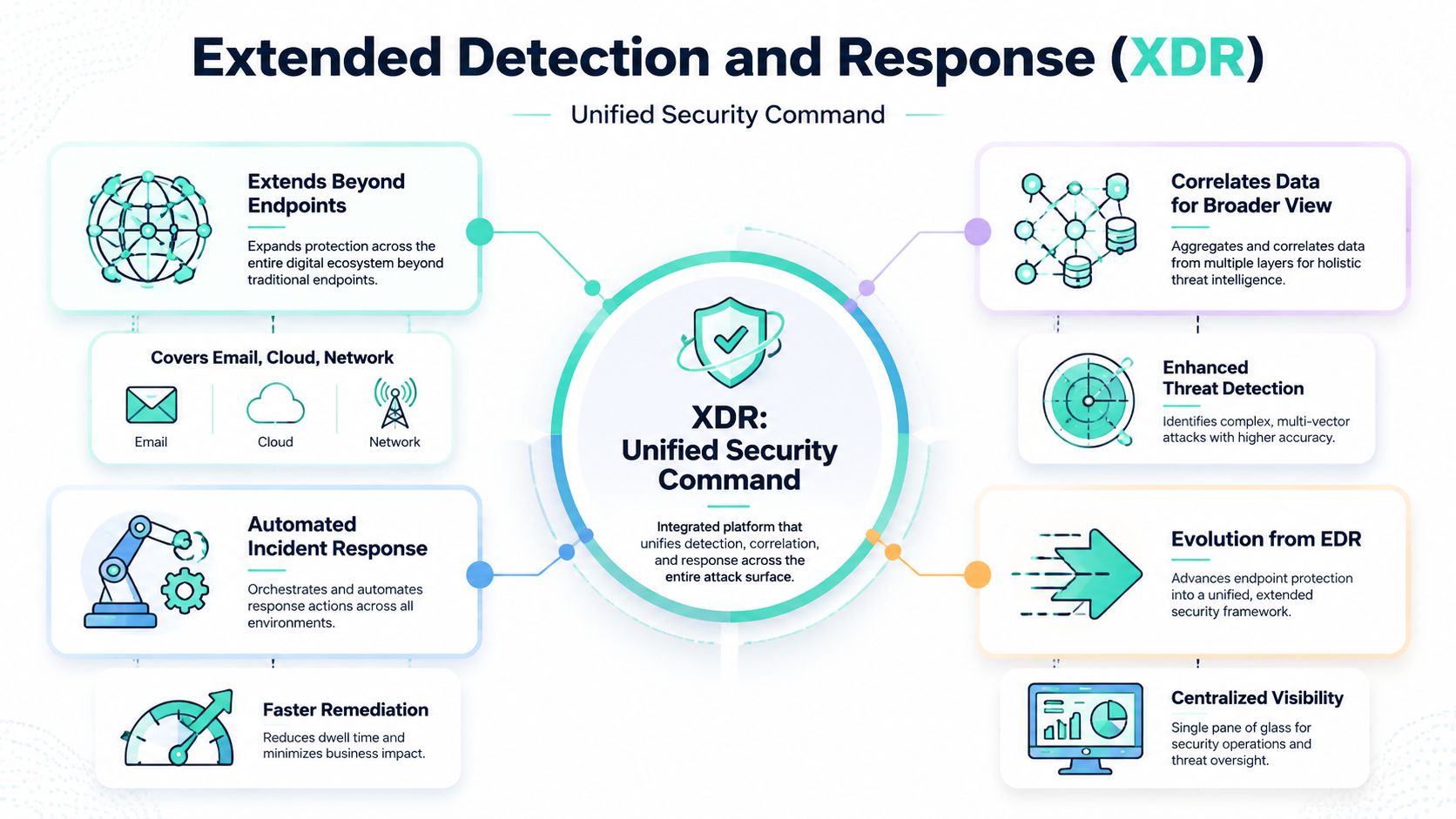
XDR stands for Extended Detection and Response. If EDR is a guard watching one building, XDR is the command center watching the whole property.
It pulls in signals from more than just endpoints. That can include email, identity systems, cloud workloads, and network infrastructure. The point isn't more data for the sake of it. The point is seeing one attack as one attack.
Why XDR exists
Microsoft describes XDR as extending protection “across your entire security stack” and says it correlates signals from multiple sources into a unified view in its EDR vs XDR guidance. In practical terms, that means a phishing email, a malicious download, and suspicious cloud or identity activity can be stitched into one attack chain instead of showing up as isolated alerts.
That matters because modern attacks rarely stay on one device. They move.
An attacker might start with email, steal credentials, log in through your identity system, touch a cloud workload, and use an endpoint only as one step in the chain. XDR was built to connect those dots.
What XDR is good at
XDR is about correlation and context.
Instead of asking your team to manually compare alerts from different tools, XDR tries to present a cleaner incident picture. It helps answer questions like:
- Where did the attack start: Email, endpoint, identity, cloud, or network.
- What systems are connected to it: One user, one laptop, one mailbox, and one cloud session may all belong to the same incident.
- What should we contain first: The account, the endpoint, the email path, or another linked system.
Where XDR makes more sense
XDR is the stronger choice when your business has outgrown endpoint-only thinking.
That usually means:
- Remote work everywhere
- Heavy SaaS use
- Cloud workloads in production
- Identity risk as a major concern
- Compliance pressure that requires clearer incident evidence
For healthcare, finance, and SaaS companies, this broader visibility is often more useful than another isolated alert source. If your environment spans multiple systems, XDR gives you a better shot at seeing the full path of an incident before it turns into a bigger mess.
Key Differences EDR and XDR Compared
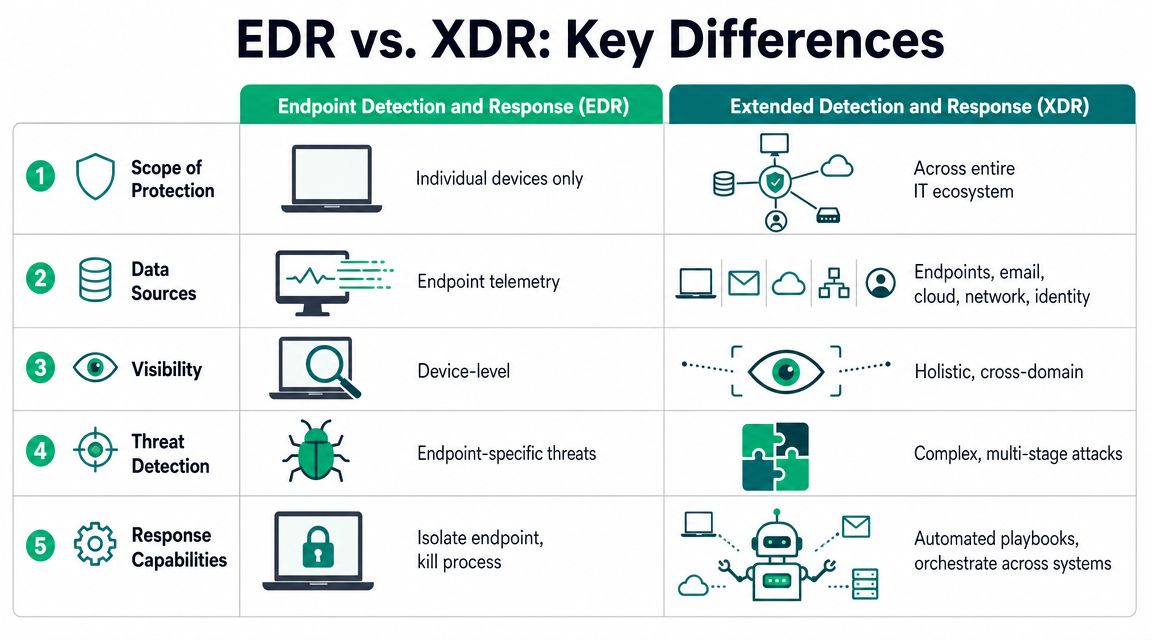
Here's the short version. EDR closely watches devices. XDR connects activity broadly.
If you're a busy IT manager, that distinction is what matters most. Everything else flows from it.
| Feature | EDR (Endpoint Detection & Response) | XDR (Extended Detection & Response) |
|---|---|---|
| Scope | Endpoints like laptops, desktops, and servers | Endpoints plus email, identity, cloud, and network sources |
| Primary view | Device-level activity | Cross-environment incident view |
| Data sources | Endpoint telemetry | Multiple integrated security signals |
| Best at | Host forensics and direct endpoint containment | Correlating multi-stage attacks across systems |
| Response style | Isolate device, kill process, quarantine file | Coordinate actions across multiple domains depending on platform |
| Operational fit | Smaller or simpler environments | Hybrid, SaaS-heavy, or more complex environments |
| Budget logic | Usually easier to start with | More value when tool sprawl and alert sprawl are already painful |
Scope matters more than marketing
This is the biggest divide in edr vs xdr.
EDR is narrow by design. That's not an insult. It's exactly why it can go deep on a host. If you care about what happened on one machine, EDR gives you the strongest microscope.
XDR is wider by design. It's built for the reality that email, identities, cloud apps, and endpoints are all part of the same attack surface now.
Depth versus context
A lot of teams buy the wrong tool because they confuse detail with understanding.
EDR gives you deep local evidence. You can inspect what ran, what changed, and what got contained on the endpoint. That's useful during investigations and cleanup.
XDR gives you incident context across systems. You may see how the endpoint alert relates to a risky login, a phishing message, and suspicious cloud behavior. That's useful during triage and decision-making.
If your main pain is “What happened on this laptop?” buy depth. If your main pain is “Why are these alerts happening across three systems at once?” buy context.
Response is not the same thing
Both tools support response, but they don't respond in the same way.
With EDR, response is usually direct and device-focused:
- Isolate the machine
- Kill the malicious process
- Quarantine the file
With XDR, response is broader and depends on what the platform integrates. It can help your team act across the attack path rather than just the endpoint where the symptom showed up.
Complexity and cost are real
Here, SMBs need to stay honest.
If your company has a modest environment and no dedicated detection team, an EDR rollout is usually easier to understand and manage. XDR can be the smarter long-term platform, but only if your team can integrate it, tune it, and use the output well.
Buying XDR too early can become shelfware. Buying EDR too late can leave obvious blind spots.
A fast practical filter
Use this if you need a blunt answer:
- Choose EDR first if your environment is mostly managed endpoints and your team needs strong host visibility without major platform complexity.
- Choose XDR first if your incidents already cross email, identity, cloud, and endpoint systems and your current tools keep forcing manual correlation.
- Choose neither blindly if you haven't defined who will monitor alerts and respond when something triggers.
Tools don't fix unclear ownership. They just make unclear ownership more expensive.
How EDR and XDR Impact Your Security Team
Most companies don't fail with security tools because the tools are bad. They fail because nobody has time to run them properly.
That's where the operational side of edr vs xdr matters. You're not just choosing a product. You're choosing the kind of workload you hand to your team.

EDR gives depth but needs attention
EDR is strong when an analyst needs to dig into endpoint behavior. It's good for investigation, scoping, and deterministic containment on the host. But someone still has to review alerts, decide what's real, and perform follow-up.
If your IT team is already stretched, that can become a problem fast. A capable endpoint platform still creates work if the staff reviewing it don't have time or confidence to investigate thoroughly.
XDR aims to reduce triage pain
A major reason XDR emerged was alert fatigue. In a 2025 survey cited by Tailwind Voice & Data, 83% of security analysts reported feeling overwhelmed by the volume of alerts and false positives. That helps explain the move toward platforms that centralize visibility and prioritize threats more coherently.
For a lean team, that matters more than feature charts. XDR is attractive because it tries to cut down the manual work of comparing disconnected alerts across systems.
More telemetry is only useful if the platform helps your team decide faster.
What this means for a small team
If you have one IT manager, a systems admin, and maybe outside help, here's the practical impact:
- With EDR, your team gets strong endpoint control but may spend more time piecing together the bigger picture.
- With XDR, your team may get better context up front, but the rollout and tuning can be more involved.
- With either one, response ownership still matters. Someone has to decide what gets isolated, escalated, documented, and remediated.
A lot of teams benefit from pairing tooling decisions with exercises like purple team validation. If you want a useful guide for IT security professionals, that's a good place to pressure-test how your people and tools work together.
The burnout angle is real
If your staff dreads opening the security console, the setup is failing.
EDR can be noisy when every endpoint event needs analyst judgment. XDR can be cleaner when it's configured well, but more moving parts also means more setup discipline. The right answer isn't the one with the longest feature list. It's the one your team can run consistently without dropping alerts on the floor.
Making The Right Choice For Your Business
Here's the opinionated answer. Most startups and smaller SMBs should start with EDR unless their environment is already spread across cloud apps, identity workflows, and remote users in a way that makes endpoint-only visibility too narrow.
Don't buy for the company you hope to become in three years. Buy for the attack surface and staffing reality you have right now.
When EDR is the smart buy
Choose EDR if your business looks like this:
- You mostly manage laptops and a few servers
- Your team is small and needs something focused
- You need strong host evidence for investigations
- You want a more affordable first step into modern detection
A startup with one office, remote employees, standard SaaS apps, and no dedicated security operations team usually gets more value from a solid EDR deployment than from an ambitious XDR rollout it won't fully use.
When XDR is worth the extra effort
Choose XDR if your business already depends on multiple connected systems and you keep seeing security events spill across them.
Typical signs:
- Email is a major risk entry point
- Identity abuse worries you more than simple malware
- Your production environment includes cloud workloads
- You need cleaner visibility for regulated operations like SOC 2 or HIPAA
If you're a fintech, healthcare provider, or SaaS company with hybrid infrastructure, XDR usually fits the actual attack path better. In those environments, incidents don't stay on one device for long.
Bottom line: EDR is usually the better first control for simpler environments. XDR is usually the better operating model for more complex ones.
Budget and proof matter
Security spending has to survive scrutiny. Founders want to know why this tool matters. Compliance teams want evidence. Auditors want to see that controls are not just purchased but used.
That's another reason to be practical. A well-run EDR program beats a half-deployed XDR platform every time. But once your environment becomes distributed enough, staying with endpoint-only visibility can leave gaps that are hard to explain during an incident review.
The best choice is the one your team can operate, document, and defend.
Validate Your Security With Penetration Testing
EDR and XDR are detection tools. They are not proof that your security is effective.
That's where companies get stuck. They buy software, turn on dashboards, and assume they're covered. Then a client asks for evidence. An auditor asks how controls were validated. Leadership asks whether the tooling would catch a real attack path. Now you need more than screenshots from a console.
Tools show signals, pentests show gaps
A manual pentest, pen test, or penetration test answers the question your tooling can't answer on its own. Can a skilled human still get in, move around, abuse weak access, or reach sensitive data despite the controls you've bought?
That matters for real security and for compliance. If you're working toward SOC 2, HIPAA, PCI DSS, or similar frameworks, validation matters. A human-led penetration testing exercise shows whether your EDR or XDR setup detects meaningful attacker behavior and whether your response process holds up under pressure.
If your project includes cloud collaboration changes or tenant moves, specialized testing also matters. This overview of penetration testing for M365 migrations is a useful example of how targeted testing lines up with infrastructure changes that often create new exposure.
Why manual testing still matters
Automated tools are good at finding patterns. Human testers are good at finding bad assumptions.
That's the difference.
A skilled tester can chain together small issues that don't look dangerous in isolation. They can act like an attacker, not like a checklist. That's why companies still need manual penetration testing, especially when they're trying to prove security to customers, auditors, or their own board.
For teams that need the basics explained clearly before they buy a test, you can learn about penetration testing and how it fits with broader control validation.
What good testing should look like
If you're hiring a pentesting provider, be picky.
Look for:
- Manual testing, not just automated scans
- Fast turnaround, because stale reports are low-value
- Clear findings with remediation guidance
- Certified testers such as OSCP, CEH, or CREST
- A report your engineering and compliance teams can both use
A good penetration test doesn't just dump vulnerabilities on your desk. It tells you what matters, how an attacker could use it, and what to fix first. That's how you turn an EDR or XDR purchase into something you can defend in front of customers and auditors.
If you need an affordable pentest, pen test, or penetration testing engagement that's built for startups and SMBs, Affordable Pentesting is worth contacting through the site's contact form. Their team focuses on manual testing, fast report delivery within a week, and certified pentesters with credentials like OSCP, CEH, and CREST, which is exactly what budget-conscious teams need when they want real findings instead of a slow, overpriced checkbox exercise.