.svg)
Your audit is coming. Engineering is shipping fast. Someone asks for proof that your application is secure, and suddenly you're comparing overpriced security firms, vague scan reports, and timelines that drag on for weeks.
That's where source code analysis helps. It gives you a fast way to catch obvious problems early, clean up code before review, and show auditors you take security seriously. But don't confuse a scanner with a real pen test, penetration test, or penetration testing program. A tool is a filter. A human tester is the one who proves what breaks.
If you're a founder, CISO, or IT manager trying to pass SOC 2, PCI DSS, HIPAA, or ISO 27001 without wasting money, keep it simple. Use automated analysis early. Fix what it finds. Then get a real manual pentest from certified testers who can deliver a report quickly.
Your Guide to Source Code Analysis
You're probably in one of two situations. Either an auditor asked for evidence of security testing, or your team is moving so fast that nobody wants security to become a release blocker.
Both are normal. Neither gets solved by buying a random scanner and hoping for the best.
Why founders care now
Source code analysis means checking your code for mistakes and security flaws before the app goes live. It's practical, not academic. It helps your team catch bad patterns early, reduce obvious risk, and avoid handing auditors a weak story.
The market tells you this isn't niche anymore. The global source code analysis software market reached USD 4.9 billion in 2025, driven by cyber threats and wider DevSecOps adoption, according to Growth Market Reports on source code analysis software.
What it solves and what it doesn't
Use source code analysis to find issues while developers are still working. That's cheaper and faster than waiting until production. It also gives compliance teams evidence that security checks happen during development.
But don't stop there. Auditors and customers don't just want proof that a tool ran. They want proof that someone tested the actual attack surface.
Practical rule: If your only security evidence is an automated scan, expect hard follow-up questions during audit review.
For teams dealing with old systems plus new cloud apps, architecture matters too. If part of your risk lives in older platforms, this guide for CTOs on mainframe modernization is worth reading because security testing gets harder when legacy code and modern pipelines collide.
A simple working model
Think of your security process in three layers:
- Automated code checks: Fast feedback for developers
- Dependency review: Checks third-party packages and libraries
- Manual penetration testing: Finds what tools miss in workflows, auth, access control, and business logic
That last layer matters most when deadlines are close. A clean codebase makes the final pen test faster. A messy one makes it longer, more expensive, and more painful.
What Source Code Analysis Really Is
A founder pushes for a fast release. The code ships. Weeks later, an auditor asks how the team checks for insecure coding practices before deployment. If the answer is "we run a scan sometimes," you have a process gap, not a security program.
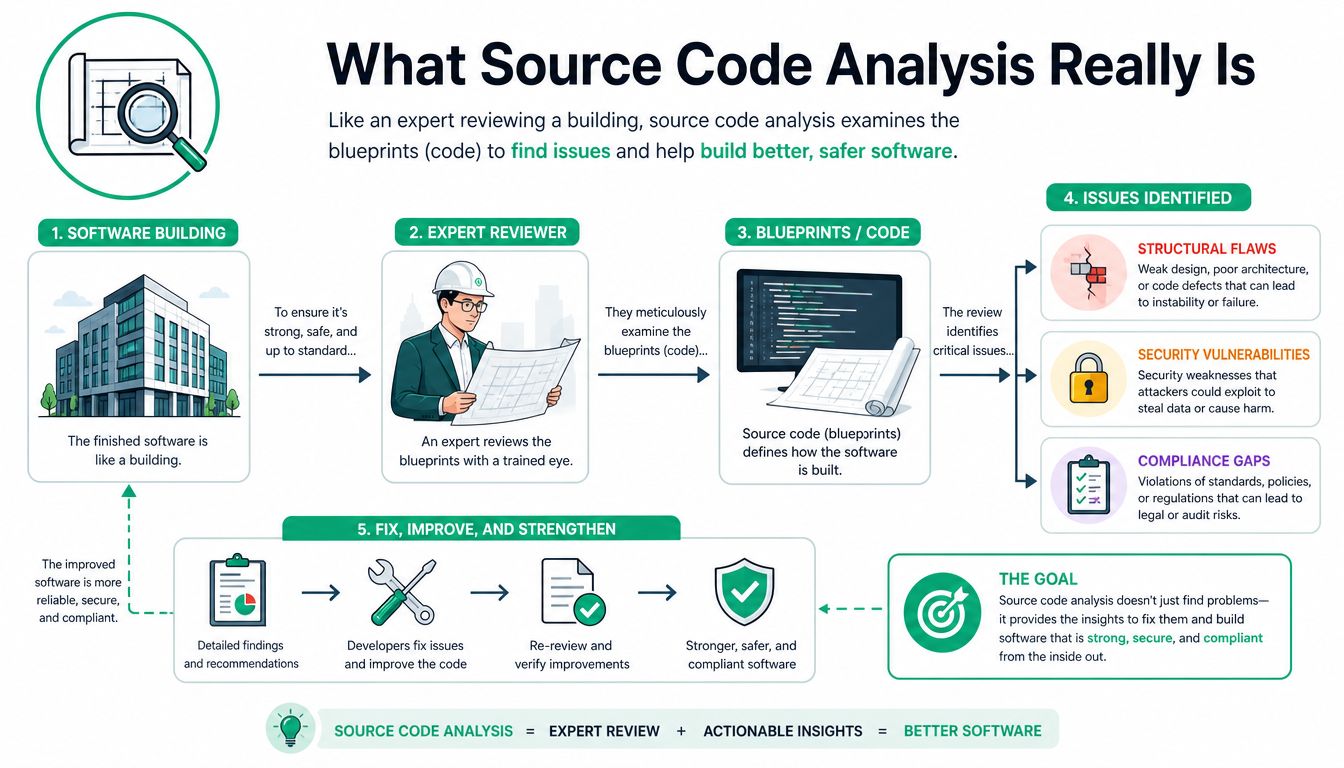
Source code analysis is the disciplined review of source code for security flaws, coding errors, and policy violations before the application runs. In practice, that usually means SAST tools scanning the codebase for patterns tied to injection, unsafe input handling, hardcoded secrets, weak cryptography, and insecure function use.
What the analysis actually does
A source code analysis tool reads your code statically. It does not need a running app. It checks files, functions, data flows, and rules your team defines. Good setups also enforce secure coding standards in pull requests, so developers fix issues before they become release blockers.
This falls under white-box testing because the reviewer or tool can inspect the internals directly. That visibility is useful. It helps teams catch repeatable mistakes early and produce evidence that security checks exist in the development process.
It also has clear limits.
Comparison with Penetration Testing
Source code analysis helps you find weaknesses in code. Penetration testing shows whether those weaknesses can be used in a live environment, with live authentication, real roles, real integrations, and the messy edge cases that break systems in production.
That difference matters during audits. A clean SAST report supports secure development claims. It does not prove the deployed application resists attack. Auditors reviewing SOC 2, PCI DSS, or HIPAA controls often want to see testing addressing the actual attack surface, not just the source files.
Source code analysis gives you early warning. Manual review and penetration testing give you evidence that the system holds up under attack.
If your team is still finding effective security testing solutions, treat SAST as the first control, not the final one.
Where it belongs in a real security program
Run source code analysis in the IDE, in pull requests, and in CI. Make it automatic. Tune the rules so developers see fewer false positives and more issues they can act on quickly.
That keeps costs down. Fixing obvious flaws during development is far cheaper than paying engineers, consultants, and incident responders to sort them out later.
What to expect from it
Use source code analysis to do these jobs well:
- Find common code-level flaws: Injection risks, unsafe functions, exposed secrets, and insecure data handling
- Enforce standards: Teams write cleaner, more consistent code when checks run automatically
- Support secure development evidence: Audit teams want to see that checks happen before release
- Reduce pen test cleanup: Cleaner code means less time spent fixing preventable issues right before an assessment
Do not expect a scanner to understand business abuse, broken workflows, tenant isolation mistakes, or authorization gaps tied to how your product works. Those are expert-level findings. They come from manual review and penetration testing by people who know how attackers chain small weaknesses into real impact.
Comparing Your Code Analysis Options
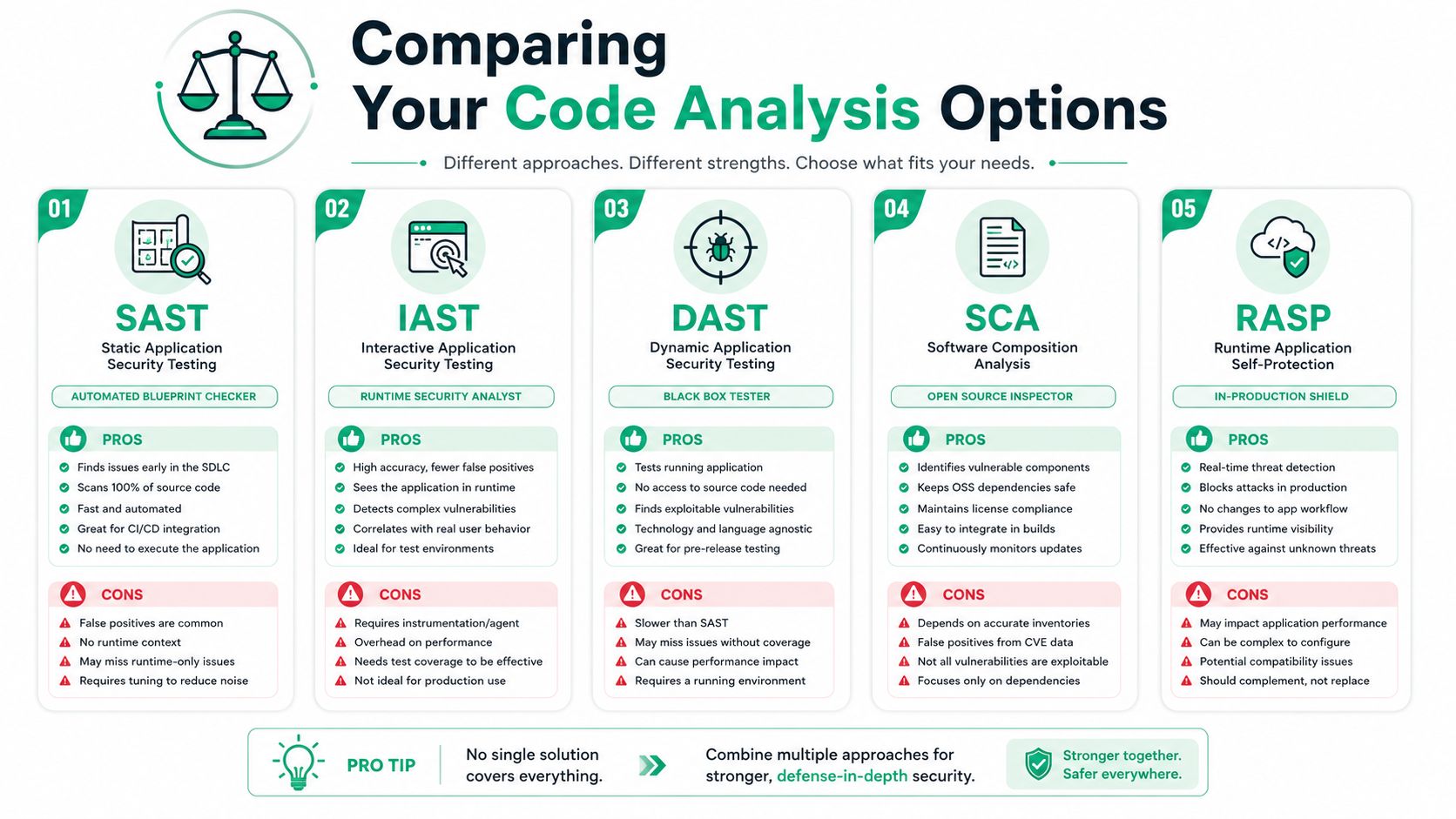
You have several ways to test application security. None is enough on its own. The right answer is a stack, not a single product.
The quick comparison
| Method | What it does | Good for | Misses |
|---|---|---|---|
| SAST | Reads source code without running it | Early bug and security detection | Runtime behavior and business context |
| IAST | Watches the app during testing | More context than pure static checks | Needs a running app and test coverage |
| DAST | Tests the running app from the outside | Real attack surface and web flaws | Can't see all internal code paths |
| SCA | Reviews third-party packages and dependencies | Known library risk and supply chain hygiene | Custom code flaws |
| Manual review | Expert reads code and logic | Complex misuse and risky design choices | Slower than automation |
SAST is the first filter
SAST is your starting point. It's fast, repeatable, and easy to automate. It belongs in pull requests and CI because developers get feedback while the fix is still cheap.
That said, SAST creates noise if nobody tunes it. You still need a person to separate a real issue from a rule that doesn't matter in your environment.
Dependency analysis matters more than most teams think
A lot of startups obsess over their own code and ignore packages, SDKs, and vendor components. That's a mistake. Third-party code can carry risk straight into production, even when your own engineers write clean software.
If your team is evaluating tools and approaches, this article on finding effective security testing solutions is a useful place to compare practical options.
Manual review is where maturity shows
Manual review is the part many firms undersell because it takes real skill. A strong reviewer can look at auth logic, tenant boundaries, password reset flows, file handling, and admin features and say, “Here, someone will break it.”
That insight doesn't come from pressing Scan.
Advisor's take: If a vendor sells source code analysis as a complete substitute for a pen test, keep shopping.
Use a blended model
Here's the practical way to choose:
- For daily development: Run SAST automatically
- For package hygiene: Add SCA to every build
- For pre-release validation: Use runtime testing like DAST or IAST
- For real confidence: Add manual review and a full penetration test
A startup doesn't need the fanciest stack. It needs enough coverage to remove easy mistakes before paying experts to hunt the harder ones.
How To Integrate Analysis Into Your Workflow
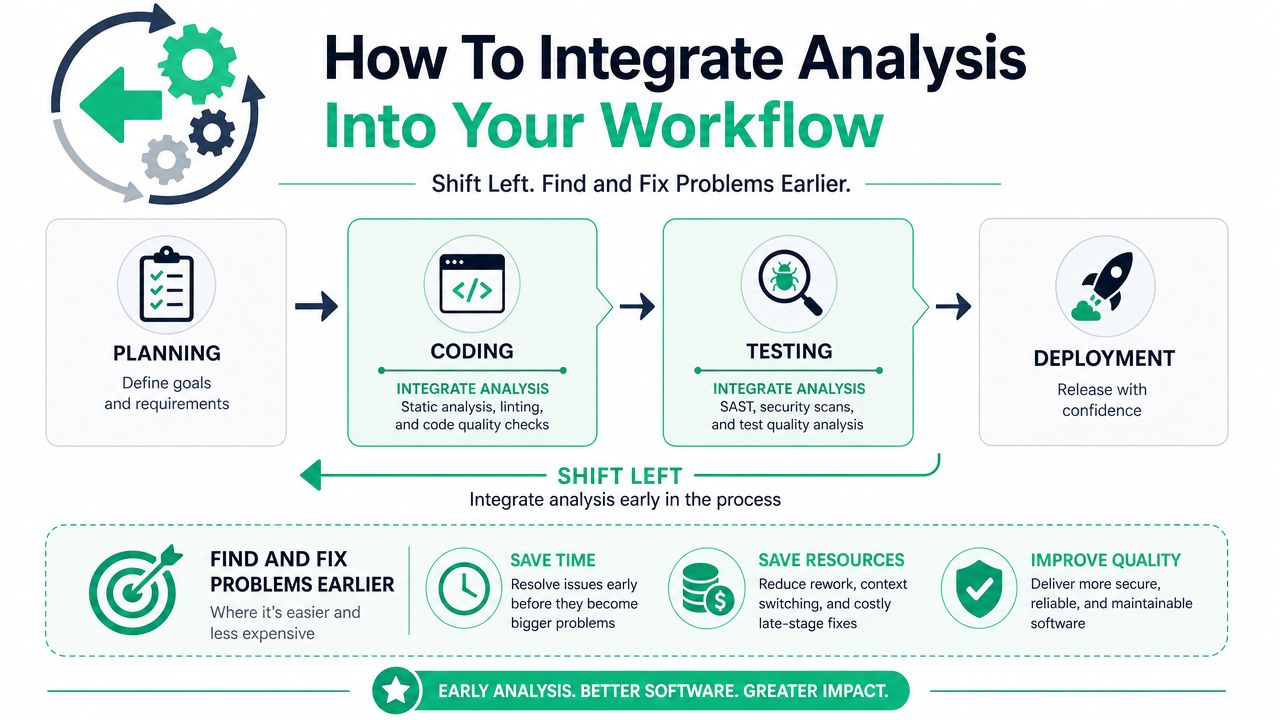
Security gets cheaper when you move it earlier. That's all “shift left” really means.
If you wait until release week, every fix becomes a fire drill. If you scan during coding and review, most issues get fixed before they turn into delays.
Put checks where developers already work
The best place for source code analysis is inside normal engineering flow. That means IDE plugins, pre-commit hooks, pull request checks, and CI jobs. Don't make developers leave their workflow just to see a warning.
Experts using source code analysis tools can detect defects at rates ranging from 70% to 90%, which improves time-to-market, productivity, and velocity compared to manual code review alone, according to Cycode's overview of static code analysis.
A clean setup looks like this
Write code
Developers see issues inside their editor before they even open a pull request.Open a pull request
Automated checks run against changed files and block risky merges.Run CI validation
The pipeline enforces minimum security rules before code reaches the base branch.Test the release candidate
Human reviewers and penetration testers focus on harder flaws instead of obvious mistakes.
For teams comparing platforms, this roundup of top code analysis tools 2026 can help narrow down what fits your stack.
Keep the policy simple
Don't start with hundreds of rules. Start with a short set that developers will respect.
- Block secrets: Never allow hardcoded credentials or tokens
- Flag unsafe input handling: Catch basic injection patterns early
- Watch auth-sensitive code: Make role checks and access paths visible in review
- Fail on critical issues: Don't bury serious findings in warning spam
If you're working through the operational side, this guide on securing your CI/CD pipeline fits neatly with source code analysis because the pipeline is where enforcement becomes real.
Why this saves money later
A strong pipeline makes the final pen test tighter and faster. Certified testers can spend their time on chained attack paths, business logic, and privilege abuse instead of reporting basic code hygiene problems.
That matters when you want results quickly. If your testing window is short, clean prep work is the difference between getting a useful report within a week and getting bogged down in preventable issues.
Why Code Analysis Is Not a Pen Test
Many teams are often misled. A scanner is not a pen test. An automated report is not a penetration test. And “we ran SAST” is not the same as “we validated security.”
The gap is simple. Source code analysis looks for known bad patterns. A human tester looks for ways the whole system can be abused.
A flaw scanners often miss
Take a billing portal. A user should only view invoices from their own company. The code may sanitize input, use prepared queries, and pass every static rule. But the app still lets a user change an account identifier in a request and see another customer's invoice.
That's a business logic flaw. The code can be technically clean and still be insecure.
Third-party blind spots are real
Tools also have visibility limits. Data shows SAST is blind to compiled third-party components and firmware, creating a visibility gap. That helps explain why 30% of modern vulnerabilities originate in transitive dependencies invisible to source-only scanners, as explained by Finite State on source code versus binary analysis.
That matters for audits. If your software depends on vendor code, libraries, or compiled components, source-only checks leave holes.
What a real penetration test adds
A manual pen test does things scanners can't do well:
- Chain small issues together: Weak session handling plus bad access control can become account takeover
- Test business logic: Refund abuse, tenant escape, role abuse, and broken workflows need human reasoning
- Validate exploitability: A scanner might warn. A tester proves impact
- Check the live surface: Running apps, APIs, and exposed features behave differently than source code suggests
This is why expert-driven testing matters. Certified testers with OSCP, CEH, and CREST backgrounds know how attackers think. They don't just collect findings. They validate risk.
If you need to satisfy an auditor, your goal isn't “run more tools.” Your goal is “show credible evidence that a skilled human tested the environment.”
Cheap scans are not the same thing
The same problem shows up in the pen testing market. Low-cost offers often turn out to be automated scans with almost no manual validation. That's not what you want when a customer, auditor, or board asks whether a real person tried to break the app.
If speed and affordability matter, buy the manual work you need. Skip bloated engagements, but don't cheap out on human testing.
Meeting SOC2 PCI and HIPAA Compliance Goals
Compliance teams need evidence, not marketing claims. Auditors want to see that you use repeatable controls, test for real weaknesses, and fix what matters.
That's why source code analysis helps, but only as part of a broader picture.
What automated analysis gives you
Static code analysis tools can identify vulnerabilities by examining code, cover standards like the OWASP Top 10 and CWE Top 25, and directly support compliance validation for HIPAA, PCI DSS, and ISO 27001, according to NIST guidance on source code security analyzers.
That makes SAST useful for audit readiness. It shows you have preventive controls inside development, not just reactive testing at the end.
What auditors usually expect to see
A strong audit package usually includes a mix of artifacts:
- Development controls: Evidence that code is checked before release
- Testing records: Findings, remediation notes, and retest results
- Scope clarity: Which apps, APIs, and environments were reviewed
- Manual validation: Proof that security wasn't left to automation alone
SOC 2 reviewers care about whether controls are operating. PCI DSS assessors care about testing depth and evidence. HIPAA-related reviews focus on whether systems handling sensitive data are reasonably protected and monitored.
Where manual review supports the story
A clean compliance narrative looks like this. You scan code during development, review dependencies, test the running application, and document remediation. That's easier for an auditor to trust than a single exported scan report.
If you need a deeper look at human-led review before the final penetration testing phase, Affordable Pentesting code reviews show how manual review can complement automated scanning.
Audit reality: A scanner report may satisfy a checkbox. A manual penetration test report is what usually answers the uncomfortable follow-up questions.
Keep reports auditor-friendly
Don't accept reports that are hard to read. The best reports state scope, methods, findings, severity, remediation guidance, and retest status in plain language.
If your internal team can't hand the report directly to an auditor without translating it first, the report is weak.
Best Practices For Real Security Results
A founder pushes code on Friday, runs a scanner, sees a clean dashboard, and assumes the audit is covered. Then the pen test finds broken access control in a tenant boundary, weak authorization in an admin path, and an exposed internal API the scanner never reached. That mistake costs more than the test would have.
Use source code analysis as your first filter. Then bring in humans to check the parts of the application that create business risk.
Practical checklist
- Run source code analysis early: Put it in the IDE, pull requests, and CI so developers fix issues before they spread
- Tune the rules: Cut noisy findings, prioritize the patterns your team writes, and make alerts credible
- Review dependencies: Track third party packages, outdated libraries, and known vulnerable components
- Assign manual review to sensitive logic: Authentication, session handling, billing flows, tenant isolation, privilege checks, and admin features need an expert review
- Test the running application before release: A real penetration test catches exploit paths that never show up in static analysis
- Use qualified testers: Certifications help, but what matters is hands-on experience finding real weaknesses in production-style applications
- Get reports fast and in plain English: If engineering and compliance cannot act on the report immediately, the engagement was poorly run
Common pitfalls
A scanner-only process creates false confidence. It finds patterns in code. It does not prove your live application resists abuse.
Cheap pentest packages create the same problem. If the service is little more than an automated scan with a PDF, you will pay twice. Once for the weak report, then again for a real test when the auditor asks harder questions.
Keep the process lean
Startups do not need a bloated security program. They need a repeatable one. Run SAST during development, review high-risk code manually, and schedule a focused penetration test before major releases and compliance deadlines.
If your engineering team is also tightening build practices and code hygiene, Technioz has a useful overview of Technioz's secure application development that fits this approach.
The bottom line
Source code analysis saves time and catches common mistakes early. It does not replace expert review of how the application behaves in practical environments.
If you want real security results and audit-ready evidence, combine automated scanning with manual testing. That is the gap frequently overlooked, and it is the gap auditors keep asking about.
If you need a fast, affordable Affordable Pentesting engagement, use the contact form and ask for a manual pen test with certified testers. Their team focuses on practical penetration testing for startups, SMBs, and compliance-driven teams that need useful findings, clear reports, and turnaround within a week.