.svg)
Your remediation process probably looks familiar. A scan runs, a PDF lands in someone's inbox, a few tickets get opened, then everything slows down. Engineering says they need context, security says the scanner already gave it, and the auditor asks for proof that the issue was fixed.
That's not a vulnerability remediation process. That's administrative drift.
A real vulnerability remediation process is a closed loop. You find weaknesses, rank them by actual risk, fix them, and verify the fix before you call anything done, as described in this remediation lifecycle overview. If you skip the last step, you're not managing risk. You're just moving tickets around.
Startup teams feel this pain faster than big companies because you don't have spare people to babysit spreadsheets. Add remote staff, cloud assets, contractors, and customer security reviews, and the mess gets worse. Legal and operational exposure also grows when teams don't have clean control over distributed systems, which is why this primer on managing remote work cyber threats is worth a read.
Why Your Current Remediation Process Is Broken
Most broken programs fail in the same boring way. They rely on scanner output as if a list of findings is the same thing as an action plan. It isn't.
A scanner can tell you something looks vulnerable. It usually can't tell your dev lead whether the issue is internet-facing, tied to a revenue system, owned by the platform team, or safe to defer until the next maintenance window. That gap is where delays, arguments, and audit pain come from.
Spreadsheets are not a process
If your team tracks findings in a spreadsheet, you already know the problem. Nobody trusts the status, ownership changes get lost, duplicates pile up, and old findings never really die. Then somebody marks an issue “resolved” because a patch was pushed, even though nobody rescanned or retested it.
Practical rule: If you can't show who owns a finding, what fix was applied, and how closure was verified, the finding is still open.
Traditional firms make this worse. They drop a huge report, disappear for weeks, and leave your internal team to translate generic language into work tickets. That model is slow and expensive because it pushes the messy part onto you.
Point-in-time testing wastes money
A penetration test, pen test, or penetration testing engagement only pays off when the findings feed a repeatable cycle. Otherwise you buy a report, fix a few obvious issues, and repeat the same mistakes next quarter.
Here's the blunt version:
- Ad hoc patching creates noise, not progress
- Unowned findings sit open until an auditor notices
- No retest means you're trusting assumptions
- Generic reports force your team to do extra triage work
The fix is simple, but it requires discipline. Treat remediation as an operational system, not a cleanup project. That's how you cut wasted time, shorten audit prep, and make every pentest produce useful output instead of paperwork.
Finding and Prioritizing Vulnerabilities That Matter
You can't fix what you don't understand. And you definitely shouldn't burn engineering time on every scanner alert as if each one matters equally.
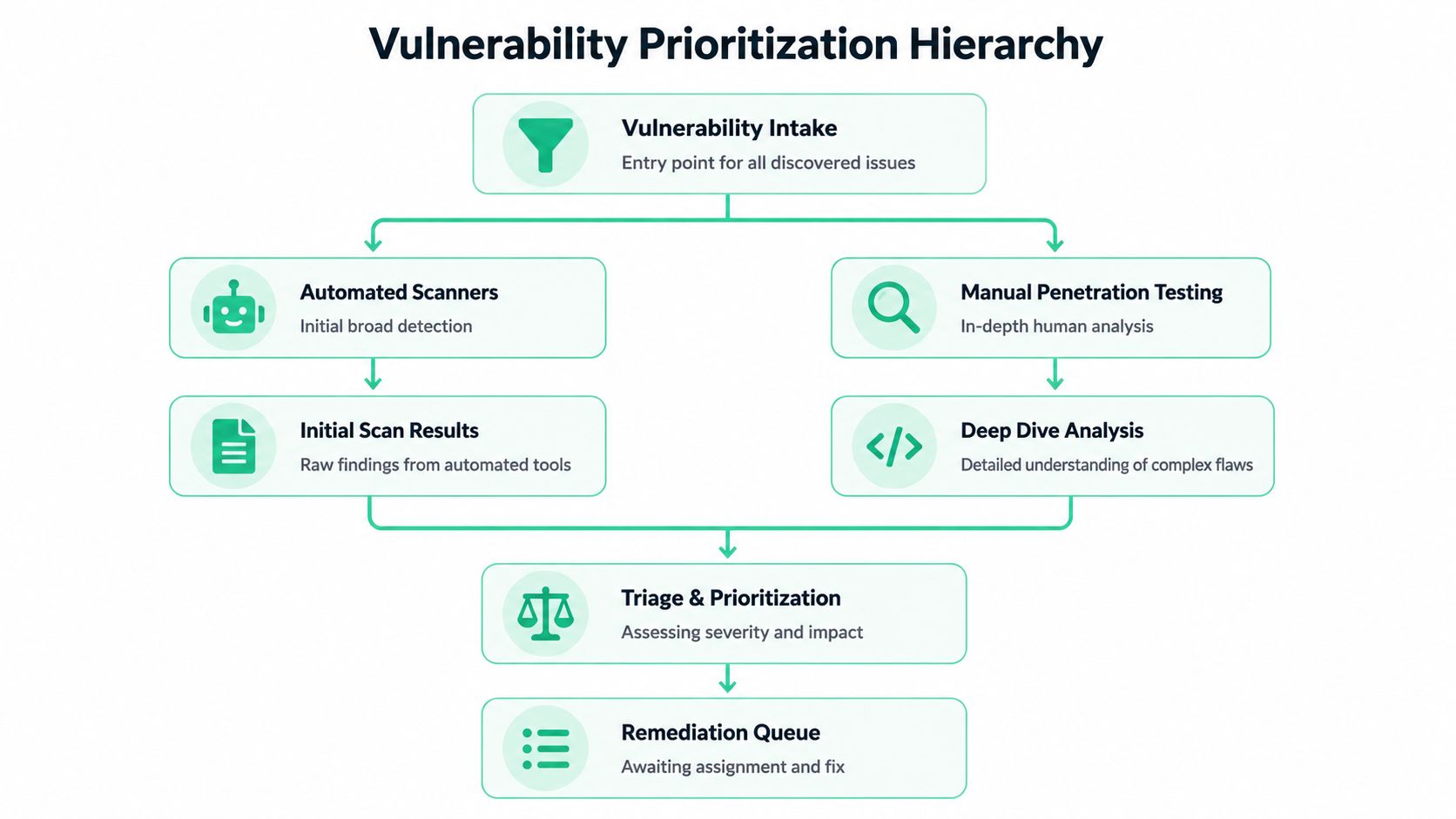
The first job is intake. Get findings from automated tools, code review where relevant, and manual pentest work. The second job is triage. Separate real risk from background noise.
Automated scans are not enough
Automated scanners are useful for broad coverage. They catch missing patches, weak settings, outdated components, and known issues at scale. That's fine.
But scanners miss the stuff attackers love. Bad authorization logic. Broken workflows. Abuse paths that only appear when a real human chains simple issues together. That's why manual penetration testing still matters. A good penetration test finds the flaws that automated tools can't reason through.
If your team is already finding security weaknesses with VA tools, use them as intake, not as the final answer. They're the start of the conversation.
Use three filters, not one
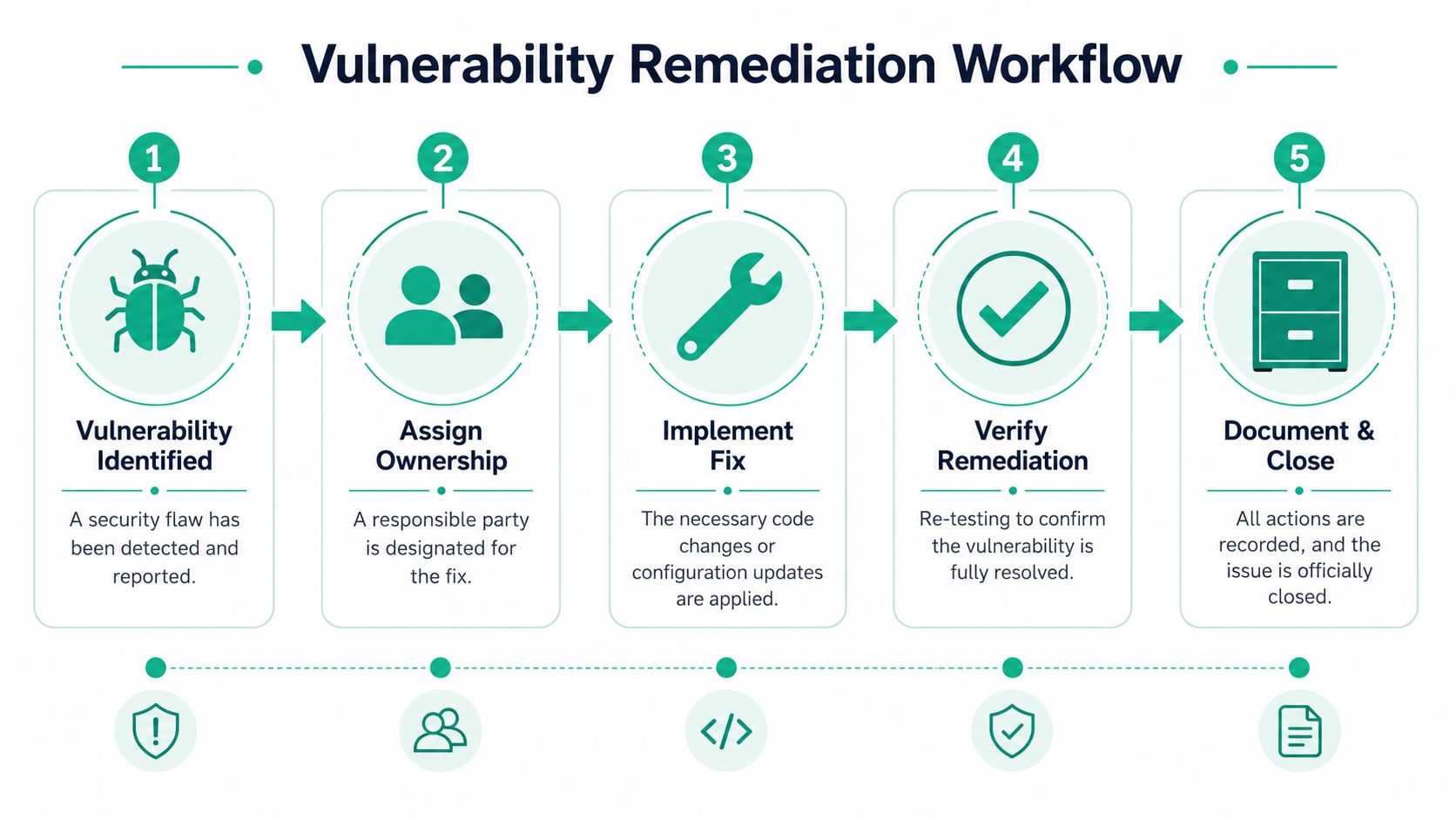
A lot of teams overreact to scores and underreact to context. Yes, CVSS uses a 0–10 scale for technical severity, but severity alone doesn't tell you what to fix first. Practical guidance recommends ranking findings by severity, exposure, and impact, then assigning ownership, fixing the issue, verifying the result, and documenting closure for auditability, as summarized in this remediation workflow guidance.
Use these three questions:
How severe is it
CVSS helps you understand the technical seriousness of the flaw.How exploitable is it
Can an attacker reach it and use it in your environment?What happens if it lands
Does it expose customer data, affect a public app, or hit something business-critical?
A low-context scanner report forces your team to answer all three after the fact. A strong pen testing report should already do that for you.
Ownership decides whether anything gets fixed
This is an often-overlooked blind spot. Findings are often hard to route because nobody can reliably map them to a live owner, CMDB record, or cloud asset. Current guidance calls this out directly and stresses the need for accurate asset discovery, CMDB reconciliation, and cleanup of shadow assets before remediation can be trusted, as noted in this discussion of remediation bottlenecks.
If a finding lands on “unknown server” or “old cloud instance,” you don't have a remediation problem yet. You have an inventory problem.
Use a simple intake table like this:
| Intake field | What it answers |
|---|---|
| Asset | What system is affected |
| Owner | Who has to act |
| Exposure | Can attackers reach it |
| Business role | Why it matters |
| Finding type | Patch, config, code, or logic flaw |
Teams with OSCP, CEH, and CREST-certified testers usually make this easier because they don't just dump raw output. They explain the exploit path in plain language, which means your engineering team spends less time decoding and more time fixing.
Assigning Ownership and Realistic Timelines
A vulnerability without an owner is just a future audit finding.
Once triage is done, route every issue to a specific team and a named person. Not “engineering.” Not “IT.” A real owner. If the app team owns the code, assign it there. If the issue is in a load balancer, WAF, endpoint baseline, or cloud security group, route it to the operations or infrastructure team that can change it.

Use your existing ticket system
Don't build a special security workflow unless you have to. Push findings into Jira, Azure DevOps, or ServiceNow with enough detail that the receiving team can act without a meeting.
Each ticket should include:
- Plain-English summary of what's wrong
- Affected asset or application so there's no routing confusion
- Recommended fix such as patch, code change, or config update
- Validation requirement so nobody closes it without proof
- Deadline based on severity and compliance needs
If your compliance team cares about evidence, this approach also supports cleaner vulnerability management for compliance because every action has an owner, date, and status trail.
Set deadlines people can defend
Deadlines shouldn't come from panic or guesswork. They should come from policy and risk.
The cleanest benchmark in the source material is severity-based timing. The University of Michigan states that critical vulnerabilities with CVSS 9-10 should have a corrective action plan within 2 weeks and be remediated within 1 month, while high-severity issues with CVSS 7-8.9 should have a plan within 1 month and be remediated within 3 months. It also notes that under PCI DSS, vulnerabilities with CVSS 4 or higher must be remediated within 30 days of notification. See the full guidance in these remediation timelines.
That gives you a sane model:
| Finding level | Practical deadline |
|---|---|
| Critical | Plan fast, fix within one month |
| High | Plan within one month, fix within three months |
| PCI-relevant CVSS 4+ | Remediate within 30 days of notification |
Make overdue findings visible
Don't wait for a quarterly review to discover that a critical issue is still open. Build escalation into the workflow.
If a finding is nearing its deadline, security should escalate before it goes overdue, not after.
That can be as simple as a Jira filter, a Slack alert, or a weekly review in your change meeting. Slow, expensive firms often stop at report delivery. Mature teams keep pressure on the closure workflow until the issue is validated and closed.
Fixing The Problem and Proving It Is Gone
Teams waste the most money. They treat remediation like patching, push a change, and assume the problem is solved. That shortcut creates zombie vulnerabilities. Everyone thinks they're closed. Attackers and auditors disagree.
Real remediation means choosing the right fix, deploying it safely, and then proving the flaw is gone.
A fix is not always a patch
Say your web app has a SQL injection flaw. There are several ways this gets addressed, and they are not interchangeable.
One team may patch the vulnerable library. Another may rewrite the unsafe query handling in application code. A third may have to add a compensating control, such as a WAF rule, because a code release would break production or miss the maintenance window.
That last part matters. Good programs don't pretend patching is always possible. Current guidance is clear that real remediation may require compensating controls, architectural changes, or risk acceptance when patching would break production or exceed maintenance windows, and that mean time to remediate and vulnerability aging are core measures of program health, as described in this vulnerability management lifecycle overview.
Pick the least risky path that closes exposure
Here's a practical way to decide:
- Patch first when it's safe: If the vendor fix is stable and your change window supports it, patch it.
- Change configuration when that's enough: Weak cipher suites, exposed admin panels, and insecure defaults often need config work, not code.
- Use a compensating control when patching isn't immediate: WAF rules, access restrictions, or segmentation can reduce exposure while you prepare a permanent fix.
- Use formal risk acceptance sparingly: Only when leadership understands the residual risk and sets a time-bound exception.
Typically, old-school firms leave you hanging. They identify the issue but don't help your team think through remediation paths in a way that maps to production reality.
Test outside production first
Another common mistake is fixing directly in production and hoping nothing breaks. That's reckless and expensive. You trade one problem for another.
Guidance cited in the verified material recommends testing fixes in a non-production environment and treating validation as a distinct step because fixes can fail, break functionality, or leave residual exposure if test and production differ. That's why mature teams don't stop at deployment.
A simple sequence works well:
- Reproduce the issue in a safe environment if you can
- Apply the planned fix
- Test the app or system for regressions
- Deploy through normal change control
- Retest using the original attack path
A vulnerability is closed only when the original exploit path no longer works.
Retesting is the step people skip
Let's go back to the SQL injection example.
If you patched a library, rescan and attempt the same payload path that worked before. If you rewrote code, test both the vulnerable endpoint and adjacent functions to make sure the new logic didn't shift the flaw elsewhere. If you added a WAF rule, try the blocked request patterns again and review logs to confirm the rule is intercepting them.
For compliance-heavy shops, this evidence matters a lot. Teams handling SOC 2, PCI DSS, HIPAA, and ISO 27001 need remediation proof that is traceable and audit-friendly. A clean pentest report for SOC 2 compliance should make retesting easier because it gives you the original finding details, impact, and validation target.
Document closure like an adult
When the fix works, record three things:
| Closure evidence | Why it matters |
|---|---|
| What changed | Shows the actual remediation action |
| Who approved it | Proves accountability |
| How it was verified | Shows closure was tested, not assumed |
Traditional penetration testing vendors often make retests slow, overpriced, or awkward to schedule. That's backwards. Retesting should be fast and targeted, because speed is what keeps your remediation loop healthy.
Integrating Remediation Into Your Workflow
If remediation lives outside your normal workflow, it will always feel like extra work. That's why teams avoid it until a customer asks for a penetration test, a PCI deadline appears, or an auditor starts asking questions.
The smarter move is to embed remediation into the systems your team already uses. Don't create a security side quest. Route findings into the same operating rhythm that already ships code and manages infrastructure.
Put findings where work already happens
Many teams already live in Jira, Azure DevOps, GitHub issues, ServiceNow, or Slack. Use that.
A pen test report should turn into tickets with owners, labels, due dates, and validation steps. Change approvals should flow through the same process you use for feature releases or infrastructure updates. Security fixes aren't special because they're security fixes. They're production changes that need the same discipline as everything else.
A practical setup looks like this:
- Ticket creation from findings: One issue per remediation item, not one giant ticket for an entire report
- Owner mapping by service: Route app flaws to the app team, platform issues to ops, cloud misconfigurations to cloud owners
- Slack or Teams notifications: Alert the owner when a critical issue is assigned
- Change control linkage: Tie the remediation ticket to the deployment or maintenance request
Remove handoffs that waste time
The expensive part of traditional remediation isn't always the fix. It's the waiting. Security writes the report. Engineering asks questions. Operations wants a maintenance window. Compliance asks for evidence. Nobody owns the whole loop.
You can kill most of that friction by setting a minimum standard for every finding:
| Required field | Why it saves time |
|---|---|
| Owner | No routing debate |
| Fix type | Tells the team what kind of work this is |
| Deadline | Prevents quiet backlog decay |
| Validation step | Stops premature closure |
Don't build a process that needs a meeting to move every finding forward.
The strongest workflows also tie remediation to release cycles. If an issue affects a web app, add the fix to the next sprint or hotfix path. If it affects infrastructure, attach it to the next approved maintenance window unless the risk justifies an out-of-cycle change. That's how security becomes part of delivery instead of a blocker sitting beside it.
Tracking Metrics and Reporting Your Success
If leadership can't see progress, they'll assume security is either under control or completely broken. Both assumptions are dangerous.
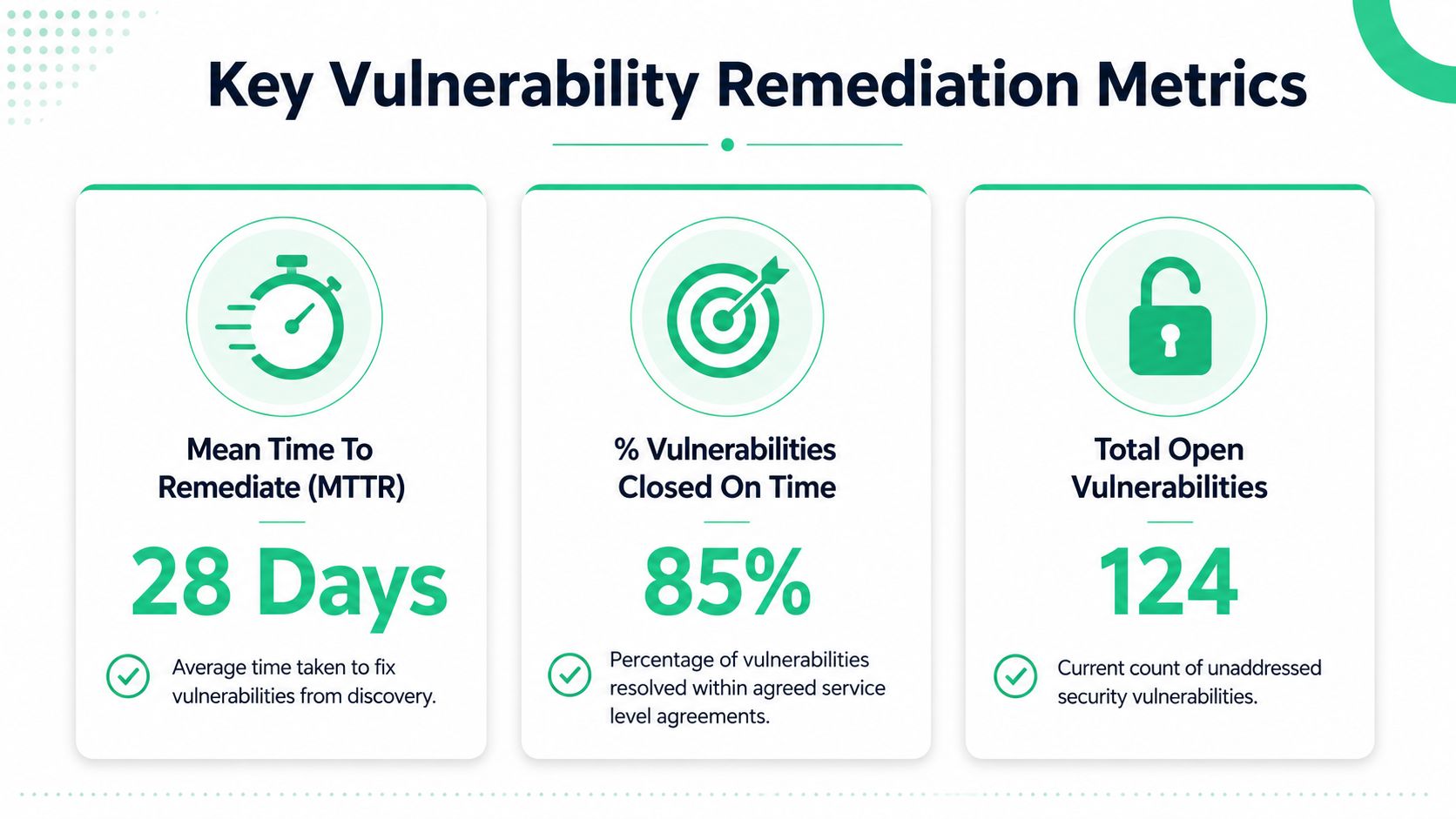
You need a short list of metrics that shows whether your vulnerability remediation process is working. Not vanity numbers. Not giant dashboards nobody reads. Just enough to show speed, backlog health, and whether teams are meeting expectations.
Three metrics that actually matter
Start with these:
Mean time to remediate
This tells you how long fixes take from discovery to closure. If it drifts upward, your process is slowing down.Vulnerability age by severity
This shows how long critical, high, and lower-priority findings stay open. Aging critical issues are a management problem, not just a technical one.SLA compliance
This tells you whether teams are closing findings within the deadlines you set.
Current guidance specifically calls out mean time to remediate and vulnerability aging as core program measures, not optional reporting. That's the right approach. If you don't track time and aging, you can't tell whether your backlog is improving or just being renamed.
Build a dashboard auditors can follow
For compliance-heavy environments, the reporting format matters almost as much as the fix itself. Snyk's guidance notes that for teams supporting SOC 2, PCI DSS, HIPAA, and ISO 27001, remediation evidence needs to be traceable, repeatable, and supportable in audits, and the process must stay a closed loop of detect, prioritize, fix, and validate. See that audit-focused guidance here.
Use a dashboard that answers four plain questions:
| Dashboard question | Metric that answers it |
|---|---|
| Are we fixing issues fast enough | MTTR |
| Are serious findings sitting too long | Age by severity |
| Are teams meeting deadlines | SLA compliance |
| Is the backlog growing or shrinking | Total open findings |
Report trends, not excuses
A penetration testing report shows a point in time. Metrics show whether your team can operate responsibly between tests.
That matters for founders, CISOs, and compliance officers because mature security isn't “we ran a pen test once.” Mature security is “we can show what we found, who fixed it, how quickly it was handled, and how closure was verified.”
When auditors ask for evidence, trend data beats status meetings every time.
Traditional firms often give you static deliverables. Good internal reporting turns those deliverables into ongoing proof that your security program is functioning.
Turn Your Remediation Process Into a Strength
Most companies treat remediation like cleanup after bad news. That's the wrong mindset. A strong vulnerability remediation process is an operating advantage.
When you can identify real issues quickly, assign them without confusion, fix them using the least disruptive path, and verify closure fast, you spend less money on chaos. You also make compliance less painful because the evidence is already built into the workflow.
What good looks like
A practical program does four things well:
- It prioritizes correctly: Not every finding deserves the same urgency
- It assigns clean ownership: Somebody specific is responsible for every action
- It verifies closure: Retests and rescans prove the issue is gone
- It reports progress: Leadership and auditors can see that the process works
That's the part most academic guides skip. They talk about frameworks. You need execution.
There's also a related discipline teams ignore until it bites them. If your environment has weak secret handling, your remediation backlog will keep filling with preventable exposure paths. This guide to best practices for managing secrets is a useful companion because secrets management problems often turn into pentest findings, cloud risks, and ugly incident response.
Speed matters more than ceremony
Slow, expensive security work creates its own failure mode. Findings sit too long. Teams forget context. Retests get delayed. Audit prep becomes a scramble.
Fast, affordable pentesting and pen testing support a much better cycle. You get a usable report quickly, route findings while they're still fresh, fix them without months of drift, and retest before the issue turns into a compliance headache. That's how a penetration test becomes part of an efficient machine instead of an annual fire drill.
You do not need a perfect environment. You need a repeatable one.
If your current process is slow, vague, and overloaded with manual follow-up, rebuild it around speed, ownership, and proof. That's the version that saves time, holds up in audits, and reduces risk.
If you're tired of slow, overpriced penetration testing and want a fast, practical report your team can remediate, contact Affordable Pentesting through the contact form for a same-day quote. Their OSCP, CEH, and CREST-certified pentesters deliver affordable pentest, pen test, and penetration testing services built for startups, SMBs, and compliance-driven teams that need real findings and quick turnaround.